
-1.png)
Table of Contents
Like this article?
Subscribe to our Linkedin Newsletter to receive more educational content
Subscribe now
Customer-Facing Reliability Powered by Service-Level Objectives
Service Availability Powered by Service-Level Objectives
Learn More
Integrate with your existing monitoring tools to create simple and composite SLOs

Rely on patented algorithms to calculate accurate and trustworthy SLOs

Fast forward historical data to define accurate SLOs and SLIs in minutes
Define and enforce SLOs
Why SLOs matter
Reliability goals like "high availability" sound essential but rarely tell you what to actually do. Service-level objectives (SLOs) fix this by turning reliability into measurable targets such as uptime percentages, latency thresholds, and success rates over a defined time window. This gives product, engineering, and operations teams a common reference point. Instead of debating whether the system feels stable, they compare live performance against agreed-upon numbers. That requires consistent definitions: service-level indicators (SLIs) are the actual measurements that feed into an SLO, like request success rate or p99 latency. Standardizing these through frameworks like OpenSLO ensures "99.9% availability" means the same thing across every service. SLOs keep engineers focused on what users actually experience.
How error budgets work
An error budget is the amount of unreliability allowed within an SLO window and is calculated as the complement of the reliability target. Two window types exist: a calendar-aligned window resets on a fixed boundary (for example, the first of each month), while a rolling window continuously recalculates over the trailing period, so on any given day, you’re looking back exactly 30 days. Consider a service with a 99.9% availability objective over 30 days. That month contains 43,200 minutes, so 0.1% permitted downtime yields an error budget of 43.2 minutes.
This budget is consumed by any event that violates the availability SLI: production incidents, failed deployments, infrastructure outages, or cascading failures. If total downtime exceeds 43.2 minutes within the measurement window, the SLO has been violated.
The purpose of the error budget is not to justify outages but to manage risk. When most of the budget remains, teams can confidently deploy new features or make architectural changes. If the budget is nearly exhausted, additional risk may push the service into noncompliance.
When the error budget is depleted, feature releases are paused and engineering effort shifts toward reliability improvements. This practice aligns incentives because teams are encouraged to ship quickly when systems are stable and to slow down when reliability degrades.
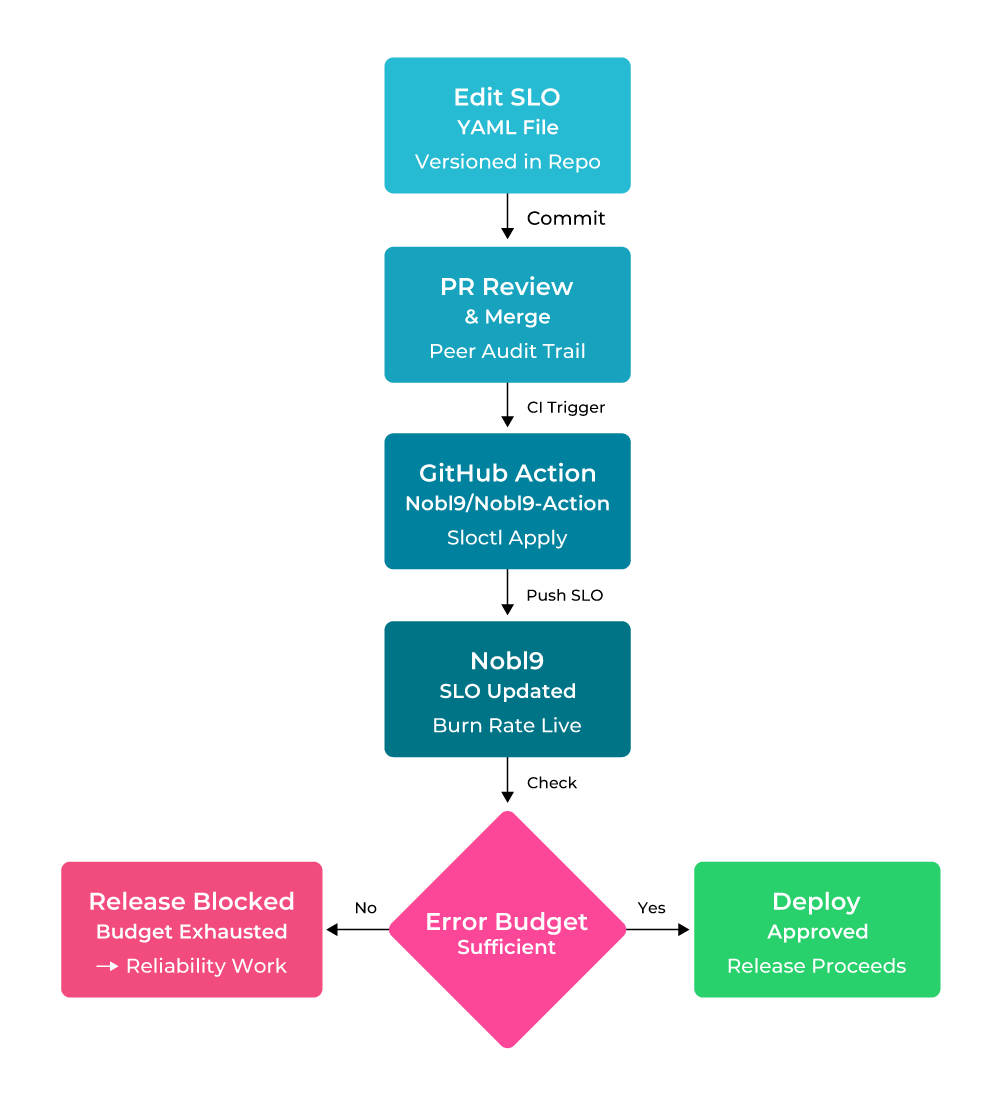
Example SLOs-as-code CI/CD pipeline depicting error-budget-gated deployment.
Related to the error budget is the burn rate, the rate at which the error budget is consumed. A high burn rate (above 1) indicates a rapid consumption of budget relative to the remaining time in the SLO window and often precedes an SLO violation. Monitoring burn rate helps teams react early rather than discovering a breach after the fact.
Setting realistic SLO targets using historical data
Selecting an SLO target without examining historical performance is one of the most common implementation mistakes. For example, a service delivering 99.5% availability allows roughly 3.6 hours of downtime per 30-day month. Increasing the objective to 99.99% reduces allowable downtime to approximately 4.3 minutes. That change represents nearly a fifty-fold reduction in tolerated failure. Achieving it typically requires architectural redundancy, improved deployment safety, and stronger observability, not just incremental tuning.
A more disciplined approach starts with data, such as gathering at least three to six months of reliability metrics and establishing a baseline for availability. However, manually backfilling this data from different providers is often a bottleneck.
Nobl9 simplifies this process with Service Health Replay, which ingests historical data from your existing monitoring tools to instantly visualize how a proposed SLO would have performed over the past 30 days. This allows teams to fine-tune objectives before they ever trigger a false alert. In the example below, the Reliability Burn Down chart shows the error budget being consumed rapidly in early February before stabilizing, revealing that a 95% target leaves only 12 minutes of budget remaining and prompting the team to adjust the objective before it goes live.
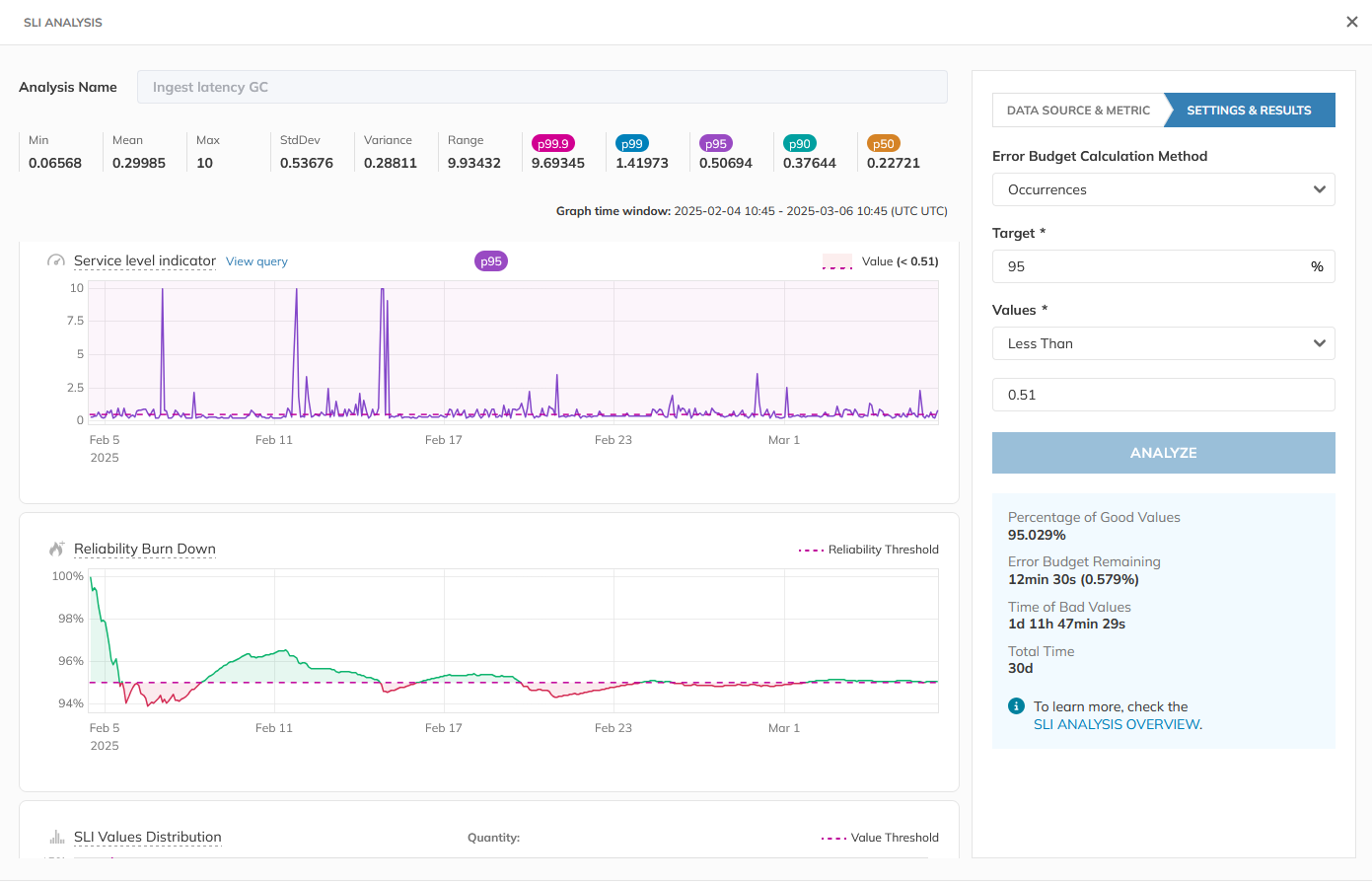
Nobl9 SLI Analyzer: 30-day historical replay for the Ingest Latency service (source)
Standardizing SLOs
As organizations grow, inconsistencies in how teams define availability can distort reliability reporting. One team may measure successful responses at the load balancer, another may measure internal process uptime, while a third may exclude certain error codes from calculations. Even if each team reports “99.9% availability,” the numbers may represent different user experiences.
Standardization reduces ambiguity and requires agreement on:
- The exact definition of each SLI
- The measurement window (for example, rolling 30 days)
- The data source used for calculations
- Naming conventions and documentation templates
Some organizations adopt vendor-neutral specifications such as OpenSLO to define SLOs declaratively. Regardless of tooling, the objective is clarity and consistency. A reliability target should mean the same across services and teams.
Without standardization, cross-service comparisons and executive reporting are unreliable. With it, SLOs provide a coherent view of system health.
Customer-Facing Reliability Powered by Service-Level Objectives
Service Availability Powered by Service-Level Objectives
Learn More
Build SLO-driven observability
Connecting monitoring frameworks to SLOs
SLOs shift the focus from system health to user-perceived service reliability. To implement SLO-driven observability effectively, monitoring signals must map to user-facing objectives. Standards and frameworks such as RED, USE, and Golden Signals can help streamline your SLO journey and let you avoid reinventing the wheel for problems the industry has already solved:
- RED (rate, errors, duration) for services: Request rate, error rate, and latency directly map to availability and performance SLOs.
- USE (utilization, saturation, errors) for resources: These signals support capacity planning and help explain SLO degradation.
- Golden Signals (latency, traffic, errors, saturation): This set provides high-level service health indicators that can be translated into SLIs.
While these frameworks provide the strategy, your monitoring tools provide the raw telemetry. Nobl9 acts as the translation layer, connecting directly to your existing stack to transform these signals into actionable objectives.
A single manifest wires up the Prometheus connection and defines the availability SLI in one place:
apiVersion: n9/v1alpha
kind: SLO
metadata:
  name: api-availability
  project: default
spec:
  service: gateway-api
  indicator:
    metricSource:
      name: prometheus-backend
      kind: Direct
      spec:
        kind: prometheus
        url: "https://prometheus.example.com"
        description: "Production Prometheus instance for API metrics"
    prometheus:
      promql:
        good: sum(rate(http_requests_total{job="api", code=~"2.."}[5m]))
        total: sum(rate(http_requests_total{job="api"}[5m]))
  objectives:
    - displayName: High availability
      target: 0.999
      budgetingMethod: Occurrences
A Ratio-based availability SLO in Nobl9, using Occurrences budgeting for granular per-request tracking
The good query counts 2xx responses; total counts all requests. Nobl9 divides the two at evaluation time, tracks the ratio against the 99.9% target, and burns the error budget whenever it drops below that target.
Alerting on SLO burn rate
Instead of alerting on static infrastructure thresholds (e.g., CPU > 80% or memory saturation), alert on SLO burn rate because it ties alerts directly to user impact. A short, sharp spike that barely dents the error budget may not warrant escalation, while a sustained degradation that rapidly consumes the budget does. This approach ensures that responders know precisely how much time they have before a violation occurs, brief fluctuations that don't threaten the budget are ignored, and incidents are ranked by the severity of the budget threat, not the volume of the logs.
For instance, teams can define “fast burn” alerts for immediate crises and “slow burn” alerts for ticket-based tracking. This approach allows stakeholders to visualize service health ranked by real-time risk, moving the organization from reactive firefighting to proactive, data-driven reliability management.
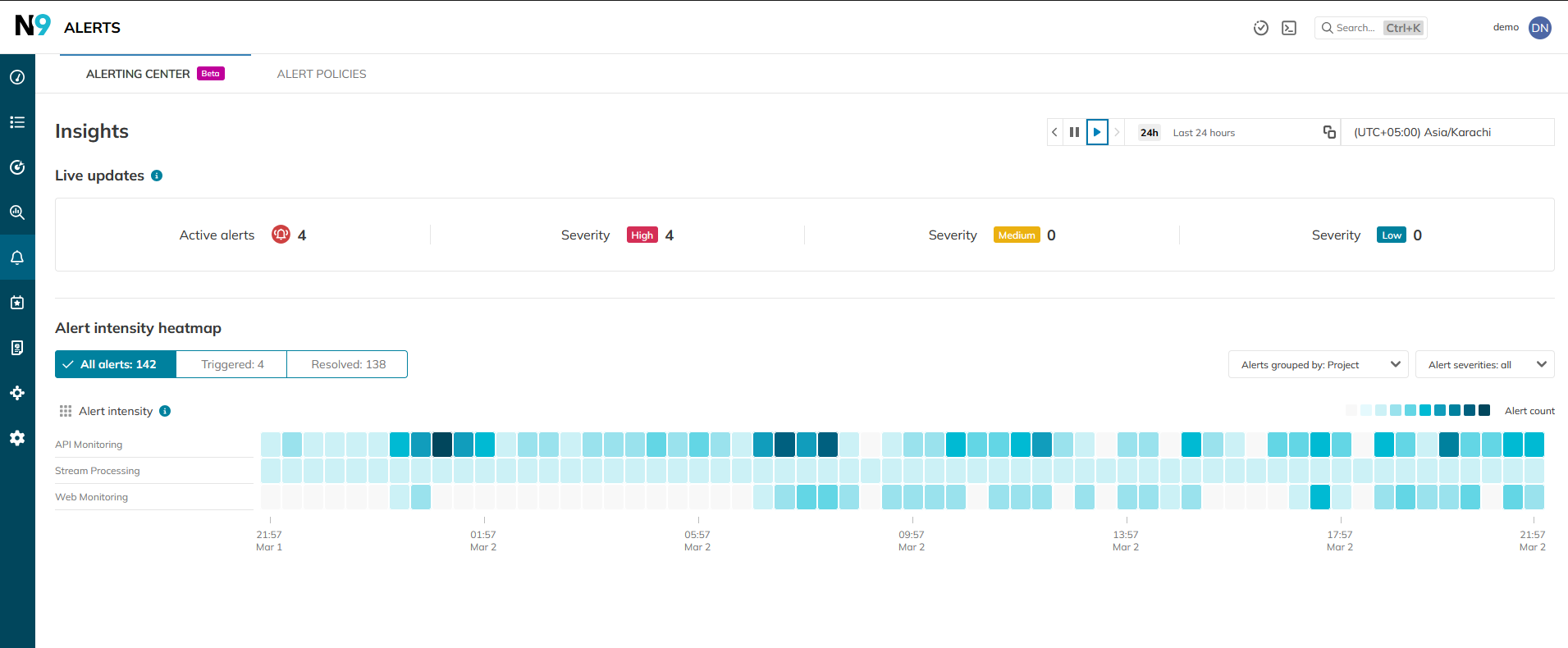
The Nobl9 Alerting Center: By focusing on burn rate intensity (Heatmap) rather than static thresholds, SREs can distinguish between minor fluctuations and critical threats to the error budget. (source)
Reduce toil through automation
Quantifying toil to expose hidden reliability costs
Toil is often discussed abstractly, but it becomes actionable only when measured. Repetitive deployments, manual health checks, reactive alert triage, and one-off fixes consume engineering time that could otherwise improve system resilience. By quantifying this work, how often it occurs, how long it takes, and whether it creates lasting value, teams can prioritize automation efforts that directly protect their error budgets.
Making toil visible reframes automation from a convenience to a reliability investment.
Shifting reliability automation left in CI/CD
Reliability should be enforced before users can feel its impact. Embedding automated checks into CI/CD pipelines ensures that changes are evaluated against service-level objectives before and immediately after deployment.
Pre-deploy validations can assess risk to latency or availability targets, while post-deploy checks should rely on real service-level indicators with clearly defined rollback criteria. Using SLO-based thresholds, such as burn rate, keeps release decisions aligned with user experience rather than arbitrary infrastructure metrics.
If infrastructure is defined in code but SLOs live in slide decks or dashboards, reliability will drift. The same discipline applied to infrastructure as code should apply to service-level objectives. Nobl9 supports SLOs as code using YAML and the sloctl CLI, making them version-controlled artifacts that move through CI/CD like any other change. For teams already standardizing on Terraform, SLO definitions can follow the same workflow, aligning infrastructure provisioning and reliability objectives under a single review process. And for organizations adopting OpenSLO, those specifications can be converted and imported, preserving portability while integrating with Nobl9’s platform.

You can define and apply YAML configurations of your required Nobl9 resources directly in the Nobl9 Web application. Either paste your prepared YAML definition here or use templates for further fine-tuning. (source)
Standardizing reliability as code
The principle of reliability as code applies not just to SLO definitions but to alerts, runbooks, and automation templates themselves. By version-controlling these artifacts just like application code, teams gain auditability, peer review, and consistency.
Tools and frameworks like OpenSLO let you define SLOs in a vendor-agnostic way that can then be converted into platform-specific configs. Adopting a “reliability-as-code” workflow lets you move from manual dashboard configuration to a repeatable, peer-reviewed process.
Here is a standard Nobl9 SLO definition that captures a checkout success rate, used to track reliability targets within the same Git repository as your application logic:
apiVersion: n9/v1alpha
kind: SLO
metadata:
  name: checkout-success-rate
  project: production-services
spec:
  service: checkout-api
  indicator:
    metricSource:
      name: datadog-prod
      kind: Direct
    datadog:
      query:
        good: "sum:checkout.requests{status:success}.as_count()"
        total: "sum:checkout.requests{*}.as_count()"
  objectives:
    - displayName: Checkout success rate
      target: 0.999
      budgetingMethod: Occurences
A standard Nobl9 SLO definition in YAML
This SLO tracks the checkout service’s success rate by counting successful checkout requests against all requests. Nobl9 divides the two at evaluation time and tracks the ratio against the 99.9% target, meaning no more than 1 in 1,000 checkout attempts can fail before the error budget starts burning.
Similarly, alerts, runbooks, and automation scripts should be under version control so they evolve alongside the services they support. When changes are reviewed and tested, you reduce the likelihood of breakage during critical moments, and you make reliability improvements transparent across teams. Centrally maintained automation templates and runbooks ensure that responses to common symptoms behave consistently, and that reliability workflows scale with organizational needs.
Centralizing automation to reduce team-specific variation
In many engineering organizations, each team builds its own automation patterns. Without central governance, this leads to inconsistencies such as different rollback scripts, different alert thresholds, and different ways of responding to the same operational symptom. Centralizing automation efforts helps reduce this variation by establishing shared templates and standards that teams can adopt. Standardization doesn’t mean everyone must use the same tool, but it does mean that they follow common practices and interfaces so reliability becomes predictable across services.
Centralizing reduces onboarding friction for new engineers, improves collaboration between teams during incidents, and eliminates the kind of automation that only one person understands. Over time, standardized automation becomes a foundation for dependable runbooks and response frameworks that scale as the organization grows.
Respond to incidents based on user impact
Define severity by user impact, not infrastructure symptoms
Severity should reflect how badly users are affected, not which component is struggling. For example, a degraded database replica might not warrant high urgency, but a slow checkout flow likely does.
The clearest way to measure user impact is through your error budget burn rate. A high burn rate means users are encountering real issues.
Consider a concrete example. If you allows 0.1% errors over 30 days, and if your burn rate hits 14x, you’re burning through that budget 14 times faster than planned, and will exhaust it entirely in under two days. It’s a P1 severity, which means you need to page someone immediately.
A practical severity matrix ties burn rate to response as follows:
|
Severity |
Burn rate |
Budget remaining |
Response |
|
P1 |
>14× |
<10% |
Page immediately |
|
P2 |
6-14× |
10-30% |
Notify on-call |
|
P3 |
2-6× |
30-60% |
Ticket + monitor |
|
P4 |
<2× |
>60% |
Log & review |
The result is a system where severity reflects user experience rather than internal symptoms. If nothing in the table is firing, your users are fine, regardless of what the infrastructure dashboard says.
Nobl9’s dashboard groups services by error budget status and burn rate to let you see which user journeys are currently under threat.
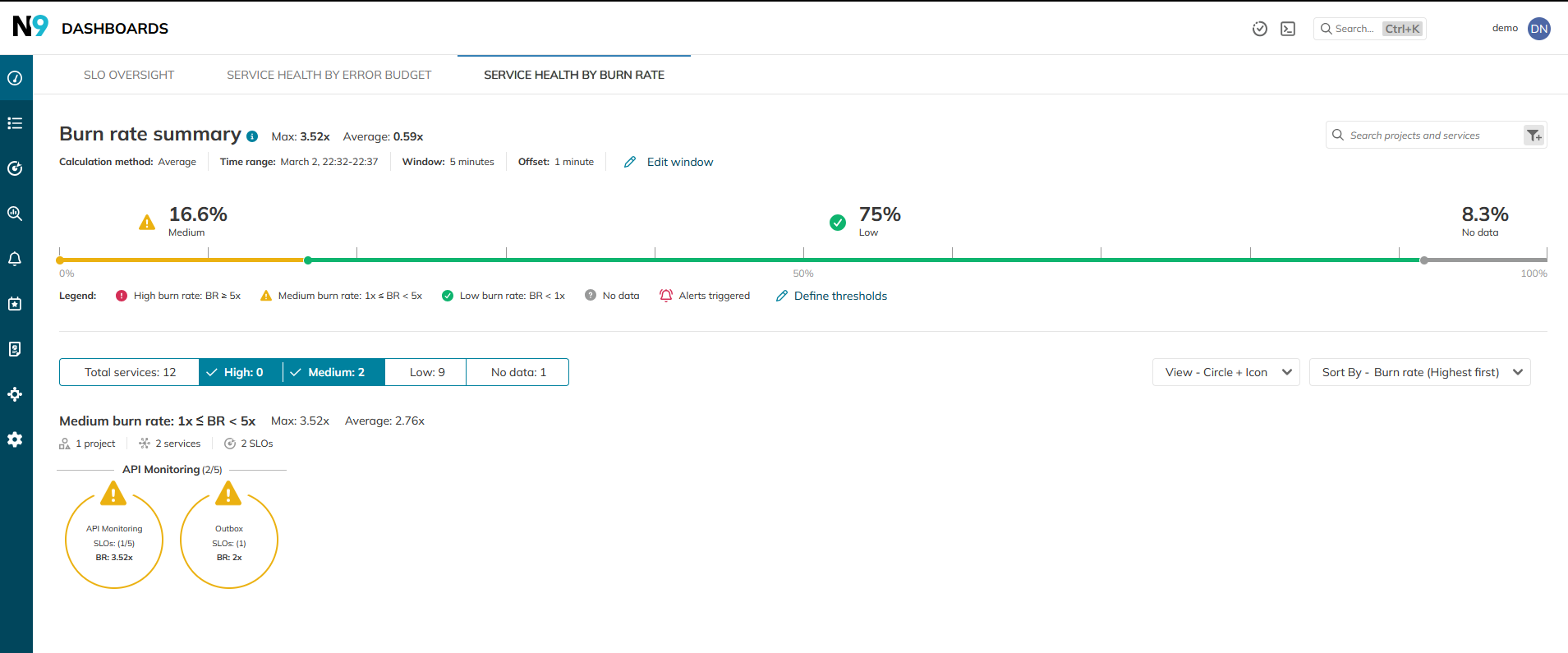 The Nobl9 Alerting Center prioritizes incidents by their threat to the SLO. Responders can immediately see the burn rate and projected budget exhaustion, allowing for impact-first triage. (source)
Introduce decision checkpoints driven by burn rate
During active response, define explicit checkpoints:
- Is the SLO currently violated?
- What is the short-window and long-window burn rate?
- At the current burn rate, when is the error budget projected to exhaust?
- Does mitigation reduce burn, or are we stabilizing symptoms only?
For example, if a 30-day SLO has consumed 40% of its error budget in two days and is currently burning at 8×, rollback is rarely optional. The math makes the decision more apparent than debate ever will.
This is why SLO-based alerting is powerful. Burn-rate-based alerts (rather than static 5xx thresholds) align escalation with reliability objectives rather than noise.
Build impact-first dashboards and context-rich alerts
Most dashboards are organized by system architecture, which is convenient for engineers but misaligned with customers. Instead, group services by customer journey or product capability and surface reliability health first. Error budget remaining and burn rate should sit above latency histograms and CPU charts. Supporting metrics add context; SLOs anchor the conversation.
Alerts should arrive with enough context to make the first five minutes productive:
- Link to the relevant runbook
- Recent deployments affecting the service
- Owning team
- Current burn rate and remaining error budget
- Suspected upstream or downstream dependencies
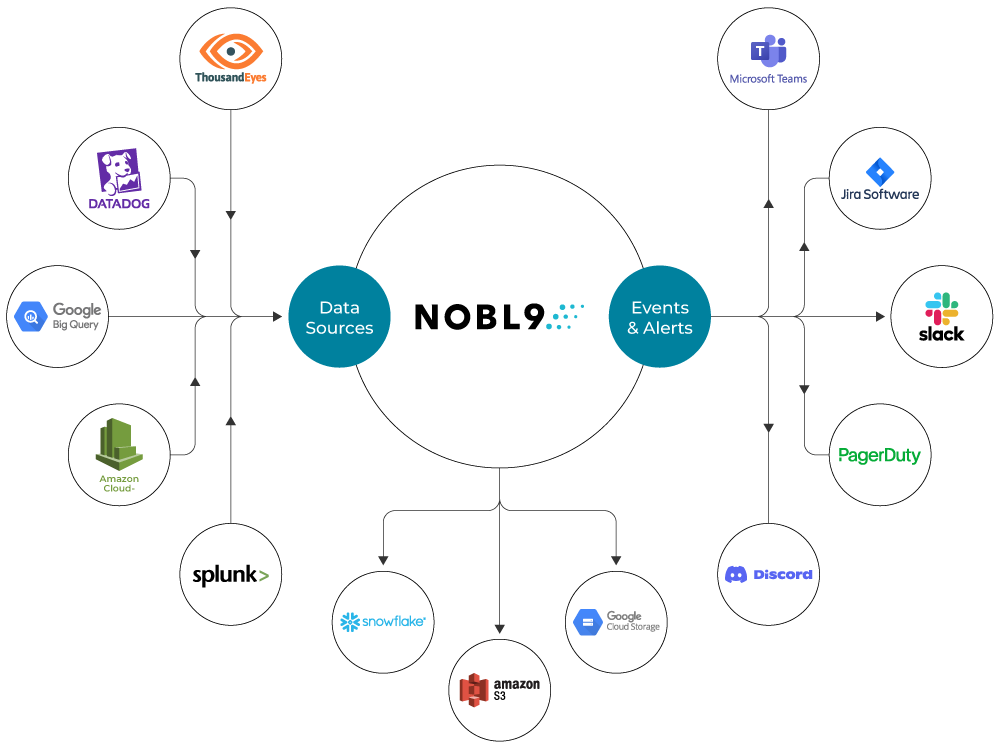
Nobl9’s integrations allow SLO breach and burn-rate alerts to flow into incident tooling with this context attached.
Make on-call sustainable
The fastest way to burn out a team is to page them on infrastructure signals that don’t translate to user harm. When alerts are driven by burn rate and error budget consumption, responders trust that a page represents real risk to a reliability commitment. If an issue doesn’t threaten the SLO, it can be handled during business hours.
Sustainable on-call is about fewer ambiguous incidents. When SLOs define what “healthy” means, and tooling consistently measures and alerts on that definition, incident response is focused, measurable, and aligned with user impact rather than internal system noise.
Design systems for resilience and self-healing
Design for failure at dependency boundaries
If you operate distributed systems long enough, you stop asking whether dependencies will fail and start asking how they fail. In practice, failures are rarely clean outages. You may see slow responses, partial errors, timeouts under load, sudden rate limiting, stale reads from replicas, or one shard behaving differently from the rest. The first step toward resilience is mapping your critical dependencies and writing down the failure modes you’ve actually experienced, not the ones in architecture diagrams.
Once you understand those patterns, deliberately design degraded-but-usable behavior. For example, it could be read-only mode instead of total failure, serving slightly stale cached data rather than blocking, or temporarily turning off non-critical features to protect core flows like login or checkout.
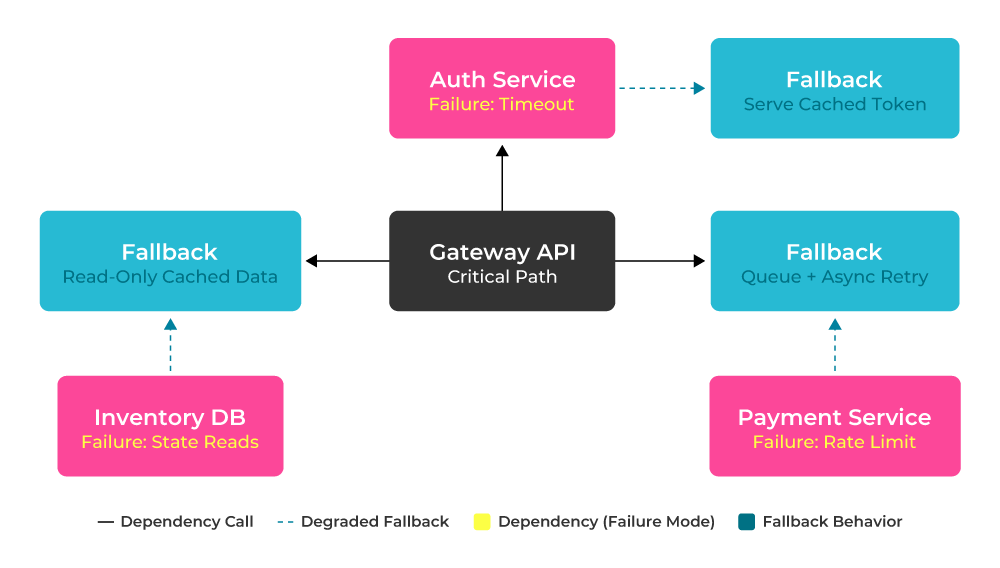
Example of dependency failure modes and degraded fallbacks: Each critical dependency has a defined failure pattern and a deliberate degraded-but-usable response.
These are product decisions as much as engineering ones, and this is also where SLI/SLO clarity matters. If you haven’t defined where degradation becomes an outage, every incident becomes subjective. Clear objectives draw the boundary: this level of latency is tolerable; this level burns the error budget. Everyone in engineering, product, and leadership should know the difference.
Limit blast radius and prevent retry storms
One unhealthy dependency shouldn't bring down your entire platform, yet that’s precisely what happens when retries are unbounded, and timeouts are sloppy.
Retries need to be surgical and shouldn’t exceed retry budgets. Limit them to transient failures and use exponential backoff with jitter. When a dependency is clearly unhealthy, trip the circuit breaker and fail fast instead of amplifying the load.
Idempotency is equally essential. If operations can be retried safely, you avoid double charges, duplicate writes, and cascading inconsistencies. Request IDs or deduplication keys should be standard practice, not an afterthought. Most large outages weren’t caused by a single failure but by uncontrolled amplification. Limiting blast radius is less about heroics and more about being disciplined at boundaries.
Automate and test recovery
When designing self-healing systems, best practice is to automate recovery and test it thoroughly under realistic conditions. Basic recovery mechanisms like container restarts and rescheduling are expected in modern platforms, but they need sensible boundaries. Autoscaling, for example, should react to sustained saturation signals rather than short-lived spikes; otherwise, you end up oscillating capacity and compounding instability. Similarly, failover processes need clearly defined triggers and cooldown periods to prevent systems from repeatedly switching states under fluctuating conditions.
Product-level controls often make the most significant difference during an incident. The ability to turn off non-critical features, switch to cached responses, fall back to asynchronous processing, or temporarily queue requests can preserve core user journeys while reducing load on stressed components. These controls should be intentional parts of the design, not improvised during an outage.
Recovery paths must be exercised deliberately through game days, disaster recovery restores, and failover simulations. These exercises reveal hidden dependencies and manual steps that are rarely shown in architecture diagrams. After real incidents, review how mitigation actually unfolded: which steps were manual, where delays occurred, and whether the same failure pattern has appeared before. Repeated manual intervention is usually a signal that the recovery path should be automated or simplified.
Understand the active-active vs. active-passive trade-offs
Active-active designs reduce failover time and improve regional resilience, but they introduce complexity: data consistency challenges, higher costs, and more operational overhead. Active-passive setups are more straightforward and often cheaper, but recovery time objectives may be longer, and failover paths may be less exercised. There is no universally correct choice: the right architecture depends on the business's tolerance for downtime, recovery objectives, data consistency requirements, and operational maturity.
The mistake is designing for a theoretical maximum uptime without understanding operational cost. Resilience is a balance between reliability targets, complexity, and the team’s ability to operate the system confidently under stress.
Architecture decisions should be traceable back to SLOs. If your availability target justifies active-active complexity, the business case is clear. If it doesn’t, simplicity may be the more resilient option in practice.
Plan capacity around reliability targets
Capacity planning is about ensuring that the system can meet its reliability objectives under expected and unexpected conditions. If your SLO defines what “good” looks like, capacity planning defines how much room you need to stay there.
Forecast from SLOs, not just traffic curves
A core SRE best practice is to start with explicit reliability objectives and work backward. Instead of asking “How much traffic do we expect?”, ask “What conditions would cause us to miss our SLO?”
Historical performance and error budget consumption are strong indicators. Look at periods where the burn rate increased. Were you close to latency thresholds during peak hours? Did minor dependency slowdowns push you toward violations? That history tells you how much headroom you actually require.
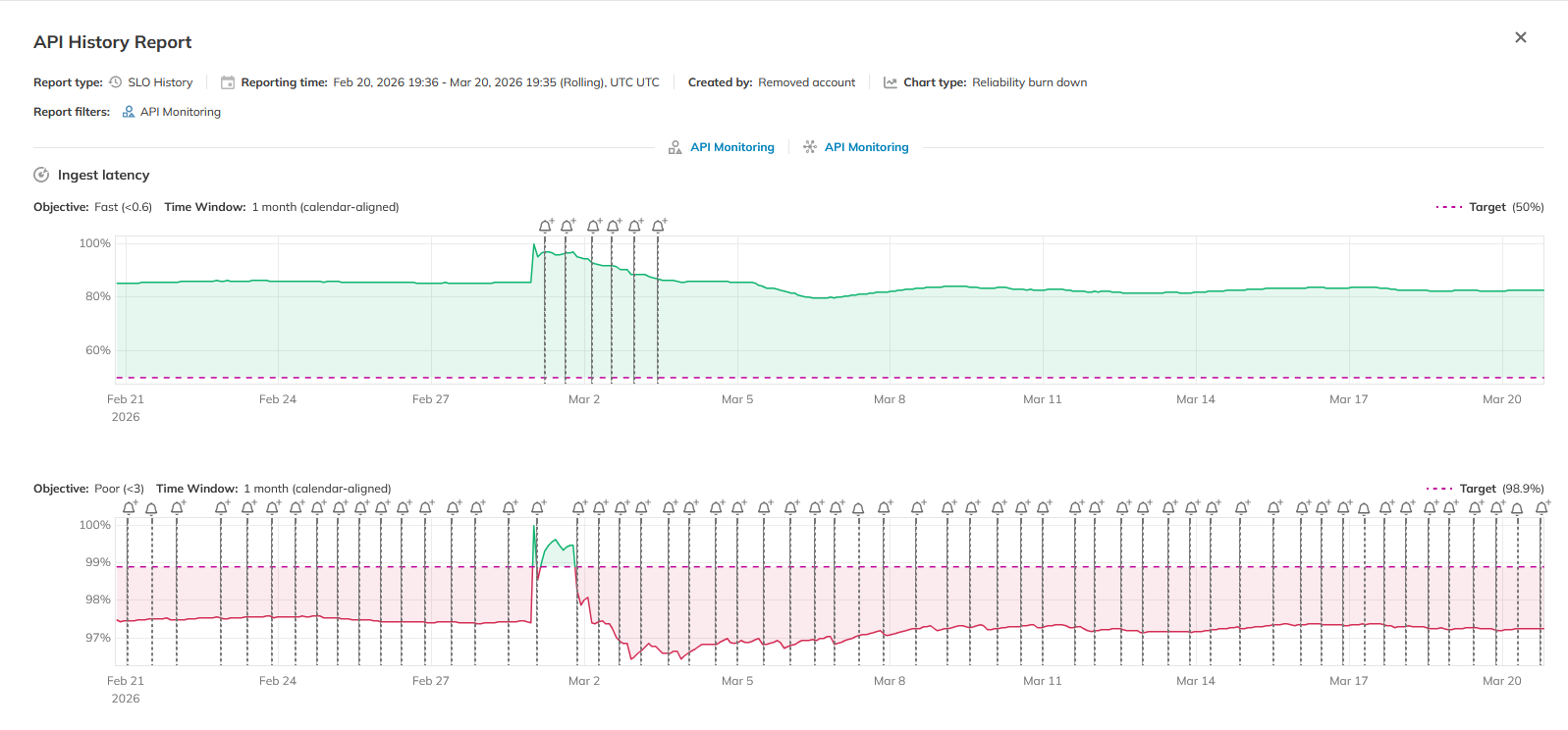 Nobl9 SLO History Report: 30-day reliability burn down across two objectives for a service, with alert events marking the early March degradation period. (source)
This exercise often exposes hidden constraints. For example, a system might handle average load comfortably but operate too close to latency limits during predictable spikes. Translating SLO targets into concrete engineering margins, CPU utilization ceilings, request queue depth limits, and acceptable tail latency under load turns capacity planning into a reliability safeguard rather than a reactive exercise. In practice, shifts in SLO compliance and burn rate give you an earlier and less ambiguous signal of an emerging capacity problem than any infrastructure metric will.
Align redundancy with error budgets
If single-node or single-zone failures routinely consume a significant portion of your error budget, that’s evidence that your redundancy model is misaligned with your objective. On the other hand, if your SLO remains comfortably intact through those events, adding layers of redundancy may introduce cost and operational complexity without measurable benefit.
A practical approach is to revisit past incidents and replay them against your current SLO targets. Would your present objective have been violated under last year’s architecture? Would an additional replica or region have materially reduced burn? These retrospective evaluations keep redundancy grounded in data rather than assumptions.
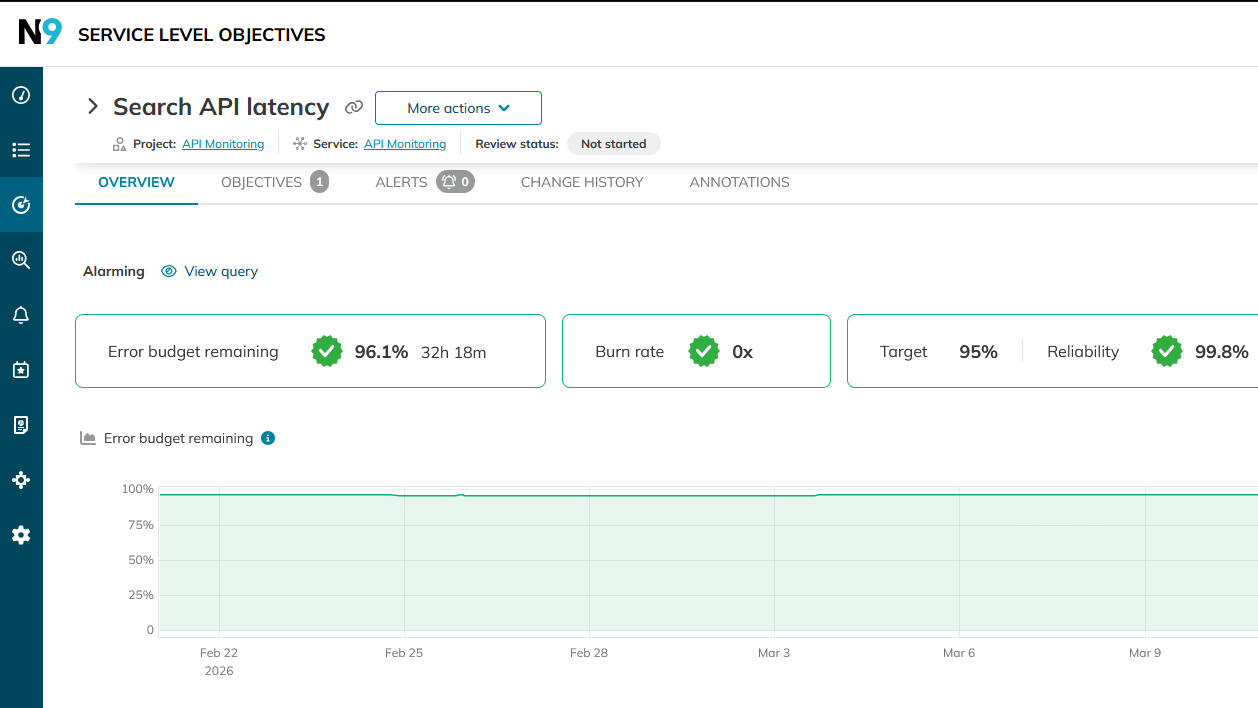
SLO detail views in Nobl9 show error budget consumption over time, enabling teams to evaluate how past incidents would have impacted current reliability targets. Source
Composite SLOs add another layer of discipline. Individual services may meet their targets while the overall customer experience degrades due to correlated latency or cascading slowdowns. Monitoring aggregate reliability across related services helps you identify systemic weaknesses that per-service SLOs don’t surface.
Consider surge and exhaustion planning
Traffic surges, marketing campaigns, regional failovers, and dependency slowdowns all stress the system in ways that average-day metrics do not capture.
Preparing for these scenarios means explicitly testing them. Load and stress testing should model realistic peak patterns and degraded dependencies, not just linear traffic growth. Define how the system behaves when limits are reached: where do you apply rate limiting? When does backpressure kick in? Which features degrade first?
Instead of alerting only after SLOs are violated, use sustained burn rate increases or saturation trends as triggers for scaling out protective action, shedding optional load, or enabling degraded modes.
Navigate Chapters: