
-1.png)
Table of Contents
Like this article?
Subscribe to our Linkedin Newsletter to receive more educational content
Subscribe nowA 200ms spike in database latency isn’t typically enough to trigger an alert. However, as that delay propagates through your microservices, a chain of events is set off. Thread pools get saturated, retries flood the network, and a system that looks perfectly healthy starts suffocating its users.
That's the blind spot in uptime-focused monitoring: a service can be "up" by every traditional measure while delivering a genuinely broken experience. Knowing your pods are running tells you nothing about whether your checkout flow is timing out for users.
Fixing that requires a layered architecture of tools working in concert. At the base, observability platforms collect raw telemetry like logs, metrics, and traces. It then filters it into signals that reflect actual user experience. Above that, a governance layer translates those signals into error budgets, giving teams an objective answer to the question that causes the most arguments: do we ship, or do we stabilize? When budgets burn too fast, an action layer responds, in other words, paging engineers, triggering rollbacks, and opening tickets. IaC practices tie it all together, keeping reliability targets version-controlled alongside your code so they can't drift.
This article walks through each layer, with specific tool recommendations and the architectural decisions that make them work in practice.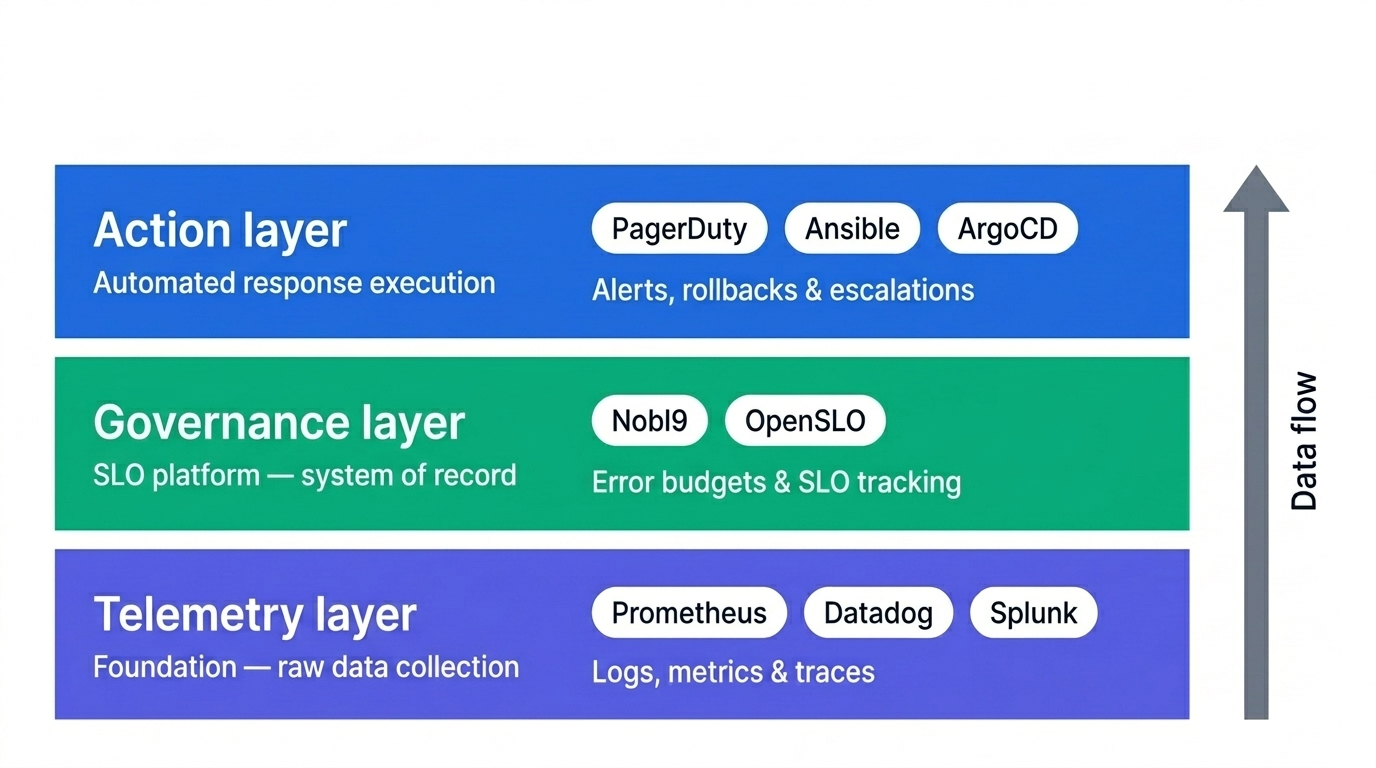
A 3-layer architecture tooling framework.

Customer-Facing Reliability Powered by Service-Level Objectives
Service Availability Powered by Service-Level Objectives
Learn More
Integrate with your existing monitoring tools to create simple and composite SLOs

Rely on patented algorithms to calculate accurate and trustworthy SLOs

Fast forward historical data to define accurate SLOs and SLIs in minutes
Observability and telemetry
Telemetry is the raw stream flowing out of your infrastructure: logs, metrics, and traces. Observability is your ability to ask questions of that stream and get answers that reflect what users are actually experiencing.
At a scale of millions of events per second, the challenge isn't data collection; it's causal attribution. Without high-dimensional correlation across logs, traces, and metrics, ephemeral failures in distributed systems remain invisible within the telemetry stream. Trace-context propagation is what gets you there: it lets you follow a request across service boundaries and pinpoint exactly where the failure state emerges, rather than guessing from disconnected signals.
Vendor lock-in is the most common architectural mistake at this layer. When your SLOs are expressed in a platform-specific query language, migrating to a different monitoring tool means manually rewriting every reliability target, and losing the burn history those targets depend on. Prioritize tools that support open standards like OpenTelemetry, which lets you instrument once and route to any backend.
The governance layer above depends on this layer being clean. Platforms that sit between your telemetry sources and your SLO definitions act as reliability filters, normalizing raw signals into Service Level Indicators regardless of where the underlying data lives.
Choosing between self-hosted and SaaS observability comes down to one trade-off: operational overhead versus scalability at high cardinality.
- Self-Hosted/Open Source (e.g., Prometheus, Grafana): You get full control over data residency, but you pay for it in engineering time. Managing storage sharding, high availability, and long-term retention is a real operational burden. Performance also degrades under high-cardinality workloads without careful tuning, so "free" licensing rarely means free in practice. High cardinality here means tracking metrics across a large number of unique label combinations, like a separate time series for every container ID or request ID, which multiplies storage and query costs faster than most teams anticipate.
- SaaS Observability Platforms (e.g., Datadog, New Relic): Maintenance disappears and cardinality limits are far more generous, so slicing by ephemeral dimensions like container_id or request_id won't break your backend. The catch is cost: at scale, the price per metric or custom tag compounds quickly. You need strict ingestion governance or your observability bill becomes a line item that executives start asking about.
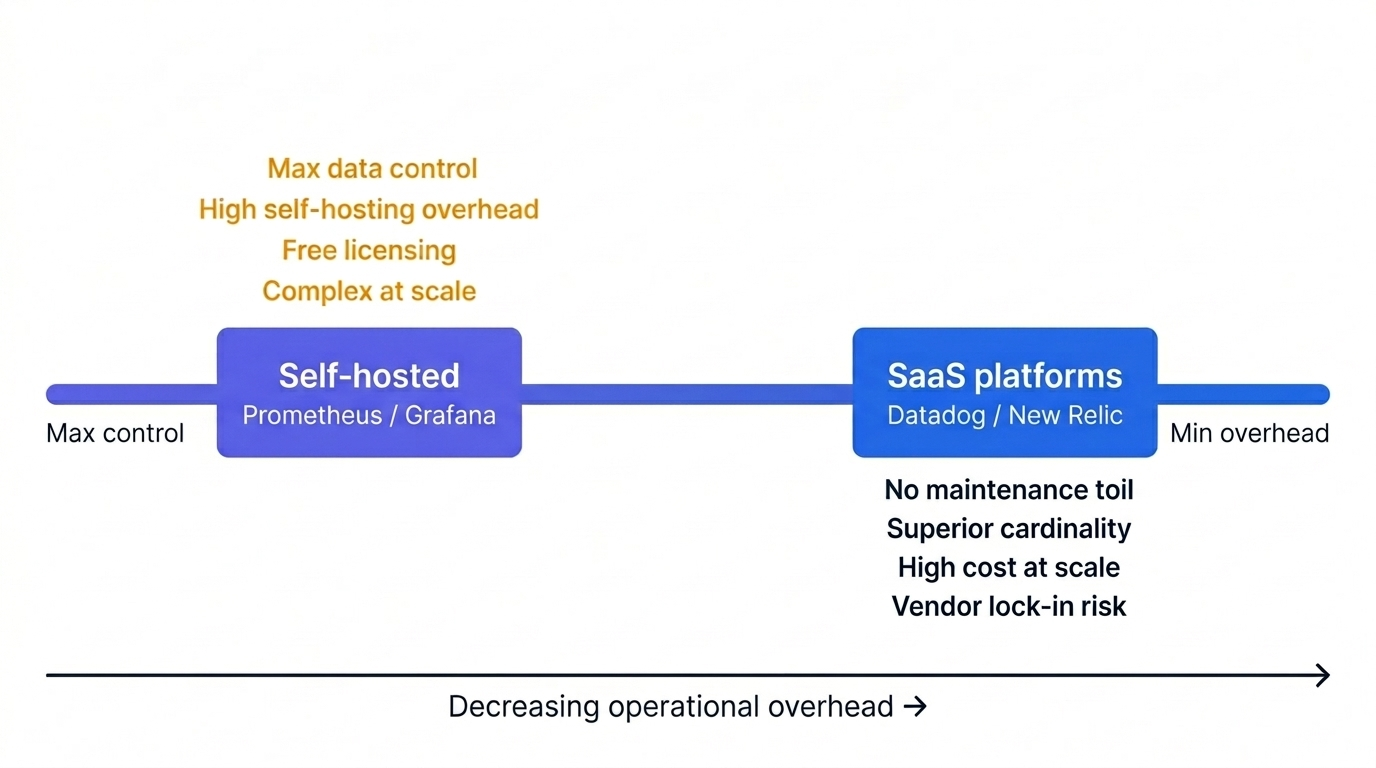
Observability trade-offs: Self-hosted vs Saas.
Customer-Facing Reliability Powered by Service-Level Objectives
Service Availability Powered by Service-Level Objectives
Learn More
SLO Management
If observability gives you the ground truth, SLO management is where that truth becomes a business decision. Raw metrics tell you that latency is high. An SLO tells you exactly how high, for how long, and what it costs you in error budget.
Modern SLO management moves beyond abstract signals like 'high latency' into quantifiable user impact. Instead of a vague alert about slow services, your SLO platform reports that 3% of checkout requests failed to meet their 500ms response time target this week, directly calculating the resulting error budget burn and its impact on your release schedule. This gives leadership something concrete to act on. For example, the conversation shifts from “latency feels high” to “we have six days of error budget left and a release scheduled for Thursday”. In practice, this looks like a formal error budget policy:
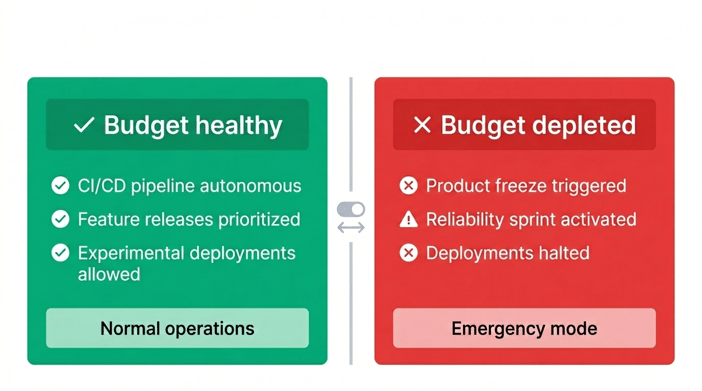
The policy only works if the SLOs behind it are kept current. Review them when your system changes, not just when something breaks.
Many platforms are solid metric sources, but they weren't built for SLO management as a primary workflow. Burn-rate alerting, error budget policies, and multi-window alerting are afterthoughts in those tools. Nobl9 is built around them, which matters when you're trying to catch a budget risk before it becomes a violation.
The Nobl9 SLI Analyzer makes this concrete. In the example below, we're pulling a threshold metric query for server response time. Once imported, you get the statistical distribution, percentile values, and a visual breakdown of how that SLI has actually behaved, before you commit it to a policy:
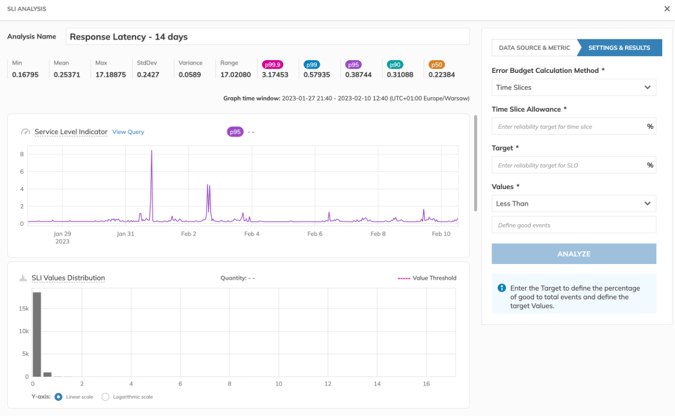
A Nobl9 SLI Analyzer dashboard. (Source)
Incident orchestration
SLO management tells you something is wrong. Incident orchestration determines who finds out, what information they get, and what the system does before they even respond. The difference between a well-orchestrated incident and a chaotic one usually comes down to how much context an engineer has in the first sixty seconds: the right dashboard, the relevant trace, and a clear picture of how fast the budget is burning.
When your governance layer detects budget burning faster than your policy allows, a mature orchestration setup triggers a coordinated response rather than a passive notification:
- Linking related data: automatically attaching specific Grafana dashboards or exact traces from your Observability tools to the alert, reducing troubleshooting time.
- Automated escalation: if the primary on-call engineer doesn't respond within your defined window, Opsgenie or PagerDuty escalates automatically, without waiting for a human to notice the silence.
- Proportional response: triggering action paths based on severity: Jira tickets for low-priority incidents, pages for outages.
After the incident, the orchestration layer feeds findings back into the governance layer. Who was paged, what data was pulled, and how long it took to resolve: all of it is captured. Your postmortem has a factual timeline before anyone opens a doc. More importantly, the question shifts from 'who messed up?' to 'where did our response policy fall short?
Here's what that looks like end to end, using a fast-burn pattern triggered by a new deployment: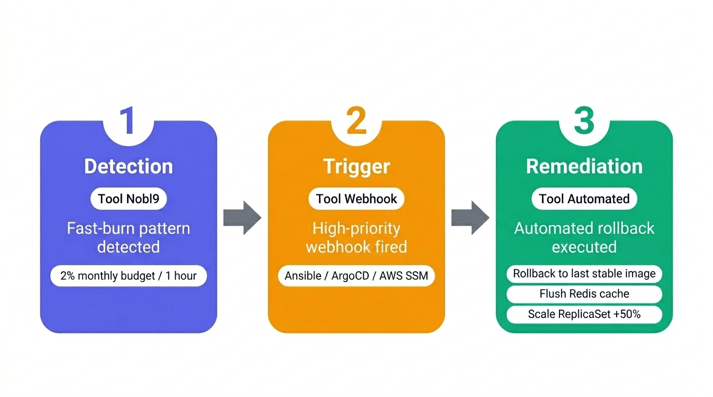
Incident Orchestration: Fast-Burn Rollback Flow
- Detection: Nobl9 detects a "Fast Burn" pattern (e.g., consuming 2% of the monthly error budget in a single hour) following a new deployment.
- Trigger: Nobl9 sends a high-priority webhook to your orchestration tool of choice, such as Ansible, ArgoCD, or AWS Systems Manager, along with the SLI_ID and relevant metadata.
- Remediation: the orchestration tool runs a pre-validated script that initiates a rollback to the last stable container image and scales the ReplicaSet to absorb the latency spike. Any actions with destructive potential, such as flushing a cache, should require human confirmation and remain outside your automated remediation path.
When the remediation path is defined in advance, engineers spend less time fighting fires and more time improving the system.
Best practices for choosing the right site reliability engineering tools
Three practices separate an SRE tool stack that holds up under pressure from one that creates more problems than it solves.
Standardize early
Treat reliability targets like application code from day one. Define your SLOs as declarative YAML manifests and put them through the same peer-review and CI/CD approval process as everything else. The screenshot below shows how Nobl9's sloctl makes this straightforward: your SLO definitions live in version control, ship with your services, and change only through a reviewable commit.
   apiVersion: n9/v1alpha
kind: slo
metadata:
  name: sample-slo
  namespace: default
spec:
  budgetingMethod: Occurrences
  indicator:
    indicatorType: Latency
    metricSource: globacount-prom
    rawMetric:
      prometheus:
        promql: latency_global_c4{code="ALL",service="globacount"}
  sloSet: sample-config
  thresholds:
    - budgetTarget: 0.99
      displayName: Painful
      value: 200
    - budgetTarget: 0.995
      displayName: Brutal
      value: 500
GitOps Ready sloctl and SLO YAML (Source)
Validate thresholds before committing
The most common mistake at this stage is setting targets based on intuition rather than data. Before a new SLO reaches your pipeline, run it through Nobl9's SLI Analyzer. It queries your historical telemetry and shows you how that proposed target would have performed over the last 30 days: how often it would have fired, how much budget it would have consumed, and whether the threshold is realistic given your system's actual behavior. A target that looks reasonable in a planning doc often looks very different against six weeks of production data.
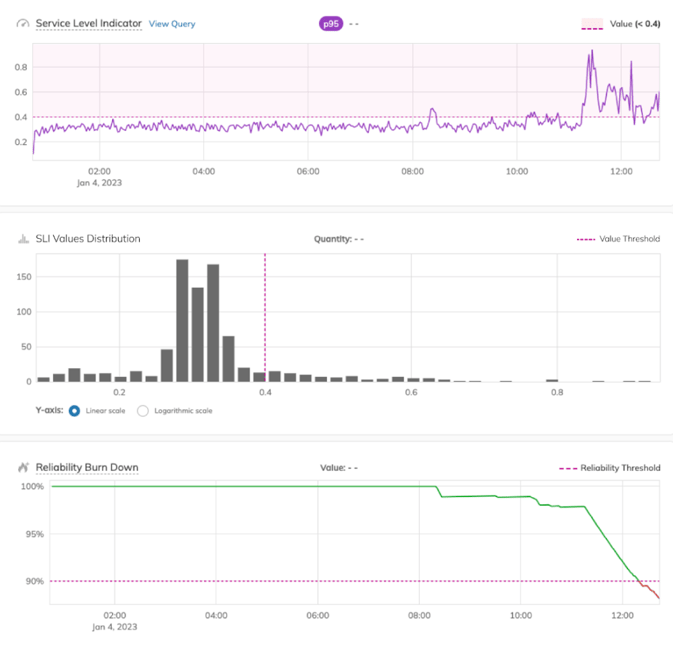
SLI Analysis (Source)
Automate your error budget policy
Define escalation paths that match your response capacity to the actual risk level, and automate the consequences. In Nobl9, you configure this directly through webhook alert methods. Rather than a generic 'something is wrong' ping, the webhook payload carries the specific SLO name, severity, alert policy conditions, and service metadata your on-call engineer needs to act immediately. The YAML below shows a full webhook template configuration:
apiVersion: n9/v1alpha
kind: AlertMethod
metadata:
  name: webhook
  displayName: Webhook Alert Method
  project: default
  annotations:
    area: latency
    env: prod
    region: us
    team: sales
spec:
  description: Example Webhook Alert Method
  webhook:
    url: https://123.execute-api.eu-central-1.amazonaws.com/default/putReq2S3
    template: |-
      {
        "message": "Your SLO $slo_name needs attention!",
        "timestamp": "$timestamp",
        "severity": "$severity",
        "slo": "$slo_name",
        "project": "$project_name",
        "organization": "$organization",
        "alert_policy": "$alert_policy_name",
        "alerting_conditions": $alert_policy_conditions[],
        "service": "$service_name",
        "labels": {
          "slo": "$slo_labels_text",
          "service": "$service_labels_text",
          "alert_policy": "$alert_policy_labels_text"
        },
        "no_data_alert_after": "$no_data_alert_after",
        "anomaly_type": "$anomaly_type"
      }
    headers:
      - name: Authorization
        value: very-secret
        isSecret: true
      - name: X-User-Data
        value: "{\"data\":\"is here\"}"
        isSecret: false
YAML sample for Webhook alert method with full template and variables(Source)
You can configure the webhook either in the Nobl9 web application or in YAML. The template supports two approaches: let Nobl9 generate the message automatically from variables, or write a full custom template using the $<variable_name> syntax for precise control over what gets sent to your alerting tools.
Navigate Chapters: