
-1.png)
Table of Contents
Like this article?
Subscribe to our Linkedin Newsletter to receive more educational content
Subscribe nowReliability problems don't announce themselves. A latency spike appears in one service, retries start climbing in another, and by the time an alert fires, users have already noticed. Meanwhile, the system was technically “up” the entire time.
Service-level indicators (SLIs) close that gap. An SLI is a quantitative measure of a specific aspect of your service's behavior from the user's perspective: how often requests succeed, how long they take, and how much data gets processed. Defined against a service-level objective (SLO) that sets the target for acceptable performance, SLIs become the mechanism by which engineering teams make explicit, data-driven decisions about reliability trade-offs like how much risk is acceptable, when to ship, and when to stop and fix.
The challenge is in defining the right metrics, grounding them in real performance data, and linking them to automated responses that act before users feel the impact. This article walks through how to do that, from mapping system boundaries to composite SLO construction and automation, with practical implementation guidance at each step.
Summary of key best practices related to service-level indicators
|
Best practice |
Description |
|
Define system boundaries |
Map where responsibility and data flow change hands between services. Measuring at these boundaries means your SLIs reflect actual service dependencies, not just the internal behavior of individual components. |
|
Create user-centric SLIs |
Define SLIs for user outcomes, not infrastructure states. Login success rate, transaction completion rate, and end-to-end journey latency tell you more about reliability than CPU utilization or request count ever will. |
|
Balance reliability with risk tolerance |
Set availability targets based on what users actually notice, not what feels safe. Error budgets make the trade-off between reliability and feature velocity explicit and turn judgment calls into policies. |
|
Validate targets with historical data |
Start from 30 days of production data, not intuition. A baseline reveals your natural reliability floor, typical failure patterns, and where user-visible degradation begins. Treat your first SLO as a hypothesis and adjust as the error budget burns. |
|
Automate reliability responses |
Tie validated SLI thresholds to automated responses: rollbacks, scaling events, and escalation paths. Automation is only safe once thresholds are grounded in historical data, because automating against poorly calibrated SLIs produces automated chaos. |
Define system boundaries
Every system has points where responsibility, data flow, or functionality changes hands. These are your measurement boundaries, and they're where SLIs deliver the most signal. In distributed architectures, these boundaries shift constantly as services are added, split, or deprecated. Without mapping them, you end up measuring the wrong things and generating noise that obscures real problems.
Consider a typical authentication flow where a frontend calls an auth service, which queries a database and an external identity provider, caches the result, and returns a session token. Each handoff is a boundary. Latency or errors at any one of them affects the user, but without measuring at the boundary itself, you can't tell which service is responsible.
Four boundary types are worth instrumenting:
- Service handoffs: Response time and error rate between microservices. This is where cascading failures typically originate and where latency budgets get consumed invisibly.
- Authentication and authorization gates: Login success rate and token issuance latency. Auth failures are disproportionately damaging to the user experience because they block every downstream action.
- Data transformation layers: Error rate and processing latency where data changes format or ownership, such as between an ingestion pipeline and a storage backend. Failures here are often silent—until they're not.
- Performance characteristic changes: Points where infrastructure behavior shifts, such as a service boundary that crosses availability zones or a synchronous call that becomes asynchronous. Latency spikes that appear unpredictable are often consistent when measured at these edges.
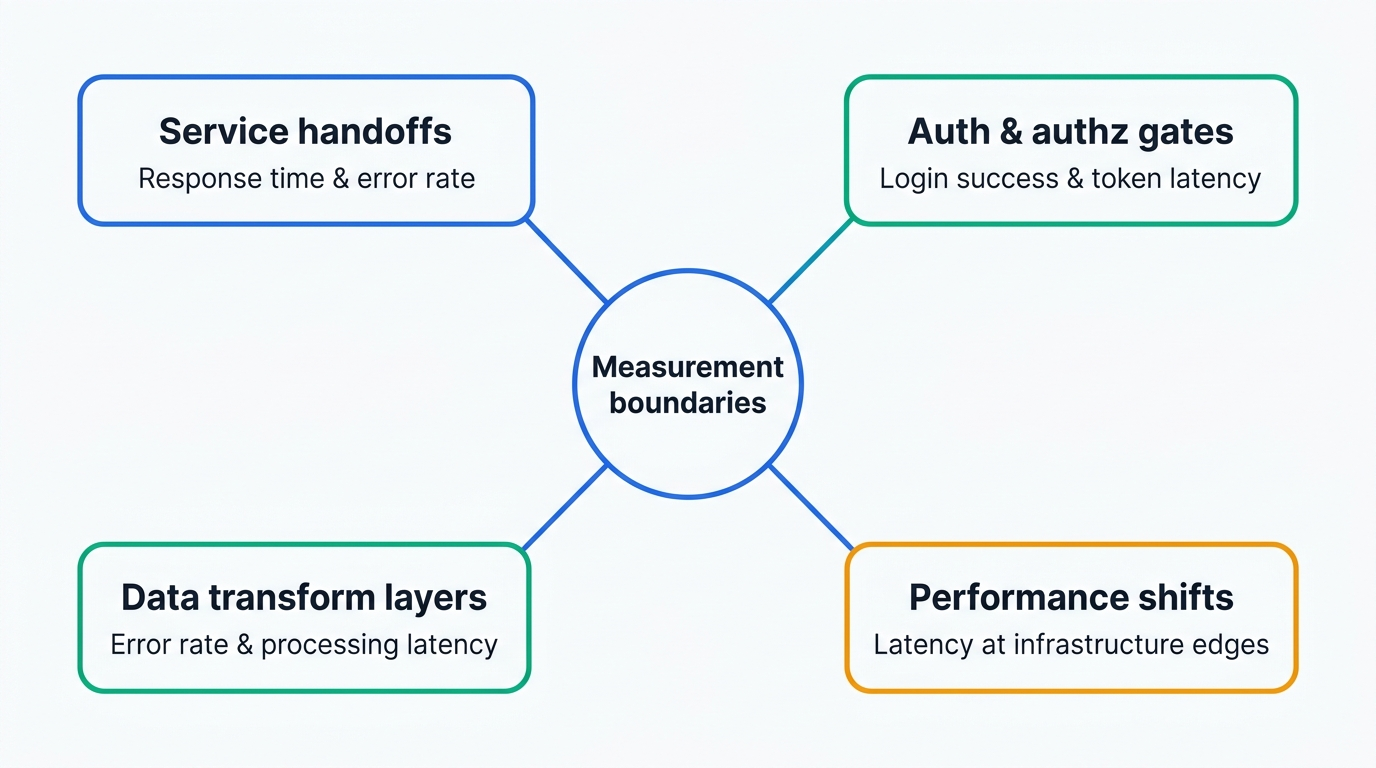
Measuring at these boundaries means your SLIs reflect actual service dependencies rather than the internal behavior of individual components.
Create user-centric service-level indicators
CPU utilization, memory pressure, and request count are easy to collect… and easy to misuse. None of them tells you whether a user successfully completed a purchase, streamed a video without buffering, or even managed to log in. Infrastructure metrics have their place in debugging, but they make poor SLIs because they don't map to outcomes users care about.
A better question than “What can we measure?” is “What does a successful interaction look like?” Start with the user journey, identify where failures are most damaging, and define the measurements that would catch them.
Defining user-centric measurements
From technical metrics to user experience
A well-designed SLI describes a user outcome, not a system state. Here are three examples that illustrate the difference:
- Login success rate: The percentage of authentication requests that return a valid session, not just a 2xx status code. A response can return 200 with an error payload, so measure the outcome, not the HTTP code.
- Page load time: p95 response time for the full page render, not just the initial server response. Time to first byte is often useful for debugging.
- Transaction completion rate: The ratio of successfully completed checkouts to initiated ones. This metric catches failures that happen after the request succeeds, such as payment processing errors or session timeouts mid-flow.
Defining user-centric measurements
Map the full interaction flow before defining any measurements. For an ecommerce journey, that might be authentication, product browse, cart, payment, and confirmation. Each stage is a candidate for measurement, but not every stage warrants its own SLI. Focus on the ones where failure is most visible to users or most costly to the business.
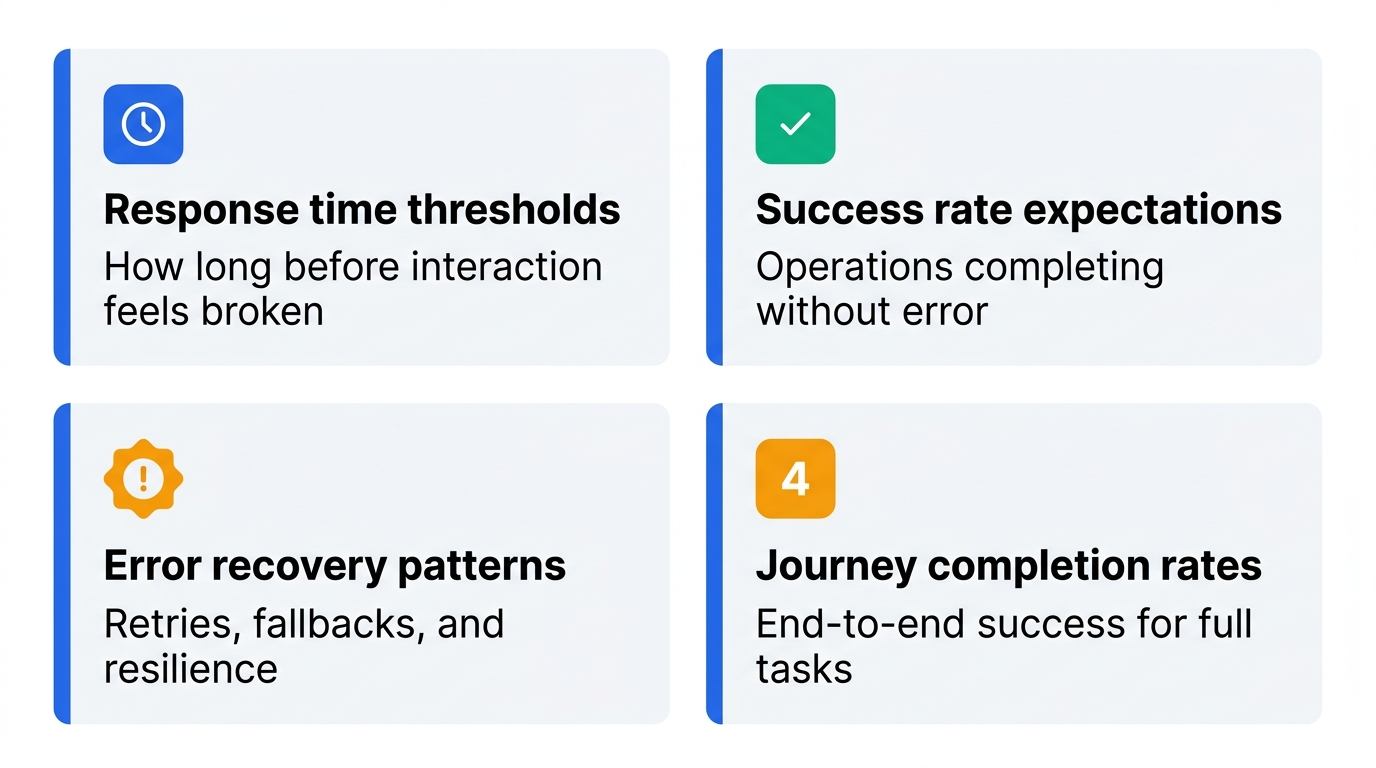
For each stage you instrument, define four things:
- Response time thresholds: How long a user waits before the interaction feels broken. These vary by context, as users tolerate more latency on (e.g.) a search results page than on a payment confirmation page.
- Success rate expectations: The percentage of operations expected to complete without error under normal load. Set these from observed data, not intuition.
- Error recovery patterns: How the system handles transient failures. Retries and fallbacks improve resilience, but poorly implemented retries can amplify load during degraded states and make failures worse. Define recovery behavior and measure whether it's working.
- Journey completion rates: The end-to-end success rate for a full user task. This is often the most important SLI because it catches failures that individual stage metrics miss.
Measurement complexity management
User environments introduce measurement noise that can corrupt your SLI data if you don't account for it. A p95 latency figure that mixes mobile users on 3G with desktop users on fiber isn't telling you much. Three practices keep your measurements consistent:
- Distributed tracing: Propagate trace context across service boundaries so you can connect frontend latency to backend behavior. Without this, you're correlating logs by timestamp and guessing.
- Lightweight sampling: Tracing every request at scale is expensive and usually unnecessary. Sample strategically higher rates for error cases and lower rates for successful high-volume paths, so your SLI data stays representative without inflating costs.
- Using uniform telemetry tags: Tag all telemetry with consistent dimensions such as region, platform, and service version. This makes SLIs comparable across observability backends and lets you slice by the dimensions that matter when something goes wrong.
Before committing any of these to a policy, use Nobl9's SLI Analyzer to validate that the signals you're measuring at each boundary have enough historical stability to set a meaningful threshold. A boundary that produces highly variable data needs investigation before it becomes an SLO.
Where you manage SLOs is as important as how you define them. Embedding SLOs directly into your observability platform, like Datadog, Grafana, or Dynatrace, keeps everything in one place and works well for small teams with a single monitoring stack. The risk is that SLO definitions become tied to a specific tool's data model, making them harder to migrate, audit, or share across teams that use different backends. A dedicated SLO management layer like Nobl9 decouples the objective from the data source, so the same SLO can pull from multiple backends, survive a tooling change, and remain legible to stakeholders who never open a metrics dashboard. The trade-off is an increase in operational surface area. However foor teams managing SLOs across multiple services, platforms, or organizational boundaries, that tradeoff is usually worth it.
Composite SLO construction
Some user journeys are too complex for a single SLI to represent accurately. A streaming platform where playback success depends on CDN performance, transcoding, and authentication can't be captured by any one of those signals alone. Composite SLIs address this by combining multiple signals into a single weighted score.
For example, a checkout journey health score might weight transaction completion at 50%, payment API latency at 30%, and cart success rate at 20%. The weights should reflect actual user impact: A failed transaction is more damaging than slow cart loading, so it carries more weight in the composite.
That subjectivity is the main tradeoff. Weights are assumptions about user impact, and they need to be revisited as usage patterns shift. For example, a weight that made sense at launch may misrepresent reality six months later when a different part of the journey becomes the primary failure point.
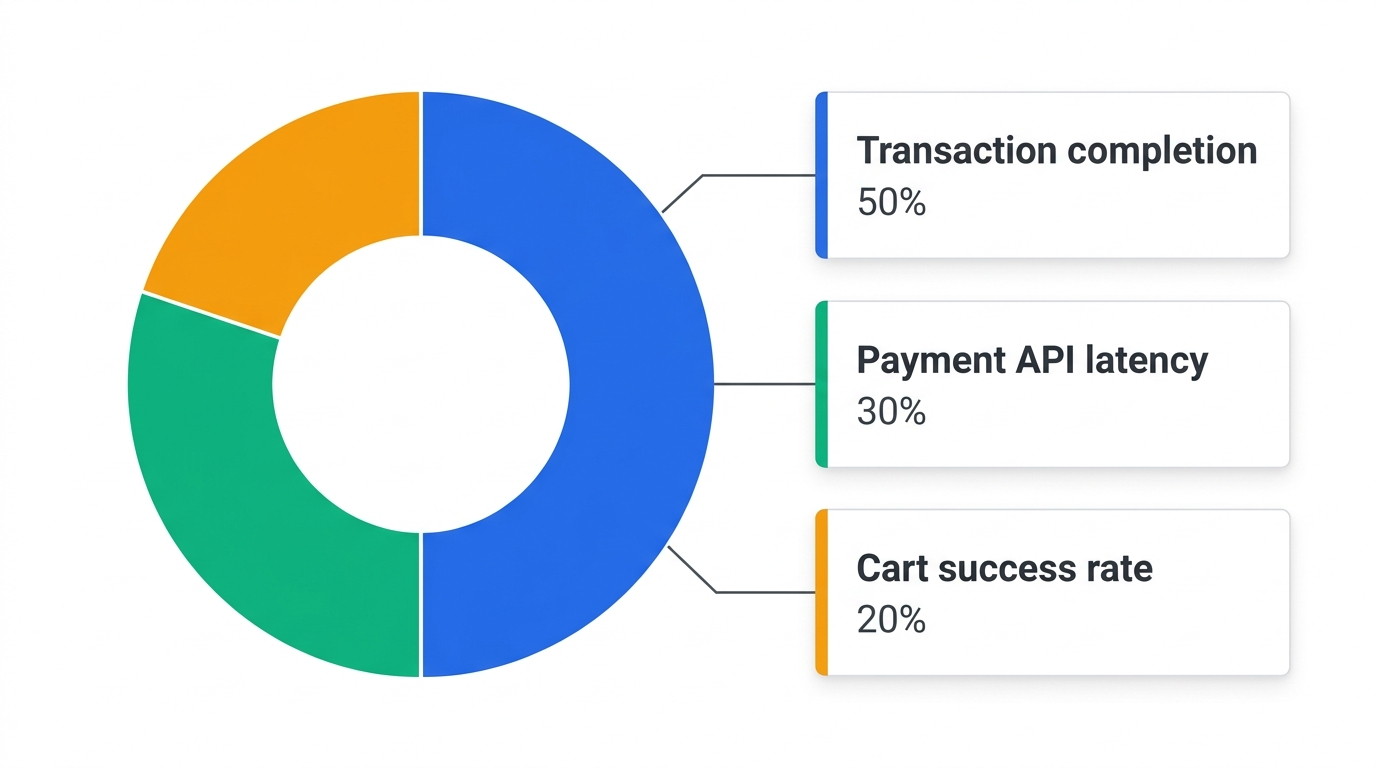
Example composite SLI
There are two important things to get right before implementing composite SLIs: The weights need to be grounded in data and not opinion, and the composite score needs a clear definition of what constitutes a good minute versus a bad one for error budget calculation purposes. The budgeting method matters too because time-based budgets measure good versus bad minutes, while occurrence-based budgets track the ratio of good requests to total requests. Nobl9 supports both, and the right choice depends on whether your SLI is expressed as a rate or a time-series. Nobl9's composite SLO feature handles the budget math across weighted components, which gets complex quickly if you're tracking it manually.
A composite SLO definition in Nobl9 looks like this for the checkout journey example above:
apiVersion: n9/v1alpha
kind: SLO
metadata:
  name: checkout-journey-health
  project: ecommerce
spec:
  service: checkout
  indicator:
    composite:
      components:
        - weight: 0.50
          slo:
            name: transaction-completion-rate
            project: ecommerce
        - weight: 0.30
          slo:
            name: payment-api-latency
            project: ecommerce
        - weight: 0.20
          slo:
            name: cart-success-rate
            project: ecommerce
  objectives:
    - target: 0.995
      displayName: Nominal
  budgetingMethod: Occurrences
  timeWindows:
    - unit: Day
      count: 30
      isRolling: true
Setting weights starts with one question: which failure hurts users most? A failed transaction means lost revenue and a broken user experience, so it takes 50%. Payment API latency comes second because slowness at that step causes abandonment even when the transaction ultimately succeeds, which puts it at 30%. Cart failures are damaging but recoverable since users tend to retry, so they take the remaining 20%. The same logic applies at any scale. In the streaming platform case study later in this article, content delivery accounts for 50% because CDN degradation directly causes buffering, authentication accounts for 20% because a failed login blocks access entirely, and recommendations and transcoding split the remainder, as their failures degrade the experience without breaking it outright. In both cases, the weights were validated against historical data before being committed to policy. That reasoning should be explicit and documented alongside the SLO definition, not just embedded in the numbers. When you revisit weights, you need to know what assumption you're replacing.
Defining thresholds manually is slow and often produces targets that are either too tight or too lenient. Nobl9's SLI Analyzer speeds this up by pulling up to 30 days of historical data from your existing observability sources, including Datadog, New Relic, CloudWatch, and Splunk, and surfacing the statistical distribution of your current performance. You can see where your p95 and p99 latency actually sit, how often your success rate dips below candidate thresholds, and what a proposed SLO would have looked like against real production data before you commit to it.
Balance reliability against risk tolerance
Reliability engineering is fundamentally about risk management. Every reliability decision involves a trade-off: Engineering time spent chasing an extra nine of availability is engineering time not spent on features, performance improvements, or paying down technical debt.
The goal is to define how much unreliability your users will actually notice and tolerate, then use that as your target. More reliability than that wastes resources; less causes user-visible failures that erode trust. The SLO is where you make that trade-off more clear and binding.
Accepting imperfection
Consider the difference between 99.9% and 99.999% monthly availability:
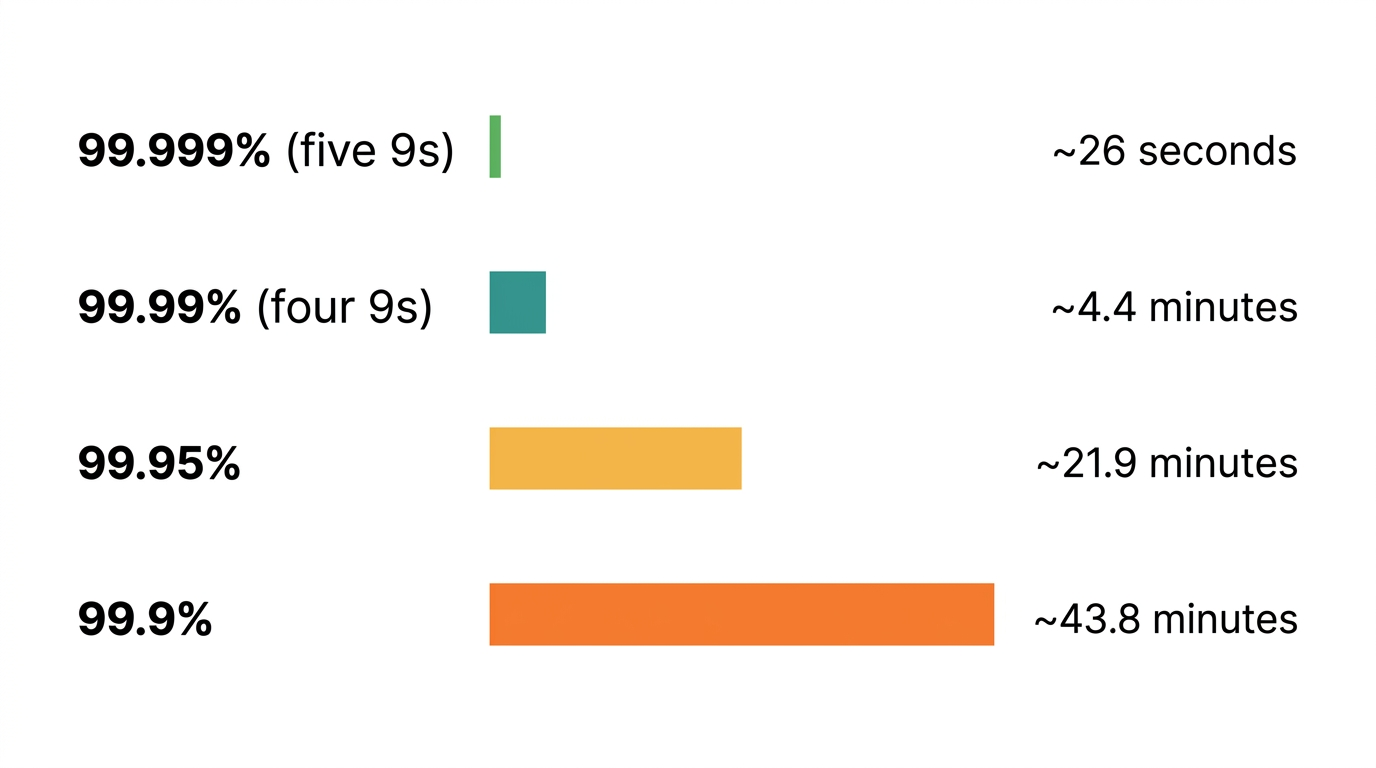
The engineering cost of moving from 99.9% to 99.99% is substantial. You need redundant infrastructure, more sophisticated failover logic, and tighter deployment controls. Moving from 99.99% to 99.999% is harder still, and often requires changes at the network and hardware level. Before committing to a target, ask whether your users can actually tell the difference. For most internal tools, 99.9% is defensible. For a payment processing API, 99.99% may be the floor.
The error budget is what makes this trade-off operational. At 99.9% over 30 days, you have 43.8 minutes of allowable downtime. You can spend it deliberately on deployments and experiments, or you can let incidents consume it and lose your ability to ship.
For infrastructure-dependent services, meaning anything running on container orchestration or shared node pools, supporting indicators like restart frequency and scheduling latency help explain why your user-facing SLI behaves the way it does, but they shouldn't replace it. For instance, a pod restart is not an outage, but enough of them in a short window will look like one to users. That's the distinction: infrastructure signals are diagnostic, user-facing SLIs are the standard.
These signals won't tell you whether users are succeeding, but they'll tell you why they aren't:
|
Signal |
What it indicates |
Why it surfaces |
|
Container restart frequency |
Stability |
Crash loops and OOM conditions that will eventually produce user-visible errors |
|
Pod scheduling latency |
Resilience |
Slow failover means redundancy isn't kicking in fast enough under load |
|
Scaling event success rate |
Elasticity |
Failed or partial scaling leaves you underprovisioned during traffic spikes |
|
Resource quota saturation |
Performance risk |
Services near CPU or memory limits degrade before they fail outright |
|
Inter-pod network saturation |
Latency |
Congestion between services inflates response times invisibly at the host level |
Error budget calculation
Error budgets convert an SLO from a target into a decision-making tool. Instead of debating whether the system is stable enough to ship, you look at how much budget remains and let that answer the question.
At 99.9% availability over 30 days, your error budget is 0.1% of 43,200 minutes, which is 43.2 minutes. Once that's gone, new deployments pause until the SLI recovers. The budget makes the policy automatic rather than a judgment call made under pressure during an incident.
Burn rate measures how fast you are consuming your error budget relative to the rate that would exhaust it exactly at the end of the SLO window. A burn rate of 1 means you are on pace to use the full budget by the end of the window. A burn rate of 2 means you will exhaust the full budget in half the SLO window rather than at the end of it.
Multi-window burn rate alerting is more reliable than single-threshold alerting. A short window (5 to 15 minutes) catches fast-moving incidents early. A longer window (1 to 6 hours) confirms sustained degradation and filters out transient spikes that recover on their own. Alerting on both together reduces false positives without sacrificing response time.
Composite SLOs add complexity here because each component contributes to the overall budget burn at its own rate. Tracking this manually across weighted components gets difficult to manage quickly. Nobl9 handles burn rate calculation and multi-window alerting, including across composite SLOs, and lets you define budget policies that trigger automated workflows when consumption crosses defined thresholds.
Validate targets with historical data
Data-driven target setting
An SLO set without historical grounding is usually wrong in one of two directions: too tight, producing constant alert noise and a perpetually exhausted error budget; or too lenient, masking real degradation until users are already complaining.
The right starting point is what your system actually delivers today. Thirty days of production data captures enough inconsistency to reveal your natural reliability floor, typical failure patterns, and the thresholds where user-visible degradation begins. That baseline becomes your first SLO, not a guess at what good should look like.
Automated baseline discovery
Setting baselines manually means writing queries against your observability backend, pulling percentile distributions, identifying anomalies, and repeating that process for every candidate SLI. For a system with a dozen services, that's a significant time investment before you've committed to a single target.
Nobl9's SLI Analyzer automates this process. It pulls up to 30 days of historical data directly from your existing observability sources, including Datadog, New Relic, CloudWatch, and Splunk, and shows the statistical distribution of your current performance. From that, it estimates viable SLO targets and flags anomalies in the historical data that would distort your baseline if left unexamined. You can evaluate a proposed threshold against real production behavior before it goes anywhere near your CI/CD pipeline.
The example below shows this in practice. After importing 14 days of Datadog latency data, the analyzer surfaces the statistical distribution alongside percentile values. The p99 sits just below 0.6 s, which looks like a reasonable threshold candidate. However, testing it shows 10% error budget remaining over the window, tight enough to warrant trying a stricter target. Dropping to 0.5 s exhausts the budget entirely. The final target of 0.58 s holds the budget across the full window. That's a calibration decision that would have taken hours of manual query writing to reach.

Nobl9 SLI Analyzer reliability burn-down chart after testing a 0.58 s latency threshold against 14 days of production data. (source)
Here are a few things to check before accepting a baseline as your SLO target.
|
Check |
Why |
|
Anomalies in the baseline window |
A major incident in the last 30 days will drag your baseline down and produce an artificially lenient target. |
|
Seasonal or traffic patterns |
A baseline from a low-traffic period sets a target your system may not hold during peak load. |
|
Dependency-driven variability |
Latency spikes caused by upstream services you don't control will show up in your baseline and need to be accounted for separately. |
|
Recent infrastructure changes |
A migration or scaling event mid-window can split your data into two distinct performance regimes, neither of which represents your current steady state. |
Once you have a clean baseline, treat the initial SLO as a hypothesis. Run it for two to four weeks, observe how the error budget burns, and adjust. A target that burns through its budget in the first week needs loosening; one that never burns at all may be too lenient to catch real degradation.
Automate reliability responses
Well-designed SLIs are only useful if something acts on them. Manual responses to reliability signals don't scale: On-call engineers miss alerts, response times vary, and the same incident gets handled differently depending on who's awake. Automation removes that variability by turning known failure conditions into predefined, repeatable responses.
The goal isn't to remove humans from reliability work; it's to reserve human judgment for the situations that actually need it and let automation handle the rest.
Toil elimination strategy
Start by auditing where your engineers actually spend their time during and between incidents. Toil tends to cluster around a small number of recurring tasks: restarting services, triaging noisy alerts, rotating logs, and running the same diagnostic queries every time a particular alert fires.
For each recurring task, ask two questions: Does this require judgment, or is it mechanical? And does it happen often enough to justify automating? Tasks that are mechanical and frequent are the right targets. Encode them as runbooks first, then automate the runbook execution through your CI/CD pipeline or orchestration tooling. The runbook serves as documentation even when the automation runs without human involvement.
Nobl9's webhook alert methods and sloctl CLI help. Webhook payloads carry the SLO name, severity, and service metadata your runbook needs to execute, and sloctl lets you version-control the reliability policies that govern when those runbooks fire.
Operational patterns
Operational patterns are the repeatable system behaviors that keep reliability stable under stress. The two in the table below are fundamental.
|
Pattern |
Implementation |
What your SLI measures |
|
Graceful degradation |
Under load, reduce nonessential functionality rather than failing completely. For example, a streaming platform can drop to a lower resolution before returning a playback error. An ecommerce site can disable recommendations before blocking checkout. |
Whether the degraded experience still meets your minimum acceptable threshold for the critical user journey |
|
Redundancy and high availability |
Deploy across multiple availability zones, use active-active database configurations, and maintain redundant service providers for critical dependencies. |
Recovery time when a single zone or provider fails, and whether failover happens within your latency budget |
The SLI's role here is to confirm that these patterns are working as designed. Graceful degradation that doesn't actually keep your success rate above threshold isn't degrading gracefully; it's just failing more slowly.
Nobl9's burn rate alerting lets you confirm these patterns are functioning correctly in production. If graceful degradation is working, your composite SLO score should stay above the threshold even when individual component SLIs dip. If it doesn't, the weights need to be revisited.
SLI-driven automation
Once your SLIs are stable and your thresholds are validated against historical data, you can wire them to automated responses. For example, a falling request success rate can trigger a rollback; a burn rate crossing a fast-burn threshold could page the on-call engineer, who attaches the relevant traces to the alert; or a latency spike that persists beyond a defined window may scale the affected service automatically.
Automation is only as reliable as the thresholds triggering it. Automating responses against poorly calibrated SLIs produces automated chaos: rollbacks that fire during normal traffic variance, scaling events that run up infrastructure costs without addressing the real problem. Be sure to get the thresholds right first and only then automate.
Nobl9 connects SLI signals to automation hooks through integrations with CI/CD pipelines and orchestration tools. You define the burn rate thresholds and the actions, and the platform handles the trigger logic, including multi-window evaluation to filter out transient spikes before firing an automated response.
Case study: A global streaming platform
The principles in this article can be more clearly seen in a real deployment scenario. Consider a global streaming platform running across five AWS regions with over 50 active SLOs.
The problem
European users reported extended buffering. The platform had no shortage of monitoring data, but the SLOs were defined at the individual service level. Engineers could see that CDN error rates were slightly elevated, transcoding queue latency was higher than usual, and authentication response times were normal, but nothing pointed clearly to a root cause or quantified the user impact.
The boundary and SLI structure
The team mapped the platform to four measurement boundaries, as shown in the table below.
|
Component |
SLIs |
|
Authentication service |
Login success rate, token issuance latency |
|
Content delivery network |
Cache hit ratio, origin error rate |
|
Recommendation engine |
Response latency, data freshness |
|
Transcoding pipeline |
Job success rate, processing duration |
The solution
Rather than treating these as four independent SLOs, the team built a hierarchical composite SLO weighted by user impact: content delivery at 50%, authentication at 20%, recommendations at 15%, and transcoding at 15%. The weights reflected what actually degraded the playback experience most. The team set the composite SLO target at 99.5%, meaning that any window where the weighted score fell below that threshold counted against the error budget.
They validated the composite using Nobl9's SLI Analyzer against 30 days of historical data, testing different weight combinations to find the configuration that best correlated with known buffering incidents in the historical record.
The result
|
Outcome |
Detail |
|
Alert noise |
60% reduction |
|
Early detection |
CDN issues surfaced 30 minutes before user complaints reached support |
|
Root cause visibility |
Correlation identified between CDN cache drop rate and transcoding queue backlog, a relationship invisible when the two services were monitored independently |
Reducing alert noise was the expected outcome. The more valuable finding was a dependency between CDN cache drop rate and transcoding queue backlog that had been invisible when the two services were monitored independently.
Conclusion
The best practices and patterns discussed in this article are presented in a sequential order for a reason. Boundary-based measurement gives you SLIs that reflect real dependencies, but those SLIs are only useful if their thresholds are grounded in historical data. Targets grounded in data become meaningful when expressed as error budgets. Error budgets only drive decisions if the automation that acts on them is carefully calibrated. Cut corners at any stage, and the system breaks down in ways that are hard to trace back to the root cause.
A practical starting point is to pick one user journey, map its boundaries, and pull 30 days of production data through Nobl9's SLI Analyzer. You'll see where your current performance sits, which thresholds are realistic, and where your reliability coverage has gaps.
Navigate Chapters: