
-1.png)
Table of Contents
Like this article?
Subscribe to our Linkedin Newsletter to receive more educational content
Subscribe now
Customer-Facing Reliability Powered by Service-Level Objectives
Service Availability Powered by Service-Level Objectives
Learn More
Integrate with your existing monitoring tools to create simple and composite SLOs

Rely on patented algorithms to calculate accurate and trustworthy SLOs

Fast forward historical data to define accurate SLOs and SLIs in minutes
Customer-Facing Reliability Powered by Service-Level Objectives
Service Availability Powered by Service-Level Objectives
Learn More
Rightsizing compute resources
Identifying underutilized resources is simple, as all major cloud providers offer tools that flag VMs with low CPU utilization. However, cost and service performance are often misaligned. Telemetry misses context for safe downsizing.
Consider more than generic metrics
Cloud-native advisor tools help identify underutilized resources, but they often focus on generic metrics such as processor and memory utilization and overlook bundled hardware dependencies.
Since cloud providers package CPU, RAM, and I/O into fixed instance types, a VM with 80% idle CPU may still reach critical limits on memory, network throughput, or EBS-optimized disk I/O.
Downsizing based on a single metric can also cause OOM errors or I/O bottlenecks that advisor tools may not detect.
Use SLOs as a precondition for downsizing
SLO health should be a mandatory pre-check to address these shortcomings. Regardless of other metrics, high latency or a low error budget may indicate that resource limits have already been reached.
In practice, optimization automations, such as downsizing instance types or scaling replica counts, should proceed only when SLOs show a healthy error budget. If SLOs show the error budget is depleting too quickly, the pipeline should halt and notify the user rather than applying changes.
You can implement this by integrating SLO checks into your deployment or infrastructure pipelines. For example, a pre-deployment step can query an SLO platform’s API for the current error budget and burn rate, then evaluate policies such as “only allow downsizing if error budget remaining is above X% and the short-term burn rate is below Y.” The pipeline then gates any IaC plan or apply step on that evaluation result.
An SLO platform like Nobl9 is well-suited for this approach because it centralizes SLO definitions, calculates error budgets, and exposes this information via API.
For example, the screenshot below displays an ingest service with a 100% error budget and zero burn rate. The consistent reliability indicates substantial headroom. This is more than a low CPU signal. It shows that the service meets its reliability targets and is fit for resource reduction.
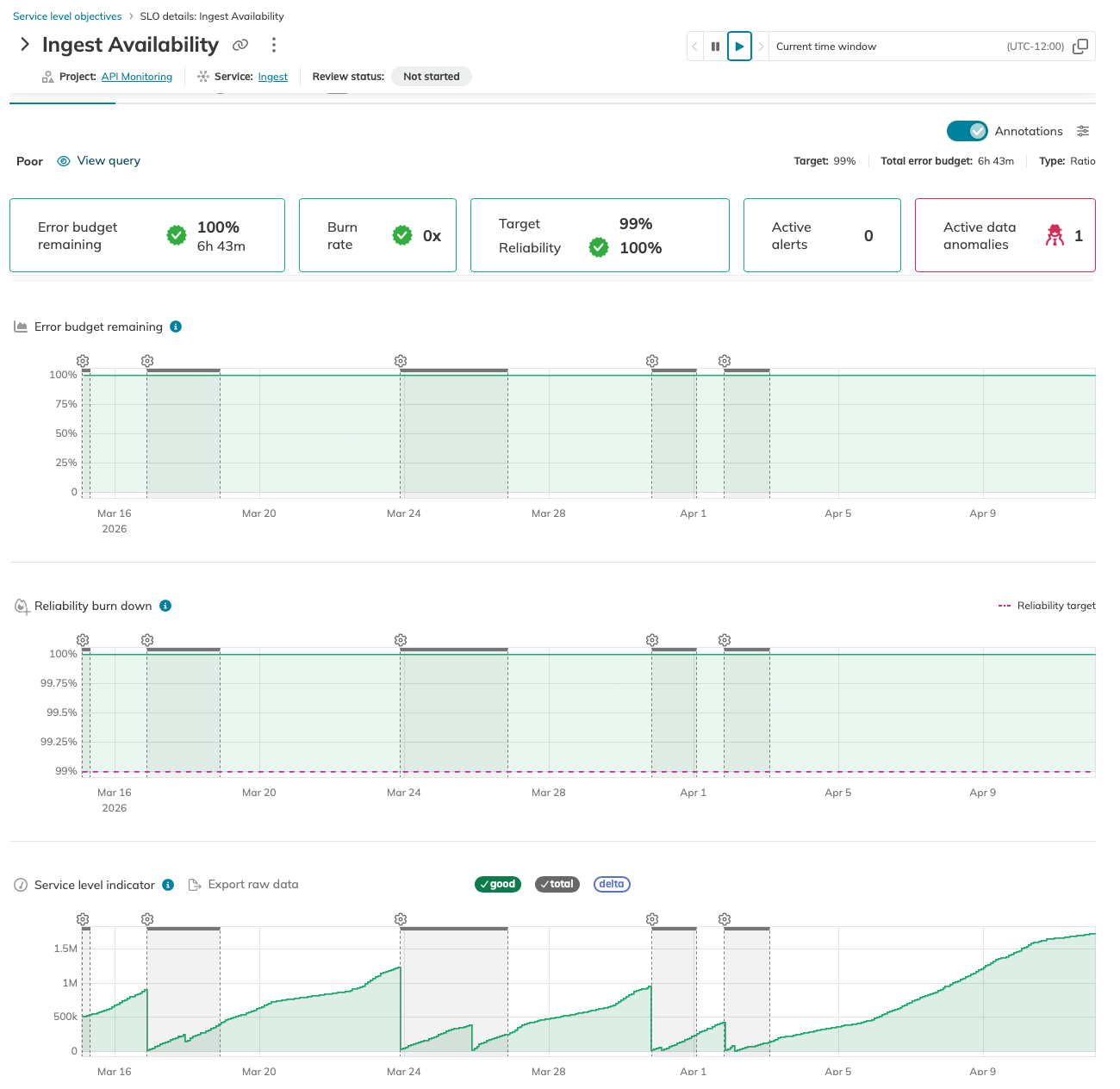
fig. Using ingest availability to verify that rightsizing doesn't impact service health (Source)
In practice, one service may appear healthy while another experiences issues. Here, overall latency remains stable, but the RDS has exhausted its budget and is burning rapidly. In an automated workflow, this should serve as a circuit breaker, stopping any planned downsizing since the database is already under stress.
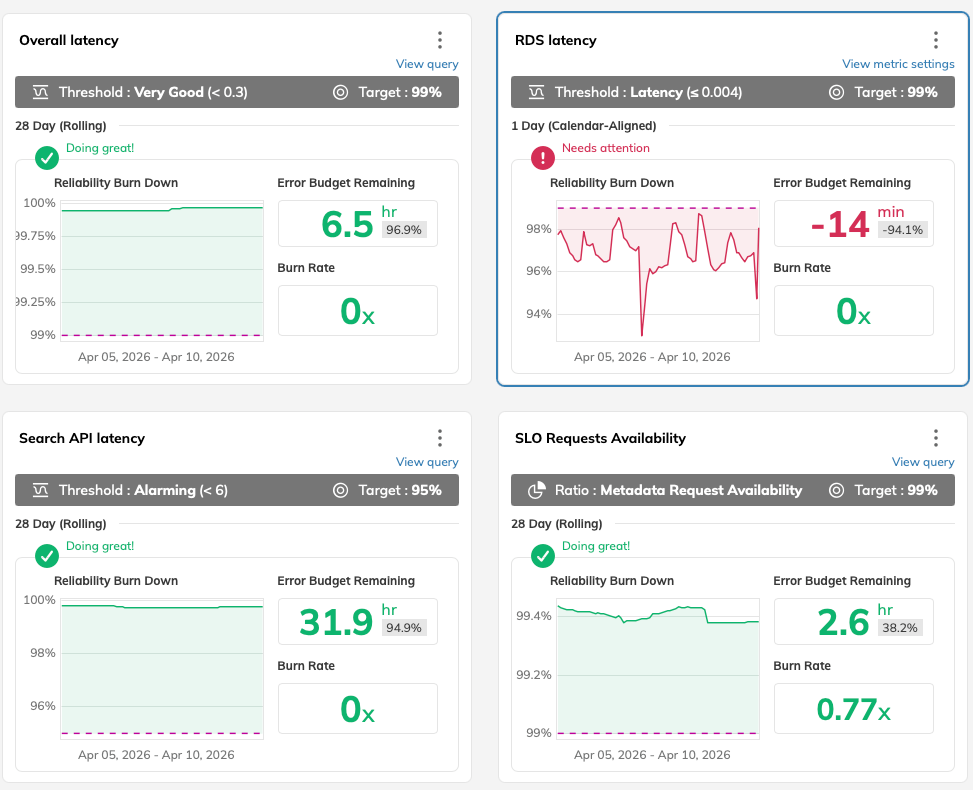
fig. An exhausted error budget acts as a circuit breaker, halting risky resource downsizing (Source)
Instead of building custom SLO calculations in every pipeline, you can rely on Nobl9 to ingest metrics, compute SLO health, and provide an API for automation to query as part of a pre-check.
Build a workflow
To scale across many services, automate these checks. A practical rightsizing workflow includes the following steps.
- Filter: Identify instances with low utilization, such as CPU utilization below 15% over 14 days.
- Validate: Confirm that the service retains at least 20% of its error budget, or a comparable healthy threshold, before reducing resources.
- Ticket: If both conditions are met, automatically generate a ticket for the service owner with the recommended instance type change.
- Deploy: Implement the change in a staging environment first and monitor for any immediate SLO degradation before promoting to production.
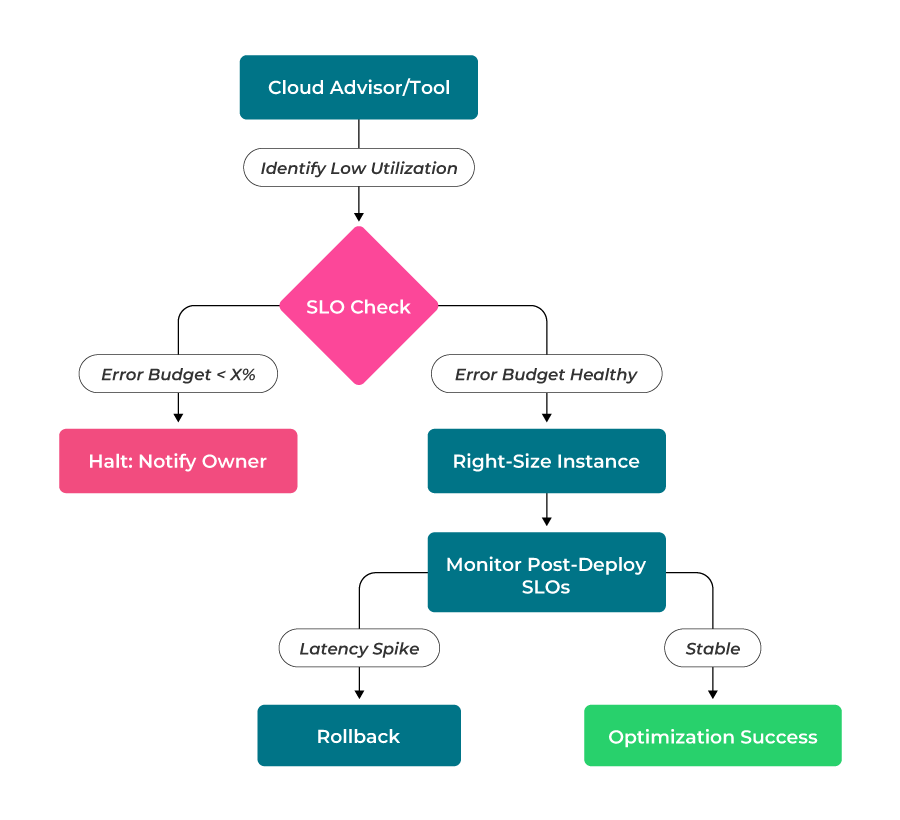 fig. The SLO-gated rightsizing workflow
Data egress minimization
Data egress is usually the most volatile part of a cloud bill. Outbound internet traffic is visible, but hidden costs come from inter-availability zone transfers and NAT Gateway processing fees. As systems scale, unoptimized cross-zone traffic can exceed compute costs.
While all cloud providers follow similar data egress principles, their implementation details vary for each provider. Amazon Web Services (AWS) is a useful example, as its complex networking often leads to high egress charges.
Case study: Strategies for AWS egress costs control
AWS architectures typically include multi-AZ redundancy, which highlights how specific billing triggers like inter-AZ and NAT gateway processing fees require targeted solutions.
In a typical AWS multi-AZ cluster, a service in Zone A may call a database leader in Zone B, incurring a per-GB transfer fee. To contain these egress costs, let’s focus on the following implementations.
- Topology-aware routing: To avoid inter-AZ charges, use topology-aware hints to prefer endpoints within the same zone. This ensures the primary data path remains local, reserving cross-zone traffic for failovers or cross-node replication.
- VPC endpoints: To bypass expensive NAT gateway processing fees, avoid routing traffic to services like S3 over the public internet or through a NAT Gateway. Use VPC endpoints to keep this traffic on AWS’s internal network, removing both egress and NAT processing charges.
- Service mesh localization: If you use a service mesh such as Istio or Linkerd, configure locality load balancing to keep east-west traffic within the same zone by default.
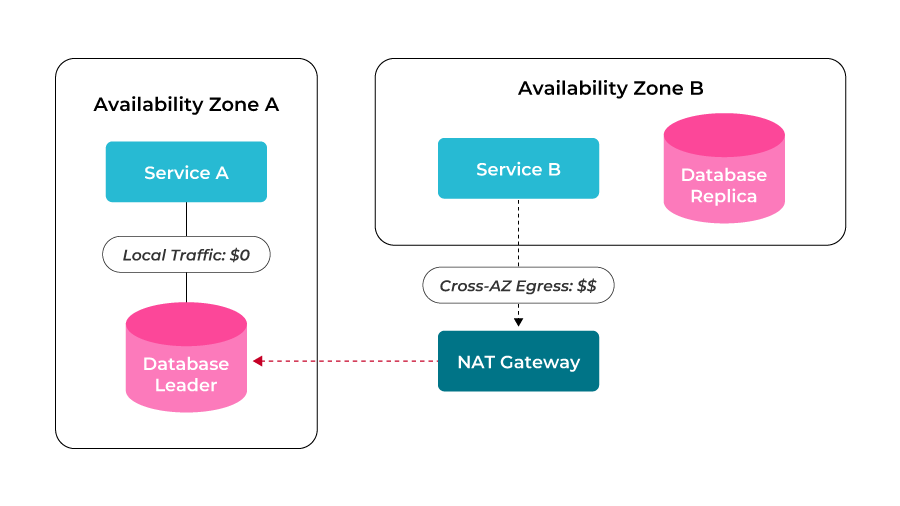 fig. Local zone affinity vs. cross-AZ egress
Design efficient internal data paths
Regularly audit your network routes to select where direct peering is more cost-effective than using a centralized gateway, such as a transit gateway or virtual WAN. Focus on the following areas to address routing inefficiencies.
Isolate high-throughput paths
Use flow logs to identify your highest-volume service-to-service connections. Centralized gateways typically add a per-GB processing fee. You can avoid these fees for high-volume traffic by creating direct peering between networks.
Use direct peering for heavy loads
Direct peering is more cost-effective for data-intensive workloads, such as Kafka or database synchronization, as it typically incurs no processing fees. Migrating these high-volume paths to direct peering can reduce your networking costs.
Prune route table bloat
Remove peering connections to orphaned networks or legacy development environments. This maintains route table quotas, prevents address space (CIDR) overlaps, and reduces your security exposure.
Use SLOs to balance redundancy and cost
Minimizing unnecessary data traffic reduces egress costs and eliminates network hops that introduce latency. Consolidating these data paths also reduces latency for latency-sensitive services. Platforms such as Nobl9 provide this validation after consolidation.
For example, the dashboard below tracks overall latency against a 0.3 threshold, providing a clear record of performance during the resource optimization process. With a 96.5% error budget remaining and p95 latencies consistently below the target, this confirms that current data paths are efficient.
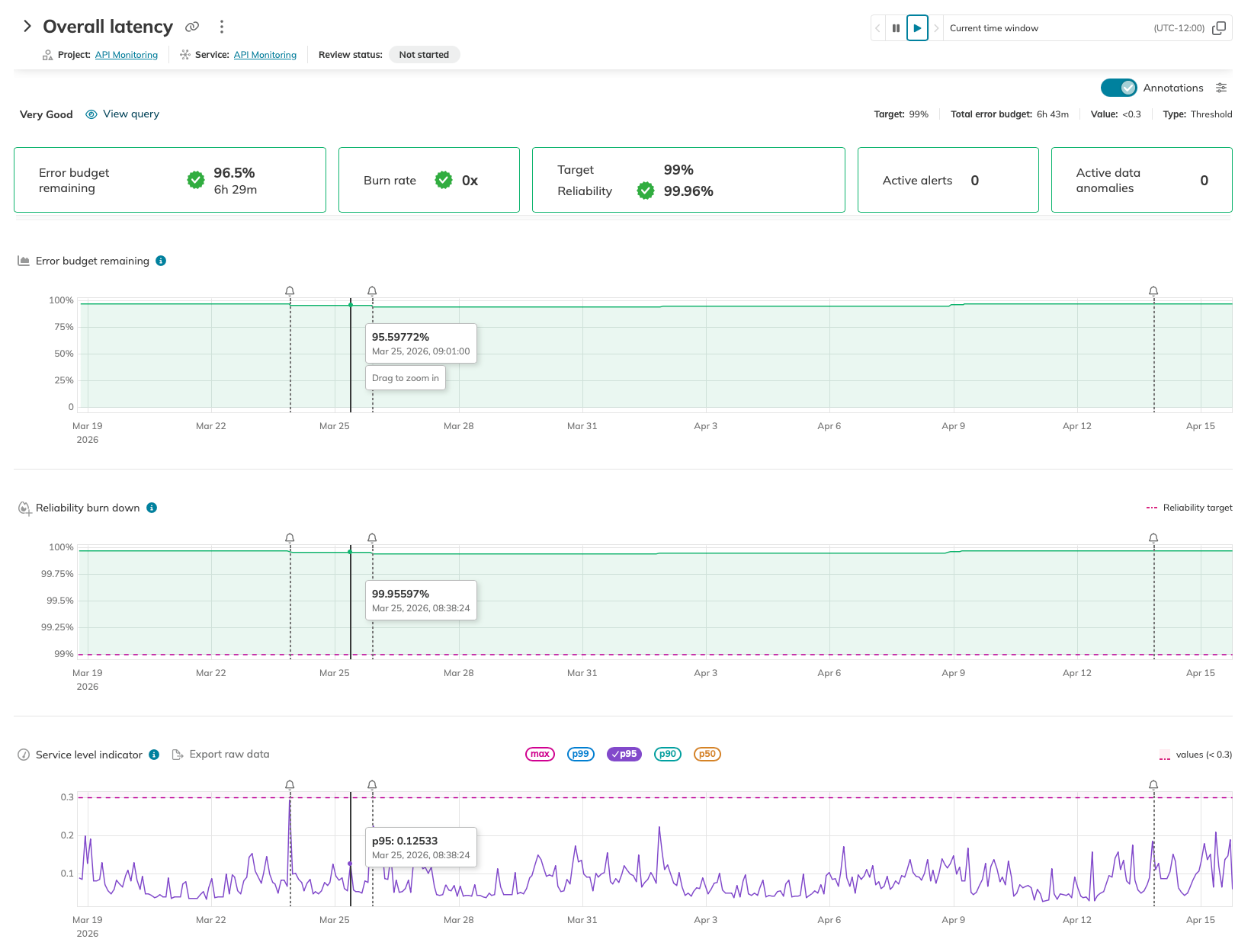 fig: Using latency SLIs as a validation for network optimization (Source)
Non-prod environment hibernation
Non-production environments, such as staging, QA, and sandbox, rarely need to run continuously, yet they frequently remain active. Assuming a standard 730-hour month, potential savings are as follows:
- Shutting down resources on weekends can reduce usage by 26%, saving about 192 hours per month.
- Extending shutdowns to nightly hours, for example, from 8:00 PM to 7:00 AM, can recover approximately 475 hours monthly and increase savings to 65% of total spend.
Apply automated scheduling
To scale hibernation, transition from manual shutdowns to automated, tag-based scheduling.
Use tools such as the AWS Instance Scheduler or a custom Lambda function to start and stop EC2 and RDS instances according to a defined schedule. For containerized workloads, use an operator such as kube-downscaler to scale deployments and stateful sets to zero replicas during off-hours and restore them before the workday begins.
Also, allow developers to manually override automation by applying specific resource tags. For example, a tag such as Hibernate: False enables a resource to bypass automated shutdown for a set period without disabling automation globally.
Manage state and dependencies
Hibernation is effective only if the environment is fully functional after restart. In addition to EBS persistence and Elastic IP associations, account for DNS propagation and service discovery TTLs.
If an instance receives a new internal IP after a restart, downstream services may try to connect to the old address until the DNS cache updates.
Review the dependency chain to avoid circular dependencies. For example, if your application needs configuration from a Vault instance that is also hibernating, ensure the Vault instance reaches a state with sealed: false before application pods begin bootstrapping.
In container orchestration tools such as Kubernetes, use init containers to run a lightweight test query (e.g., SELECT 1) to confirm database readiness. This verifies the database is reachable, authenticated, and functional, preventing startup errors like CrashLoopBackoff.
Track coverage with SLOs
Hibernation should be tracked, not performed unthinkingly. Measure hibernation coverage as a primary metric by identifying the percentage of non-production resources included.
With Nobl9, create an SLO to monitor the availability and wake-up health of these environments.
- Success signal: Measure the time required for an environment to reach a Ready state after a scheduled start.
- Alerting: If an environment fails to start correctly, such as a database remaining in Starting mode, it will consume the error budget.
- Refinement: Use this data to show that hibernation does not impact developer velocity. If the Staging Readiness error budget remains healthy, you can confidently shorten shutdown windows to optimize savings.
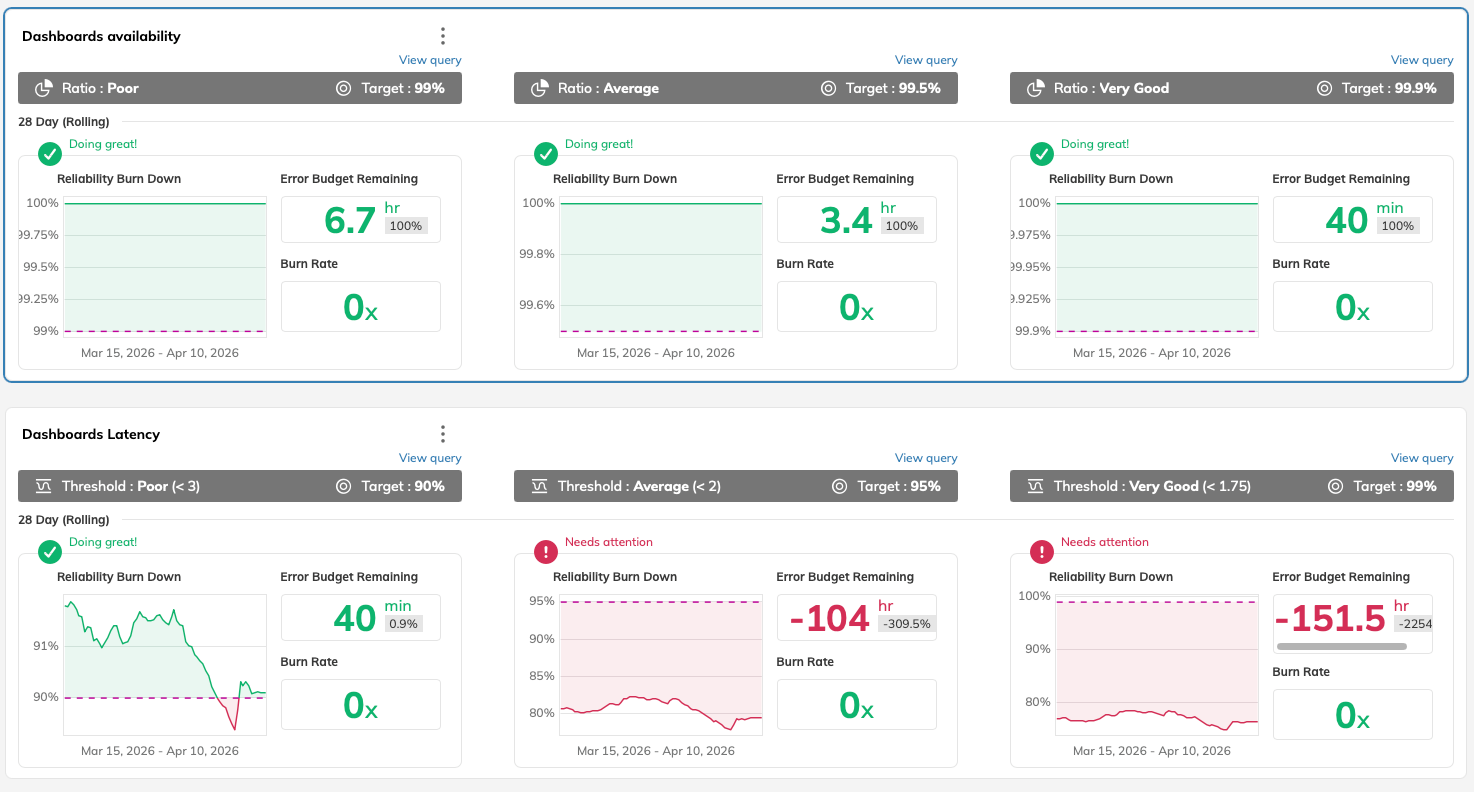 fig. Using SLOs to track recovery health and ensure non-prod environments (Source)
Storage lifecycle management
Storage costs are more difficult to manage than compute costs because they persist until deleted. If you remove a virtual machine but not its disk, you will continue to incur charges.
Clean up orphaned resources
Block Storage (EBS) volumes frequently remain active after their attached resources are deleted, especially if the DeleteOnTermination setting is disabled.
Fix this by running a script to identify volumes in the Available state for over 30 days. Enforce a tagging policy requiring an Owner tag on every disk to enable safe, automated deletion.
Move data to cheaper tiers
Increase savings by migrating older data to slower-speed, lower-cost storage. Object storage solutions such as S3 support lifecycle rules to automatically move data or backups to infrequent access (IA) or archive (Glacier) tiers based on data age. Moving log files older than 90 days to a cold tier can reduce costs by up to 80%.
Rotate snapshots by retaining daily backups for one week, weekly backups for one month, and deleting older copies.
For non-production databases, switching from provisioned IOPS (io2) to general-purpose (gp3) disks typically reduces costs without a significant performance impact. Unlike older volume types, gp3 allows you to provision IOPS and throughput independently of disk size.
Validate storage performance with SLOs
Cheaper, slower storage can degrade application performance during data retrieval. Use SLOs to ensure cost-efficiency measures do not affect user experience. Monitor read latency to determine if storage tiering is too aggressive.
If SLOs remain within target after migrating data to a lower-cost tier, the optimization is successful. If latency exceeds the target, move the affected workload back to a faster disk.
In the example below, a negative error budget and high burn rate indicate the RDS is not meeting its 4ms latency target. While other factors may cause this lag, it often suggests the current disk tier does not meet the database’s performance requirements.
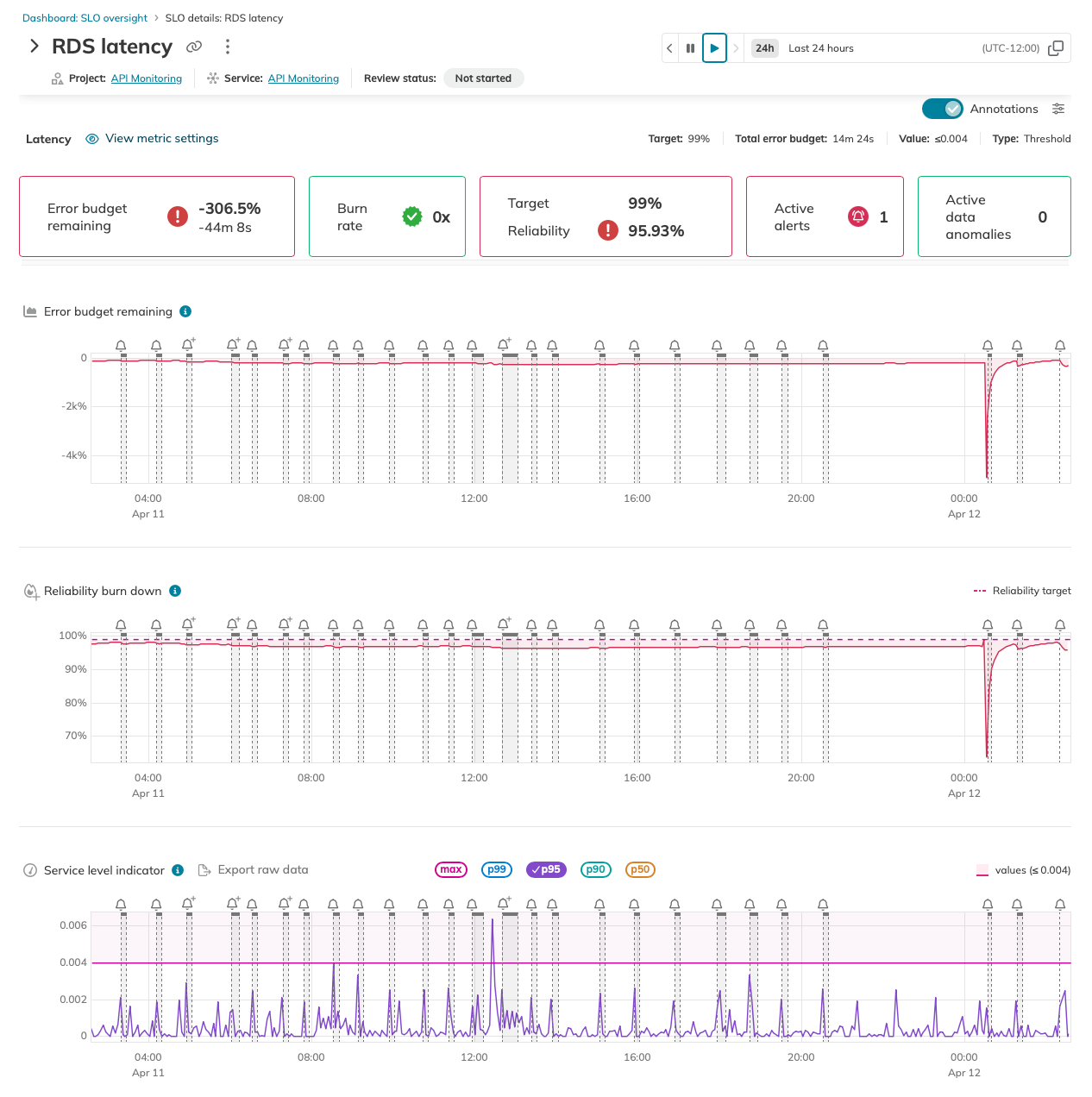 fig. A depleted error budget for RDS latency indicates the need to revert to a higher-performance storage tier (Source)
Reserved capacity and commitment planning
On-demand pricing is the most costly option for stable, predictable workloads. Committing to a set amount of compute usage or specific instance types for 1 or 3 years can reduce unit costs by up to 55%.
With the most restrictive terms, such as three-year, all-upfront commitments for certain instance families and regions, you can save up to 72%.
To maximize savings, monitor your commitment coverage ratio, which shows the percentage of your usage covered by discounts instead of on-demand rates.
Identify commitment candidates
The most practical approach is to balance flexible and static commitment types according to your technical roadmap. Compute savings plans provide flexibility by applying discounts to any instance, family, region, or serverless product.
Standard reserved instances or instance savings plans provide higher discounts but require commitment to a specific instance family and region. These options suit stable workloads, such as primary database nodes or dedicated service clusters. Although these are fixed, normalization factors based on instance size allow you to scale within the same family, such as from m5.xlarge to m5.2xlarge, without losing the discount.
Use cloud-specific tools such as AWS Cost Explorer or GCP Recommender to analyze historical hourly usage and identify the minimum required resources to avoid paying for unused committed capacity.
Manage the commitment lifecycle
Capacity planning should follow a recurring review cycle. Audit your coverage and utilization monthly to keep savings plan utilization near 100%. If utilization declines, you are paying for commitments that no longer match your infrastructure.
If your coverage ratio for stable workloads drops below 70%, you are overpaying for on-demand capacity. Quarterly reviews allow you to adjust commitments as your architecture changes and older terms expire.
Use SLOs to validate commitments
The main risk in commitment planning is committing to over-provisioned resources. Use SLO solutions such as Nobl9 to confirm that your current resource levels are necessary before making long-term commitments. Reviewing historical error budgets helps determine whether a service has enough reliability buffer to support rightsizing.
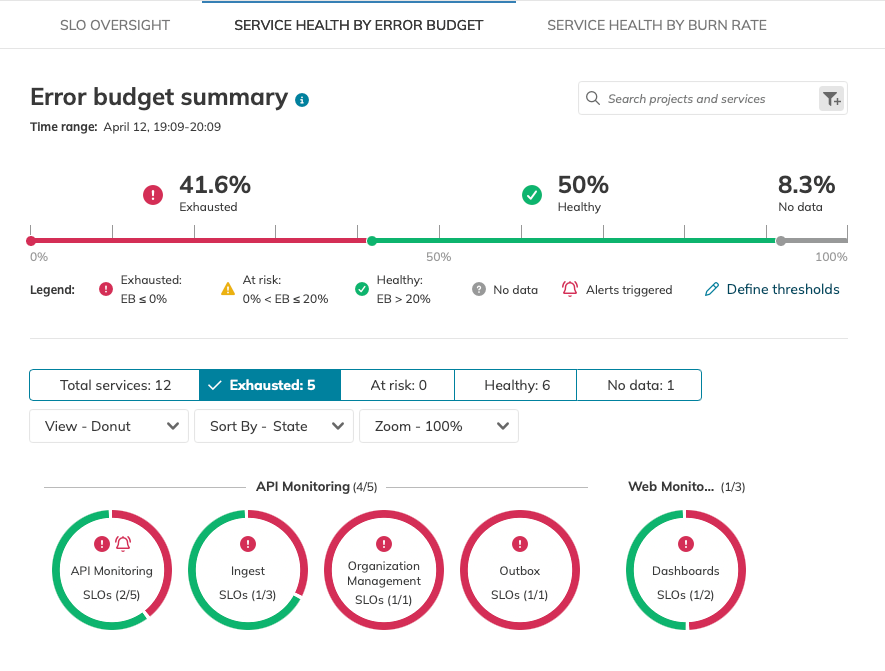
fig. Using aggregated error budget health to validate and right-size capacity commitments (Source)
If a service consistently maintains 100% of its error budget, rightsize the instance before signing a reserved capacity contract. When you align burn rates with capacity needs, you commit only to the capacity required to meet your SLOs.
Navigate Chapters: