
-1.png)
Table of Contents
Like this article?
Subscribe to our Linkedin Newsletter to receive more educational content
Subscribe now
Customer-Facing Reliability Powered by Service-Level Objectives
Service Availability Powered by Service-Level Objectives
Learn More
Integrate with your existing monitoring tools to create simple and composite SLOs

Rely on patented algorithms to calculate accurate and trustworthy SLOs

Fast forward historical data to define accurate SLOs and SLIs in minutes
#1 Instance right-sizing through systematic testing
Instance right-sizing addresses the most common source of cloud waste: running services on instance types larger than necessary. Teams typically select instance sizes based on anticipated peak loads, resulting in infrastructure running at 10-20% CPU utilization. The barrier to right-sizing is uncertainty about reliability impact. Teams cannot quantify whether smaller instances increase latency or error rates during traffic bursts.
Baseline establishment and gradual testing approach
Establish baseline performance metrics before testing more minor instances. After that you can gradually reduce instance sizes by 20-30% on non-critical services while monitoring error budget consumption and request latency. Profile current utilization across CPU, memory, network throughput, and disk I/O for at least two weeks to identify services running significantly below capacity.
To see how this works in practice, consider an authentication service running on 8 c5.2xlarge instances with an average CPU utilization of 15%. After two weeks of baseline profiling confirmed consistently low utilization, smaller c5.xlarge instances were introduced to handle 10% of traffic using weighted load balancing. Over a 30-day observation window, Nobl9 tracked P95 latency and error rates against the established SLO thresholds, confirming that error budget consumption remained within acceptable limits before expanding the smaller instances to full traffic.
|
Configuration |
Instance Type |
vCPUs |
RAM |
Monthly Cost |
P95 Latency |
Error Rate |
|
Before optimization |
c5.2xlarge |
8 |
16GB |
$5,200 |
85ms |
0.08% |
|
After optimization |
c5.xlarge |
4 |
8GB |
$2,000 |
92ms |
0.09% |
|
Monthly savings |
— |
— |
— |
$3,200 |
+7ms |
+0.01% |
SLO monitoring for quantified reliability impact
SLO monitoring and error budget combined quantify reliability impact. Treat right-sizing as a continuous engineering practice that tests new instance types as they become available. However, tracking error budget consumption across dozens of services during simultaneous right-sizing experiments creates operational complexity. Each service requires baseline establishment, gradual testing, and continuous monitoring. At scale, with 40+ microservices, manual tracking becomes unmanageable.
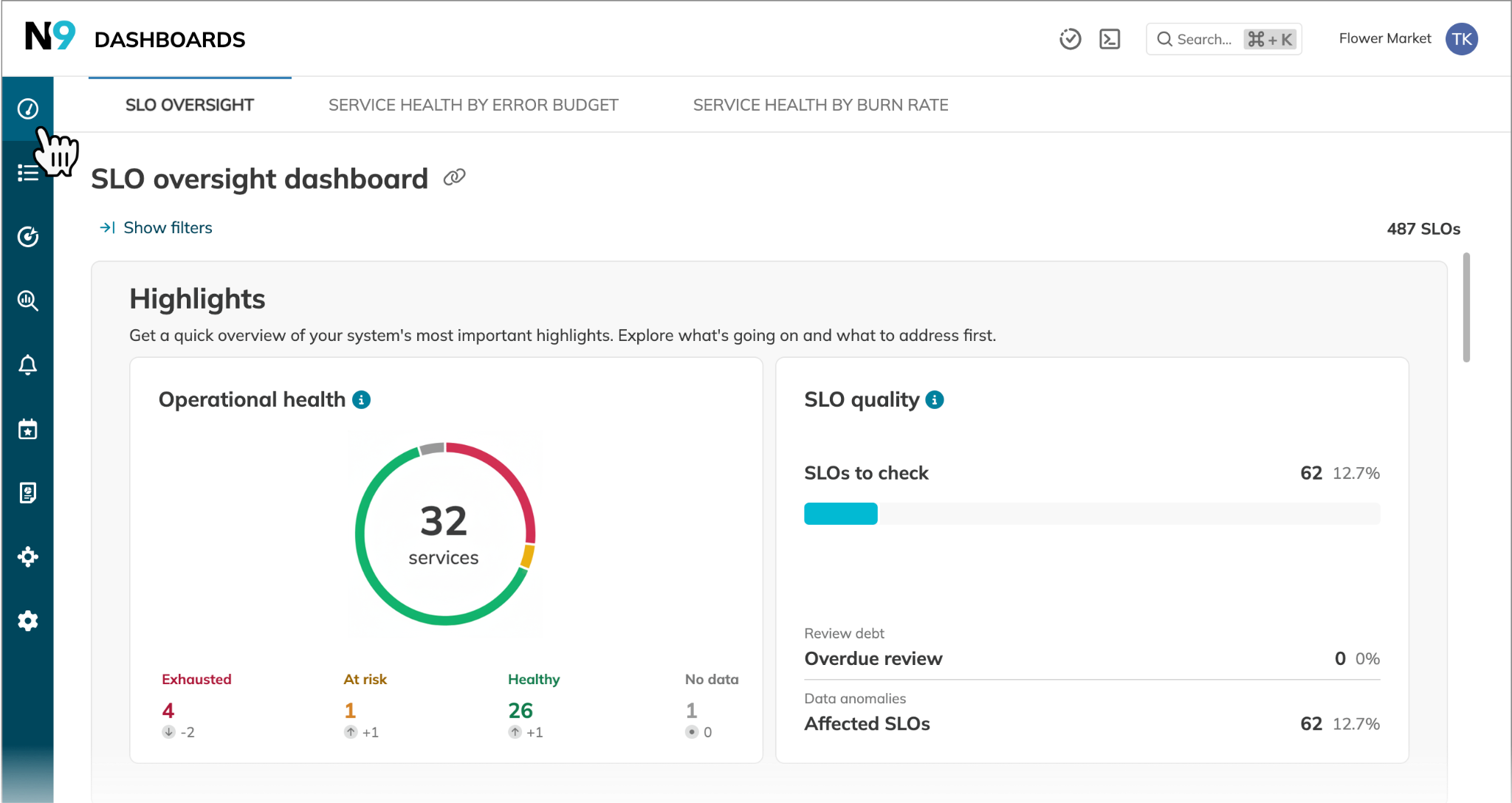
Nobl9’s The SLO oversight dashboard with the Highlights widget
SLO platforms address this through multi-window, multi-burn rate alerting that distinguishes temporary latency spikes from sustained degradation. When right-sizing authentication services.
- Short-window alerts (5 minutes) detect rapid error spikes during instance transitions
- Long-window alerts (1 hour) track whether the new instance size maintains acceptable performance under sustained load.
This prevents false alarms from brief initialization latency while catching genuine capacity issues. Platforms like Nobl9 provide Service Health Dashboards that categorize services by burn rate severity during cost optimization testing, offering single-pane-of-glass visibility across multi-service experiments.
Infrastructure as Code policies and automation
Introduce Infrastructure as Code policies and automated checks to prevent the deployment of oversized instances. You can create runbooks to evaluate new services against right-sizing criteria during initial provisioning.
Define Terraform guardrails to flag instance selections that exceed historical patterns. A simple precondition block can enforce this directly in your resource definition:
resource "aws_instance" "service" {
  instance_type = var.instance_type

  lifecycle {
    precondition {
      condition     = contains(["t3.medium", "c5.xlarge", "c5.2xlarge"], var.instance_type)
      error_message = "Instance type deviates from approved sizing guidelines. Provide justification before proceeding."
    }
  }
}
This rejects any instance type outside the approved list at plan time, requiring an explicit override before the configuration can be applied.
Teams can reduce instance sizes until error budget consumption signals that reliability is degrading beyond acceptable thresholds, then settle on the smallest configuration that maintains SLO compliance. The operational challenge is coordinating these experiments across multiple services. When platform teams right-size 15 services simultaneously, automated alerting with configurable thresholds eliminates manual monitoring burden. It triggers warnings only when budget consumption indicates concerning trends.
Customer-Facing Reliability Powered by Service-Level Objectives
Service Availability Powered by Service-Level Objectives
Learn More
#2 Auto-scaling optimization for dynamic capacity management
Auto-scaling reduces costs by minimizing idle capacity during low-traffic periods and maintains responsiveness during surges. However, aggressive policies introduce reliability risks: too-low minimum pod counts create scale-up delays, while too-high sensitivity triggers unnecessary scaling. The challenge is balancing cost savings with increased latency during scale-up events.
Minimum capacity reduction through traffic analysis
Reduce the minimum pod or node count by analyzing historical traffic patterns and gradually decreasing the minimum capacity while monitoring error budget consumption during traffic spikes. Most services exhibit predictable traffic patterns such as weekday peaks, reduced weekend traffic, and overnight lows. Traditional auto-scaling maintains a constant minimum capacity, leaving substantial idle capacity during 60-70% of operating hours.
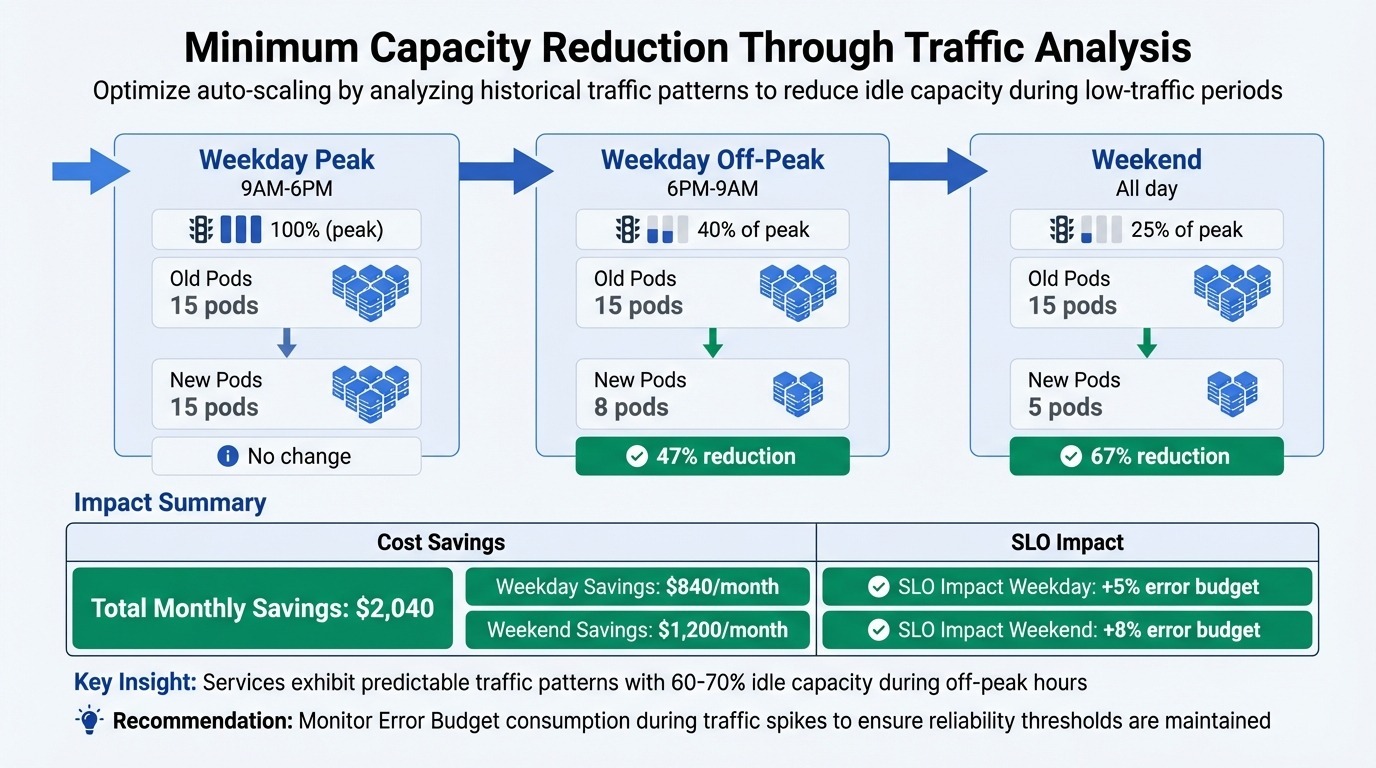
An example of a cloud capacity reduction technique for cost optimization through traffic analysis
Scale-up sensitivity and scale-down aggressiveness
Increase scale-up sensitivity by configuring auto-scaling to respond faster at lower utilization thresholds (60% CPU rather than 80%) and optimize scale-down aggressiveness to reduce idle capacity during low-traffic periods.
Complexity emerges when optimizing auto-scaling across multiple interdependent services. Reducing frontend minimum pods from 15 to 8 saves costs but increases morning scale-up latency. This latency ripples through the user journey:
Slower frontend response -> delays checkout service initialization -> delays payment processing -> delays order confirmation.
Tracking this end-to-end impact requires composite SLOs. They aggregate reliability signals from multiple services into a single weighted metric that reflects the health of an entire user journey rather than any individual component. Weighting each service by business criticality means a payment processing degradation counts more heavily against your error budget than a minor delay in a recommendation engine.
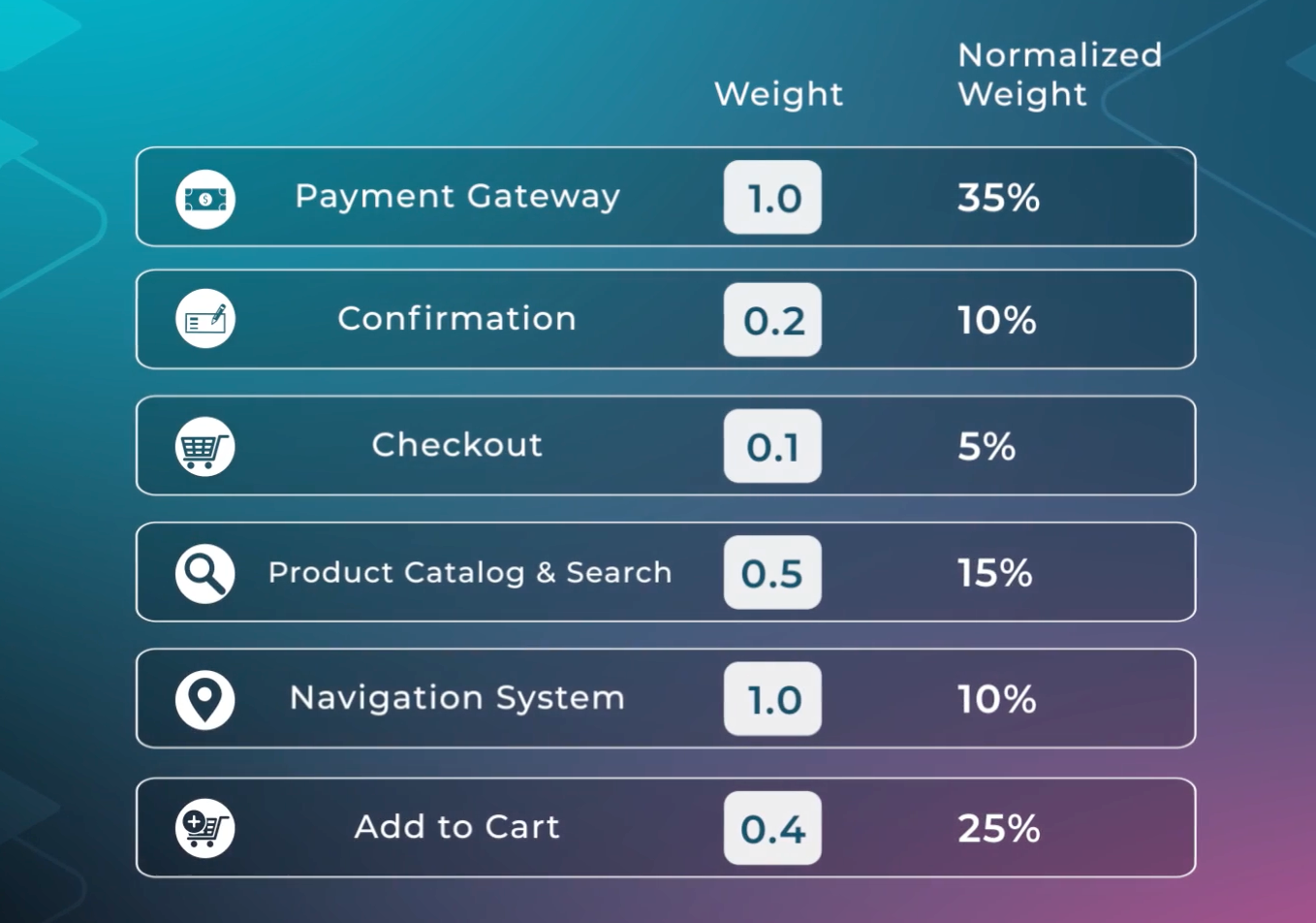
Example of a composite SLO composition with Weights and normalized weights
Platforms like Nobl9 enable composite SLO tracking to measure user journey reliability rather than isolated service metrics. A composite SLO for the checkout flow might weight frontend latency at 30%, payment processing at 40%, and order confirmation at 30%. These weights reflect the relative business impact of each failure: a slow frontend is recoverable, but a failed payment directly loses revenue, and an unconfirmed order creates a support burden and potential churn. When auto-scaling optimization increases frontend error budget consumption by 8%, the composite SLO shows whether this translates to 2% end-to-end degradation (acceptable) or 15% degradation (requires adjustment).
Error budget guardrails for safe optimization
Deploy scaling policies with error budget guardrails that automatically:
- Prevent aggressive scale-down when error budget consumption exceeds thresholds
- Trigger capacity increases when budget burn rate accelerates.
An organization implements auto-scaling optimization, reducing the minimum pods from 15 to 8 overnight. It saves $2,040 monthly. Initial testing shows that 12% of the error budget was consumed during the morning scale-up. Rather than reverting immediately, the team implements predictive scaling that begins adding capacity at 5:30 AM before traffic increases at 6:00 AM. This reduces error budget consumption to 6% while maintaining cost savings, demonstrating how measurement enables iterative refinement rather than binary accept/reject decisions.
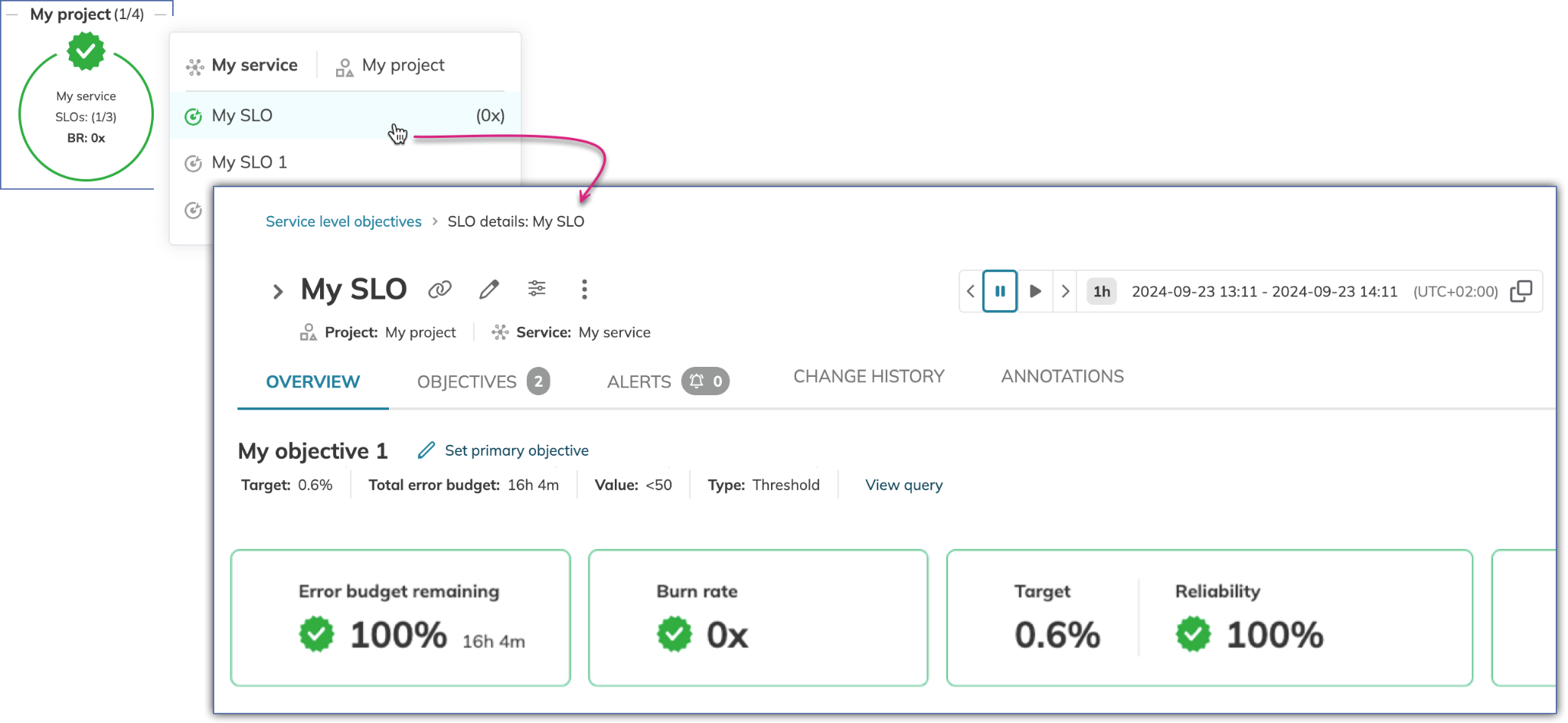
Nobl9 SLO view showing burn rate summary, showing targets, reliability percentage, burn rate status, and remaining budget percentage.
Making cost-reliability trade-offs
Each optimization strategy involves trade-offs between cost reduction and reliability risk.
- More minor instances might increase latency during traffic bursts.
- Aggressive auto-scaling policies reduce idle capacity but create scale-up delays.
- Spot instances provide dramatic savings but introduce complexity in handling interruptions.
These trade-offs remain opaque without quantitative reliability measurement.
When to revert cost optimizations
Error budget tracking transforms trade-offs from uncertain risk into measured impact. Instead of debating whether right-sizing an instance will "affect performance," teams measure actual error budget consumption during testing and make evidence-based decisions.
For example, one approach classifies budget consumption into three tiers:
- Minimal impact (0-10% consumption) gets automatically approved.
- Moderate impact (10-25%) requires service owner review
- High impact (>25%) triggers automatic reversion.
Adopt automated reversion policies that respond to budget consumption during optimization testing. When right-sizing instances or adjusting auto-scaling policies, monitor the budget burn rate continuously during the test period. If budget consumption exceeds defined thresholds, automatically roll back to previous configurations without requiring manual intervention.
Balancing short-term SLO violations against long-term savings
Consider a concrete example. A team implements auto-scaling optimization that reduces minimum pod counts from 15 to 8 during overnight periods. During the first week, morning scale-up events consume 12% of the monthly error budget due to brief latency increases as pods launch and initialize. The team evaluates:
- Monthly cost savings of $2,400
- Error budget consumption of 12% (within moderate impact threshold)
- Service criticality (internal analytics dashboard tolerating brief morning latency)
Based on this analysis, the optimization is maintained while implementing predictive scaling that begins adding capacity at 5:30 AM before traffic increases, reducing error budget consumption to 6% while maintaining cost savings.
Running this kind of analysis manually doesn't scale when teams run 20+ cost-optimization experiments simultaneously across different services. Tracking which experiments are consuming budget at acceptable rates versus trending toward breach requires automated alerting with configurable thresholds for each service.
For example, warning alerts at 25% remaining error budget and critical alerts at 10% remaining budget. Integration with incident management systems like PagerDuty or Slack ensures teams respond to concerning trends without the need for constant manual dashboard monitoring.
Track long-term cost savings against cumulative reliability impact to evaluate optimization initiatives over time. Quarterly reviews should:
- Aggregate total cost reductions across all optimization strategies.
- Compare actual reliability metrics against pre-optimization baselines.
- Calculate the cost-per-reliability-point to determine which optimization categories provide the best return on acceptable reliability degradation.
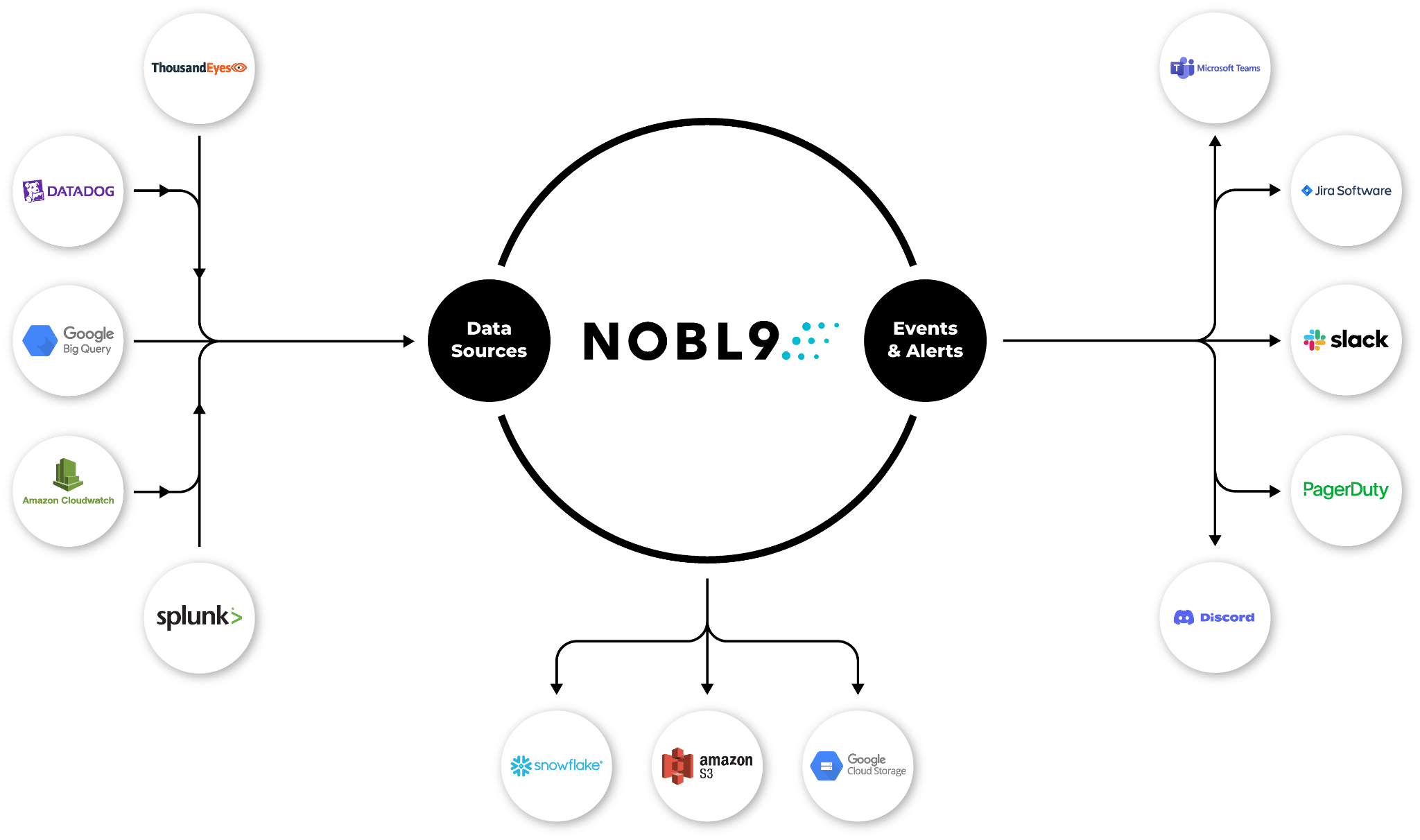
Nobl9’s integration capabilities
How Nobl9's error budget tracking enables decision-making
Tracking cumulative reliability impact over quarters requires aggregating error budget data across hundreds of optimization experiments. Nobl9's automated error budget alerting eliminates manual monitoring fatigue by triggering warnings at defined thresholds and integrating with incident management platforms.
The platform's reliability score quantifies the proportion of time services remain within error budget, distilling complex SLO compliance into executive-friendly percentages.
A team conducting aggressive cost optimization might maintain a 94% reliability score (within budget 94% of the time), validating that optimization experiments don't degrade long-term reliability despite temporary budget consumption during testing.
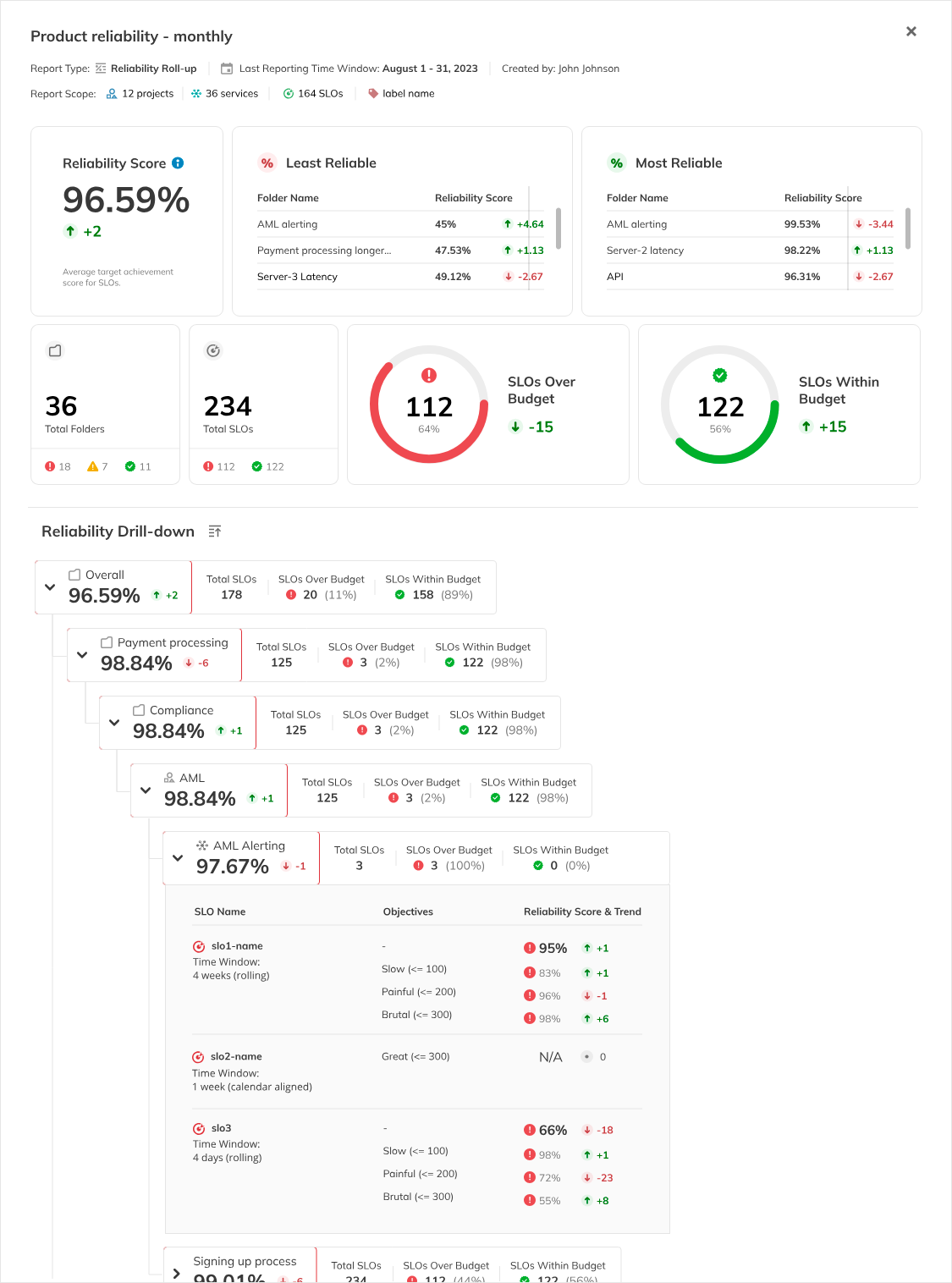
Example of the extended Reliability Score report
Navigate Chapters: