
-1.png)
Table of Contents
Like this article?
Subscribe to our Linkedin Newsletter to receive more educational content
Subscribe now
Customer-Facing Reliability Powered by Service-Level Objectives
Service Availability Powered by Service-Level Objectives
Learn More
Integrate with your existing monitoring tools to create simple and composite SLOs

Rely on patented algorithms to calculate accurate and trustworthy SLOs

Fast forward historical data to define accurate SLOs and SLIs in minutes
Customer-Facing Reliability Powered by Service-Level Objectives
Service Availability Powered by Service-Level Objectives
Learn More
Set business-aligned thresholds
A key to getting your SLIs right is aligning them to business goals, not technical goals. For example, 99.95% success for payment flows (revenue-critical), 99.5% success for search queries, 99.9% for authentication requests. Don't make the mistake of using just HTTP 200 responses as your "good" events; wait for actual business confirmation. Some platforms out in the wild can return an HTTP 200 with an error field.
You can set up these SLIs as actual SLOs in Nobl9 either through their dashboard or with YAML config. The YAML version looks like this:
apiVersion: n9/v1alpha
kind: SLO
metadata:
  name: checkout-success-rate
  displayName: Checkout Success Rate
  project: ecommerce-platform
spec:
  description: "Measures customer checkout completion success"
  indicator:
    metricSource:
      name: prometheus-production
      kind: Agent
  budgetingMethod: Occurrences
  objectives:
  - displayName: "99.95% checkout success"
    target: 0.9995
    countMetrics:
      good:
        prometheus:
          promql: sum(rate(payment_transactions_total{status="completed",confirmation_received="true"}[5m]))
      total:
        prometheus:
          promql: sum(rate(payment_transactions_total[5m]))
  service: checkout-service
  timeWindows:
  - unit: Day
    count: 30
    isRolling: true
- The good query counts payment transactions where status="completed" AND confirmation_received="true". This means you're measuring actual successful purchases, not just API responses. The total query counts all payment attempts.
- Nobl9 calculates your SLI as good events / total events = successful_purchases / all_attempts. With a target of 0.9995, you're setting 99.95% as your reliability threshold, meaning an error budget of 0.05%. The timeWindows section creates a rolling 30-day measurement window.
- The budgetingMethod: Occurrences tracks the volume of good events rather than uptime percentages. When your success rate drops below 99.95%, Nobl9 starts consuming your error budget and triggers alerts based on how fast you're burning through it.
To adapt this to your services, update the promql queries to match your metric names, adjust the targets based on business criticality, and modify the timeWindows for your operational needs. Ensure your "good" events represent user success, not just system responses. Learn more about how to do this from the Nobl9 SLO as code docs.
Once configured, Nobl9 automatically tracks these SLOs, calculates error budgets, triggers burn rate alerts when consumption exceeds normal rates, and provides dashboards showing exactly how much reliability margin remains before breaching your targets.
Prioritize availability monitoring SLOs based on business impact
Not every service failure costs the same money. Payment processing going down stops revenue immediately. Product review comments failing might go unnoticed for hours. This reality drives how you set SLO targets and allocate reliability engineering effort.
Start by researching the amount of revenue lost per minute of downtime for each service you operate. This will help you calculate the cost of each minute of payment downtime versus the cost of search slowness, allowing you to understand the real impact of your reliability efforts.
For services without direct revenue attribution, such as back-office systems or internal dashboards, measure impact through support ticket volume, dependency analysis that shows how many workflows they block, or internal productivity costs resulting from extended downtime. The table below summarizes four key areas to investigate as you define your SLO targets.
|
What to investigate |
Why it matters |
|---|---|
|
Sales metrics from your last outage |
If you lost $50,000 during a 10-minute payment failure, that's $5,000 per minute of direct revenue impact |
|
How users behave when things get slow |
Checkout pages that load in 5 seconds instead of 2 seconds often see 20% more people abandon their carts |
|
Number of angry emails and support calls |
Authentication failures may generate 200 support tickets per hour because users are unable to perform any actions when they are unable to log in. Email confirmation failures may result in approximately 20 support calls per hour from customers checking if their payment has gone through. At the same time, search slowdowns can generate 5 complaints daily because users just refresh and try again. |
|
Customers who don't come back after an issue |
Someone who can't complete their purchase today might shop with your competitor for the next six months. |
Now you can set targets that actually make sense for your business, like the following:
- Payment processing and user authentication at 99.95% because losing $5,000/minute means you can justify spending big money and time on backups and failovers for services that enable people to spend time and money on your platform.
- Notification service at 99.9% is essential for customer communication, but doesn't block transactions. Payment can be completed even if the confirmation email or sms fails. Out of 1 million events, you can tolerate 1,000 failures.
- Product search at 99.5% can accept a lower SLO because it's annoying when it's slow, but people will try again and most still convert.
- Review system at 99% because it's nice to have, but most customers don't even notice when reviews are down.
If your payment system goes down and costs $5,000 per minute, spending extra on building resilience into your systems to prevent more outages than the business can handle each month makes sense. But don't spend the same money making your product recommendations super reliable if losing them doesn’t affect your bottom line. Your login system also gets high priority because people can't explore your platform and buy anything when it's broken, and because login problems make customers call support and get frustrated. Search problems are annoying, but people will try again. When your review system breaks, most customers don't even notice.
 Nobl9's Service Health dashboard showing color-coded service status across different groups of services
Nobl9's Service Health view organizes services by team and business function, using color coding to show priority:
- Red circles indicate exhausted error budgets requiring immediate attention.
- Yellow shows at-risk services approaching their thresholds.
- Green represents healthy services with an available error budget.
This visual prioritization helps incident response teams focus on business-critical failures first rather than treating all alerts equally.
Establish consistent SLO review processes for availability monitoring
Different teams measure different things. Checkout services track payment confirmations while authentication services track login success. These services interact with users differently and might need different SLIs to measure availability accurately. As products evolve, teams need flexibility to adjust measurements without breaking organizational consistency.
Three practices can help maintain this balance: the SLO Development Lifecycle Cycle (SLODLC) standardizes how teams document and review SLOs, while allowing for different metrics to be used. Error budgets provide comparable reliability metrics across different services. Alerting policies can be shared across teams regardless of what they measure.
Using the SLODLC framework to standardize availability monitoring SLOs
SLODLC helps teams avoid reinventing the wheel when defining their own SLO creation process. Everyone gets the same worksheet with the same questions to answer before they can set up any reliability targets. Here's what the template might look like for our checkout success SLO:
|
Service Name: Checkout Service SLI Data Source: Prometheus metrics from the payment service Rationale: Measures complete user workflow from cart to payment confirmation, not just API responses
75% budget remaining: Slack notification to team 50% budget remaining: Page on-call engineer 25% budget remaining: Escalate to engineering leadership 10% budget remaining: Freeze non-critical deployments SLO Revisit Schedule: Monthly review: First Tuesday of each month Post-incident: Within 48 hours if budget impact >10% Quarterly adjustment: Last Tuesday of the last month in the quarter, based on user feedback surveys Annual review: First week of January, SLO strategy assessment based on product priorities and user expectations |
The checkout team fills this worksheet differently from how the authentication team fills theirs, but both follow the same structure. During incidents, anyone can refer to these worksheets to understand each team's reliability strategy and the reasoning behind their choices.
Some common pitfalls to be wary of when standardizing SLO processes across teams are:
- Skipping the SLODLC or similar worksheet and defining SLOs ad hoc can lead to setting poorly thought-out targets that don't reflect actual user expectations or historical performance.
- Failing to review SLOs after incidents misses opportunities to evaluate and improve measurement accuracy and reliability strategies.
- Not documenting the rationale for SLI choices makes it difficult for other teams to understand your reliability decisions during collaborative incident response.
Using error budgets and alerting policies for organizational consistency
Alert policies work the same way regardless of what you're measuring. You create the policy once, then reuse it across checkout, auth, search, and any other service. Nobl9 automatically calculates and tracks these error budgets from your existing monitoring data. The platform converts your Prometheus, Datadog, or CloudWatch metrics into error budget percentages, showing burn rate trends and remaining budget across all services in a unified dashboard.
A standard alert policy YAML that can be applied to our checkout SLO might look like the one below.
apiVersion: n9/v1alpha
kind: AlertPolicy
metadata:
  name: standard-burn-rate-alert
  project: reliability-policies
spec:
  description: Reusable alert policy for detecting fast and slow error budget burns
  severity: High
  cooldown: 5m
  conditions:
    - measurement: averageBurnRate
      value: 2
      op: gte
      lastsFor: 1h
    - measurement: averageBurnRate
      value: 1
      op: gte
      lastsFor: 24h
  alertMethods:
    - metadata:
        name: slack-reliability-team
        project: reliability-policies
    - metadata:
        name: pagerduty-oncall
        project: reliability-policies
The 2x burn rate over 1 hour catches fast-burning incidents. The 1x burn rate over 24 hours catches slow degradation. Both thresholds work across all your SLOs. Nobl9 lets you define these policies once and link them to multiple SLOs.
When checkout, auth, and search all use the same alert policy, they share escalation workflows and notification channels while monitoring completely different user outcomes. You configure alert methods (Slack, PagerDuty, email) independently and reuse them across policies, maintaining consistent incident response regardless of which service degrades.
Integrate availability monitoring SLO dashboards with incident review
Incident postmortems usually turn into arguments about whose service broke everything. SLO dashboards give you actual numbers about user impact so you can stop playing the blame game and figure out what really happened.
Replace your usual incident timeline with concrete data:
|
Incident Timeline with SLO Data: Error Budget Impact: Consumed 15.7% of the monthly budget in 22 minutes |
During incidents, teams can:
- Screenshot burn rate views directly into Slack incident channels for real-time user impact visibility
- Pull specific numbers (percentage error budget consumption, and burn rate spikes) into postmortem timelines instead of vague descriptions
- Track recovery progress by watching burn rates return to normal levels (0x-1x range) instead of relying on subjective "feels better" reports.
Teams can make this integration practical by using platforms that provide embeddable burn rate charts showing exactly when and how quickly error budgets were consumed during incidents. For recurring reliability reviews, Nobl9's System Health Review aggregates SLO health across your organization, grouping services by project, region, or custom labels to show which teams have exhausted their budgets and which remain healthy.
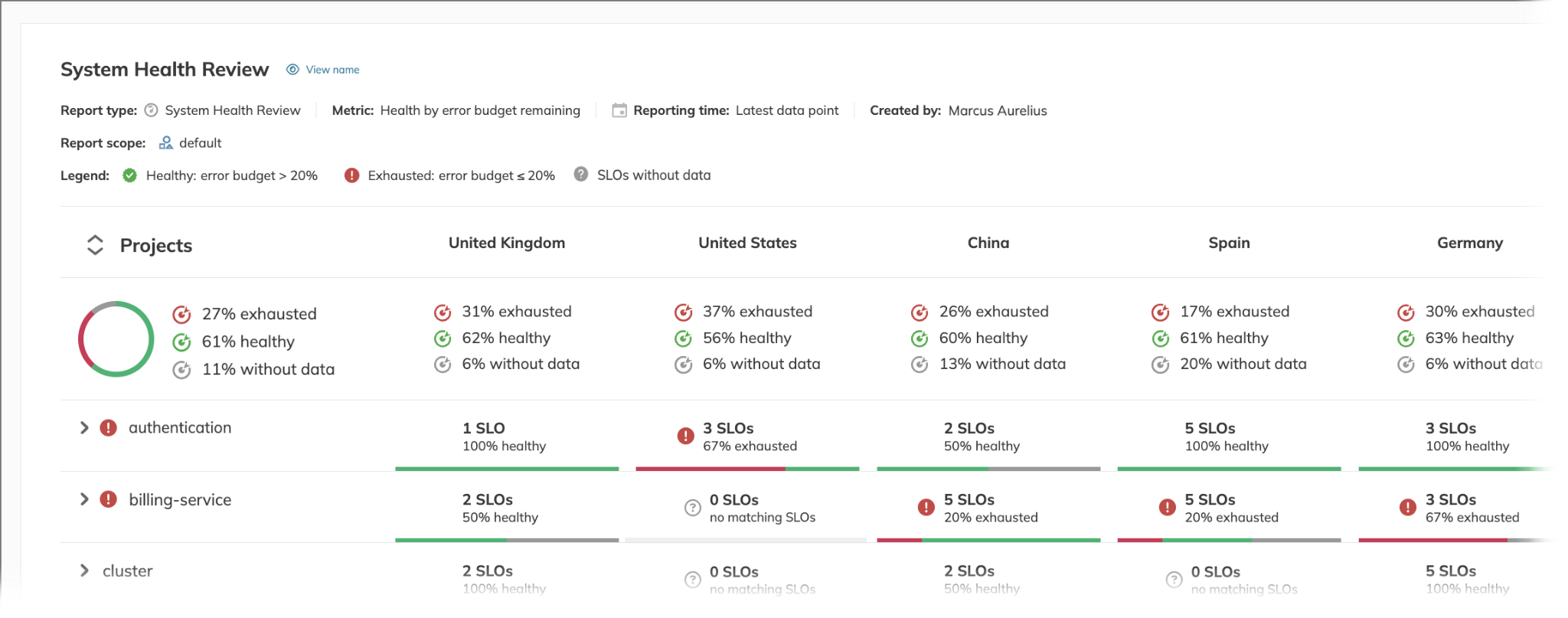 Nobl9's system health review report (Source)
Configure these reports to run weekly or monthly so teams walk into reliability meetings with current data instead of scrambling to pull metrics during the meeting.
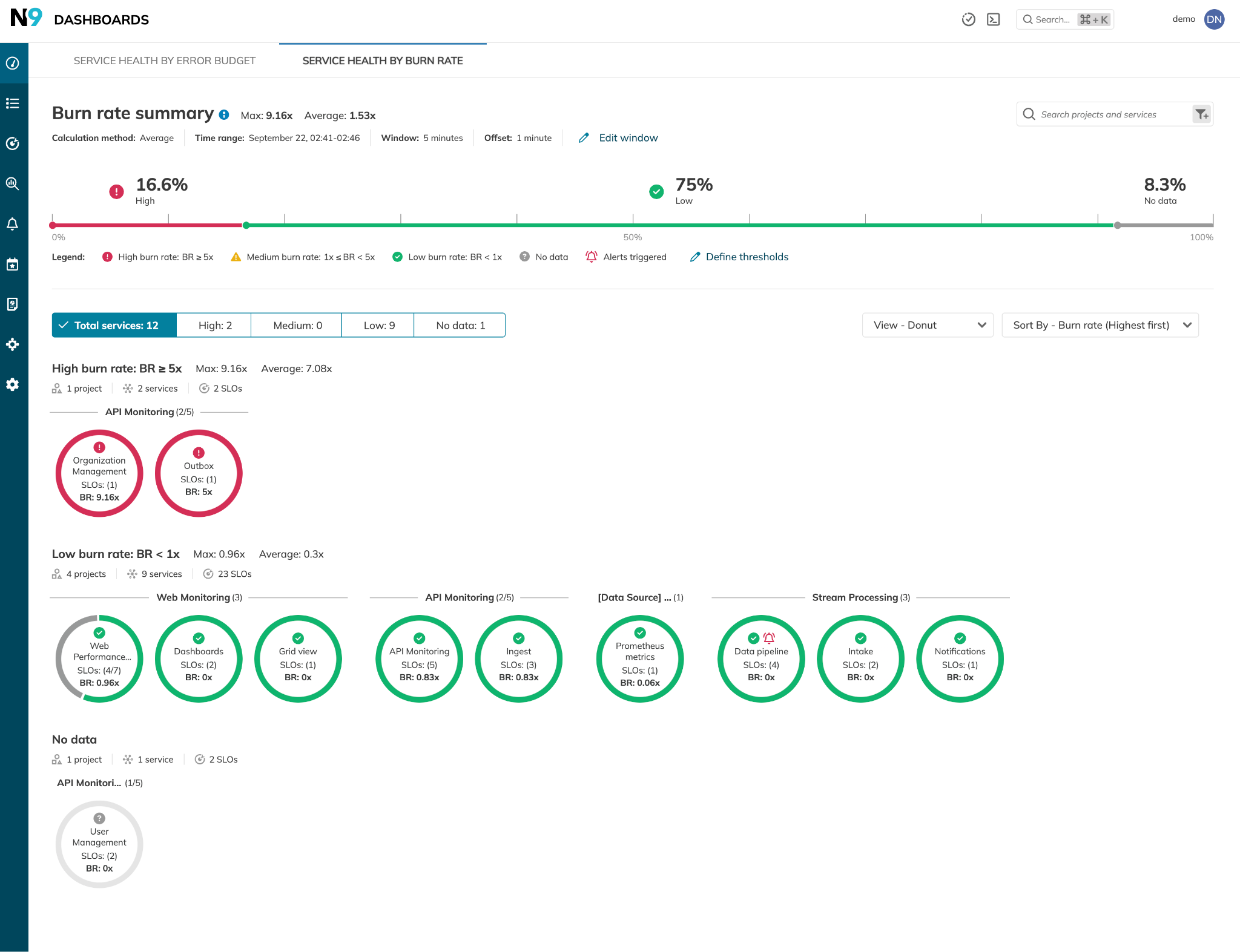 Nobl9's burn rate summary dashboard showing organizational overview
 Nobl9 dashboard showing individual SLO burn rate for Organization Management Latency.
The first dashboard gives incident teams an organizational view during multi-service outages. You can see that 16.6% of services have high burn rates (like Organization Management at 9.16x and Outbox at 5x), while 75% are burning error budgets at acceptable rates. This prioritization data is precisely what you need in your incident review templates.
Nobl9's burn rate dashboards also provide the data teams need for incident postmortems. In the second image, you can see an Organization Management service with a catastrophic 7.5x burn rate, consuming -688.1% of its error budget (meaning it's been unreliable for 462 hours beyond its monthly allowance). The timeline charts show exactly when the burn rate spiked and how reliability dropped to 21.18% against a 90% target.
Have availability monitoring for each dependency
User workflows span multiple services, but traditional monitoring treats them independently. When checkout breaks, you must guess which of your various dependencies caused it. Tracing solves this by following individual requests across all service boundaries, showing how dependencies interact and impact user success.
This approach makes cascade failures visible in real-time. When that authentication provider starts responding slowly, you see the impact ripple through dependent services before users start complaining, showing you the exact failure path instead of forcing you to guess.
Use tracing to map dependencies
Add distributed tracing to your applications to see which dependencies users actually hit when using your applications, and the times each takes to complete successfully. This requires instrumenting your code to generate trace spans and collecting them in a tracing system like Jaeger, Tempo, or your favorite observability platform.
Once you have traces flowing, you'll start seeing a clearer picture than your architecture diagrams have shown you. Here's what a real checkout trace might look like: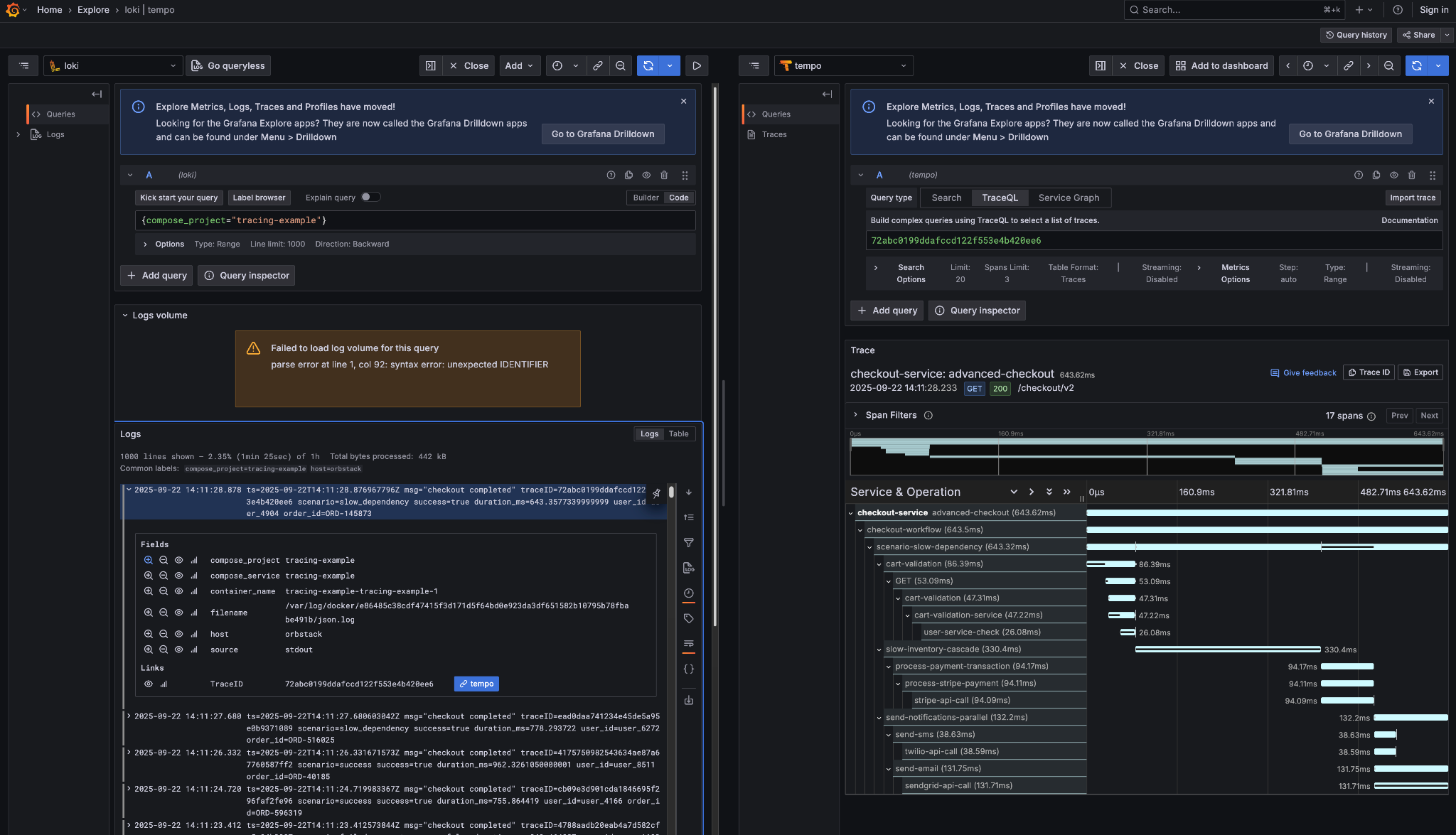
Tempo trace view showing a successful checkout workflow
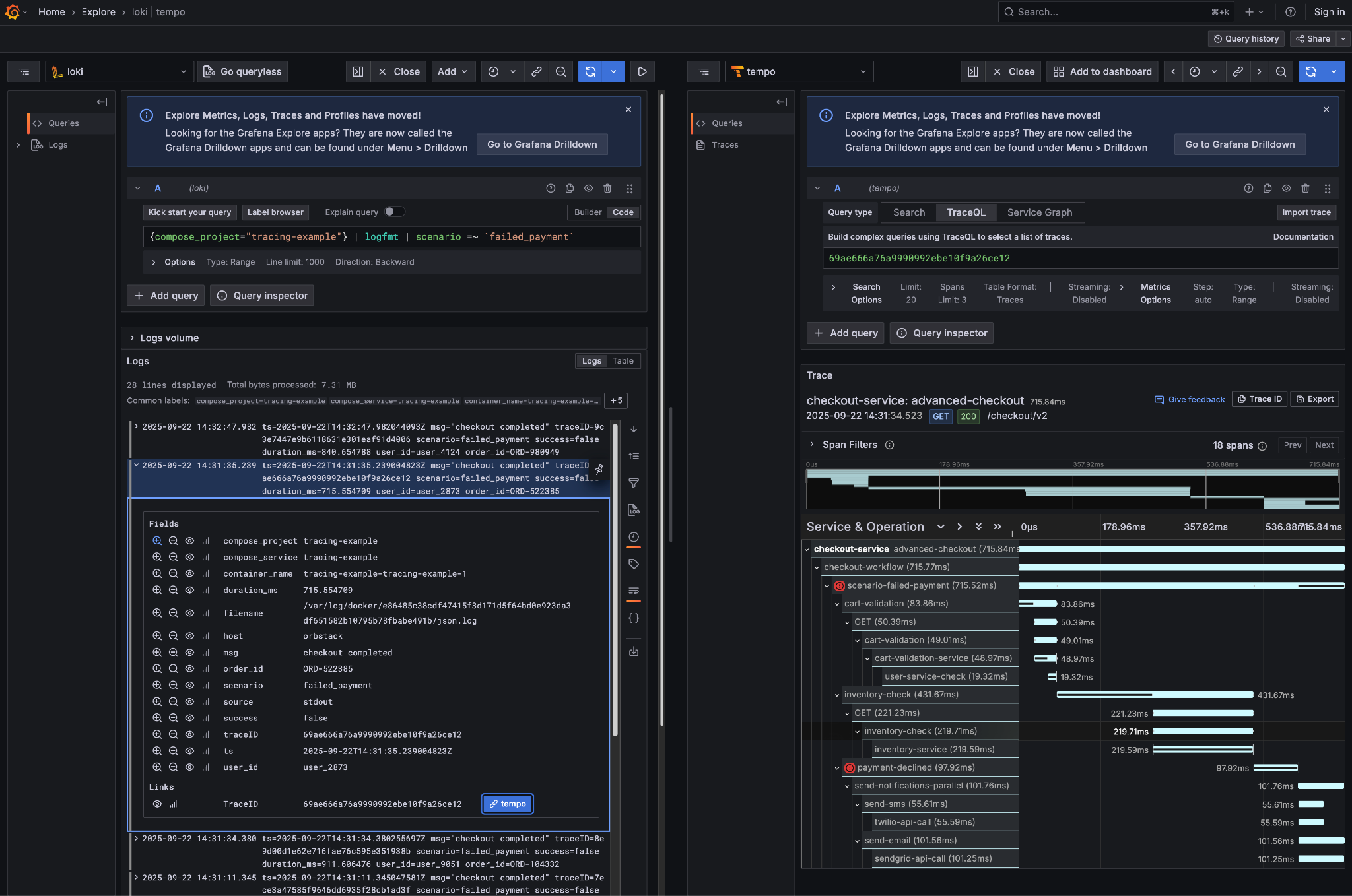 Failed checkout trace showing payment failure and cascade effects
Tracing reveals how dependencies interact during successful and failed workflows. You see which services get called, in what order, and how third-party services affect user workflows. Instead of guessing from architecture diagrams, you get real data and dashboards about what affects user success and can factor external dependencies into your reliability targets.
Weight dependencies and adopt composite SLOs
Use the tracing data and your business impact research (sales dashboard losses, user abandonment rates, support ticket volume) to assign weights, then create composite SLOs that reflect real user workflows.
Apply this research to your traced dependencies: payment processing gets 60% weight because downtime costs $5,000/minute, inventory check gets 25% weight because it causes 15% cart abandonment, cart validation gets 10% weight for moderate user impact, and user service check gets 5% weight because users rarely notice when it's slow.
Here’s how such an implementation can be represented in YAML:
apiVersion: n9/v1alpha
kind: SLO
metadata:
  name: checkout-flow-composite
  displayName: Checkout Flow Success
  project: ecommerce-platform
spec:
  description: "End-to-end checkout success based on traced dependencies"
  budgetingMethod: Occurrences
  objectives:
  - displayName: "99.5% checkout flow success"
    target: 0.995
    composite:
      maxDelay: 15m
      components:
        objectives:
        - project: ecommerce-platform
          slo: payment-service-availability
          weight: 0.60  # $5k/min revenue impact
          whenDelayed: CountAsBad
        - project: ecommerce-platform
          slo: inventory-service-latency
          weight: 0.25  # 15% abandonment + 431ms trace impact
          whenDelayed: CountAsGood
        - project: ecommerce-platform
          slo: cart-validation-performance
          weight: 0.10  # Moderate impact, 86ms typical duration
          whenDelayed: CountAsGood
        - project: ecommerce-platform
          slo: user-service-reliability
          weight: 0.05  # Hidden dependency, minimal user impact
          whenDelayed: Ignore
The weight values determine the relative contribution of each service to overall checkout success. Payment gets 0.60 (60%) because you lose $5,000/minute when it fails. Inventory gets 0.25 because slow responses cause 15% cart abandonment. The weights must sum to 1.0.
The whenDelayed setting controls what happens when service data is missing. Payment failures count as bad (CountAsBad) because every payment issue hurts your SLO. Cart validation delays count as good (CountAsGood) because slow validation is better than no validation. User service issues are ignored (Ignore) because they don't affect checkout completion.
Instead of getting separate alerts when checkout breaks, you get one alert showing checkout success dropped to 91%. Instead of debugging which individual service caused the problem, you see that the payment service (60% weight) is failing while other services are healthy. During incidents, you first focus engineering effort on the 60% weighted dependency, not the 5% weighted hidden service. Your reliability targets align with the actual business impact rather than treating all services equally.
 Nobl9 component impact visualization
Nobl9's composite SLOs combine multiple service-level objectives with weighted impact. The 'User Experience of Purchase User Journey' composite shown above aggregates several component SLOs, from pre-purchase browsing to post-purchase email confirmation. The component impact graph immediately reveals which dependencies are burning through your error budget and by how much. The weighted error budget reflects the true business impact: 15 minutes of payment downtime consumes far more budget than 2 hours of email delays. Your reliability targets align with actual user impact instead of treating all services equally.
Navigate Chapters: