
Table of Contents

High-performing development teams, which score strongly on DORA metrics for continuous deployment, understand the importance of observability during deployments. Observability data can be gathered before, during, and after software releases. The resulting insights help reduce lead times, decrease failure rates, and increase deployment frequency from months to days to hours.

This article demonstrates the importance of SLO observability for advancing through the continuous delivery maturity model (CDMM). We show how to achieve automated, adaptive, and resilient release practices to deliver on the deployment metrics that matter. While this article focuses primarily on the observability dimension, these practices support all four CDMM dimensions: frequency and speed, quality and risk, observability, and experimentation.

Summary of key continuous delivery metrics practices

Maturity level

Best practice

Description

Beginner

Establish deployment metrics and observability feedback

Identify and measure metrics that reflect deployment reliability. Integrate SLI measurements into deployment pipelines for continuous feedback that drives reliability decisions based on SLO targets.

Intermediate

Increase quality and manage risk

Use SLO error budgets to gauge risk, define deployment policies, and automate reliability enforcement in CI/CD pipelines.

Advanced

Accelerate frequency and speed

Increase automation for real-time decision-making and optimize for both innovation and reliability.

Expert

Use advanced and experimental deployment strategies

Implement autonomous, adaptive, and self-correcting data-driven deployments.

Customer-Facing Reliability Powered by Service-Level Objectives

Service Availability Powered by Service-Level Objectives

Learn More

Integrate with your existing monitoring tools to create simple and composite SLOs

Rely on patented algorithms to calculate accurate and trustworthy SLOs

Fast forward historical data to define accurate SLOs and SLIs in minutes

Beginner maturity level: Establish deployment metrics and observability feedback

Starting your journey through the CDMM requires identifying the key metrics you need to measure to enhance your deployments and progress toward advanced deployment strategies. You'll want to capture quantitative data during deployments for continual improvement in quality, speed, and reliability.

The most commonly used metrics for measuring progress and maturity are DORA metrics, developed by the DevOps Research and Assessment team at Google. You can adapt these metrics by adding SLO-based reliability measurement alongside the traditional DORA metrics. This gives you three key measures:

  • Change lead time
  • Deployment frequency
  • SLO compliance

These metrics are relatively easy to measure. The key point is that reliability underpins the confidence required to drive increases in speed and stability. Research shows that speed and reliability are not trade-offs; you can achieve both simultaneously. To improve these metrics, you need detailed insight into every deployment, which is where observability comes in. Observability data is fundamental to advancing through the CDMM levels.

Observability from metrics and logs is the first thing to get right. It needs to provide real-time measurement of service health and the impact of deployments. You should aim for a closed feedback loop that continually enhances reliability, which enables advancement up the maturity model.

SLIs and SLOs are the key to inferring reliability from observability. SLIs measure reliability performance, SLOs provide reliability threshold targets, and error budgets provide an allowance for reliability deviation.

At the beginner level, focus on basic monitoring and establishing your first SLIs and SLOs. Comprehensive metrics and distributed tracing come at later maturity levels.

To make genuinely informed decisions during and after deployments, measure user experience. Use SLOs specifically designed to measure and manage reliability, reflecting what matters most: the user experience.
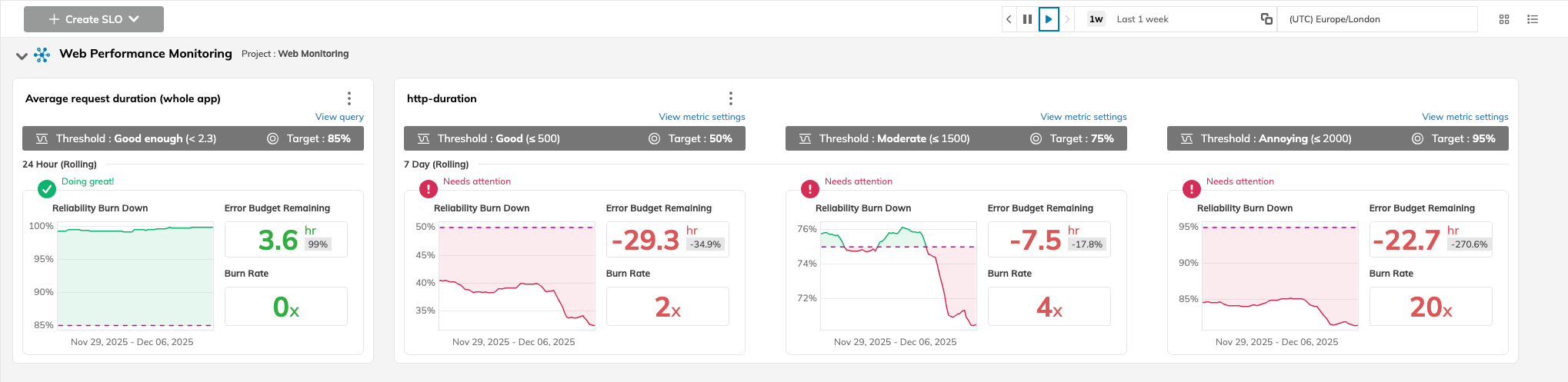
Example: SLO dashboard view showing user experience and reliability performance (source)

Service-level indicators (SLIs) measure what’s actually happening. For example, an SLI might record the percentage of customer requests that meet a specific latency threshold, such as 150 milliseconds. SLOs then set a reliability target for an SLI. In this case, the target could be 99% of requests meeting this latency threshold over a one-day rolling time window. This approach provides a measurable, user-centric, and actionable objective to inform deployment decisions. It provides teams with the context to answer the question: What effect is our deployment having on customer experience?
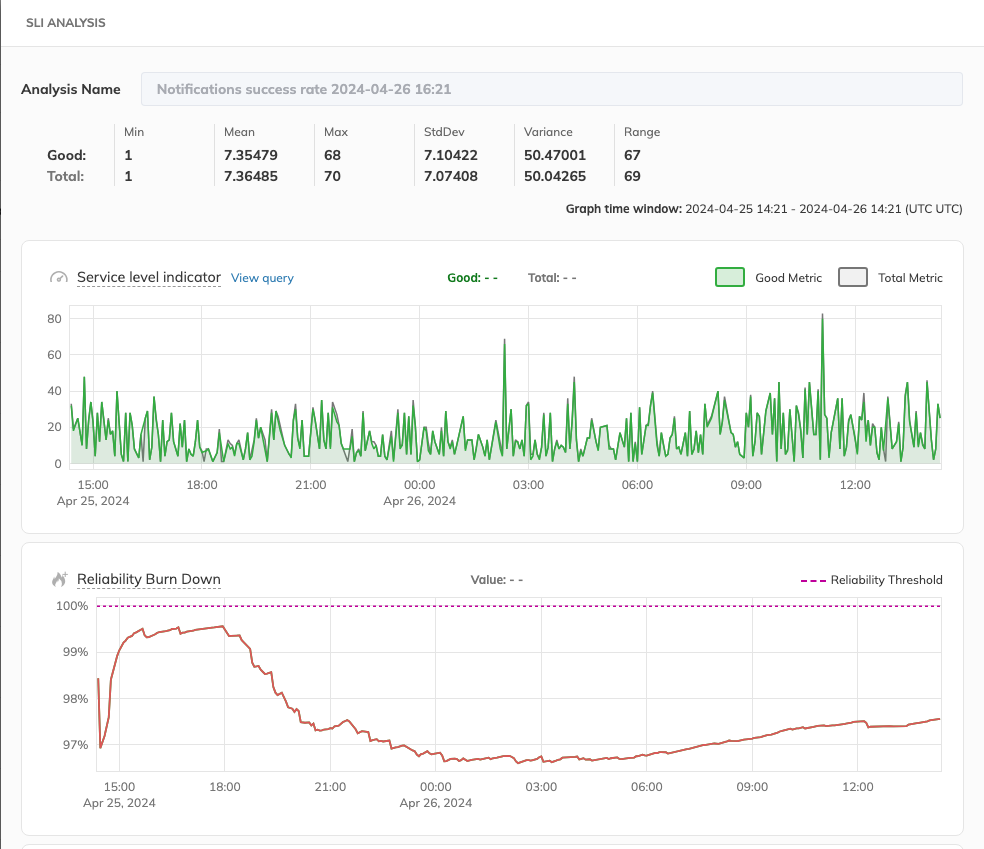
Example: Service-level indicator analysis with error budget burn down (source)

In practice, it is best to focus on a few critical SLIs, typically two to three, that most accurately reflect the user experience and are most sensitive to new deployment changes. The SLO reliability threshold should be a clear indicator of business impact, like “99.9% of checkout API calls succeed.” Build SLI collection into services and pipelines from the outset. SLI integration should be an integral part of the design and development process. See this article on the SLO Development Lifecycle for a repeatable methodology for implementing and managing SLOs.

Customer-Facing Reliability Powered by Service-Level Objectives

Service Availability Powered by Service-Level Objectives

Learn More
Intermediate maturity level: Increase quality and manage risk

With comprehensive observability data in place, you can refine and optimize reliability. This stage enables accelerating the frequency and speed of future deployments. To optimize reliability, computing SLI data (against SLO thresholds) needs to be an integral part of deployments and the deployment pipeline itself. Consider several ways to connect reliability measurements to deployment events:

  • Annotate SLO history with version deployment events.
  • Display SLO reliability and SLO dashboard links in deployment output.
  • Perform post-deployment reporting on SLI data and SLO threshold changes.
  • Track changes in error budgets to deployment events.
  • Correlate the number of new features with subsequent error budget changes.

See below for an example of how annotations can be used on SLO reliability timelines to show alerts and events, for example, deployments.
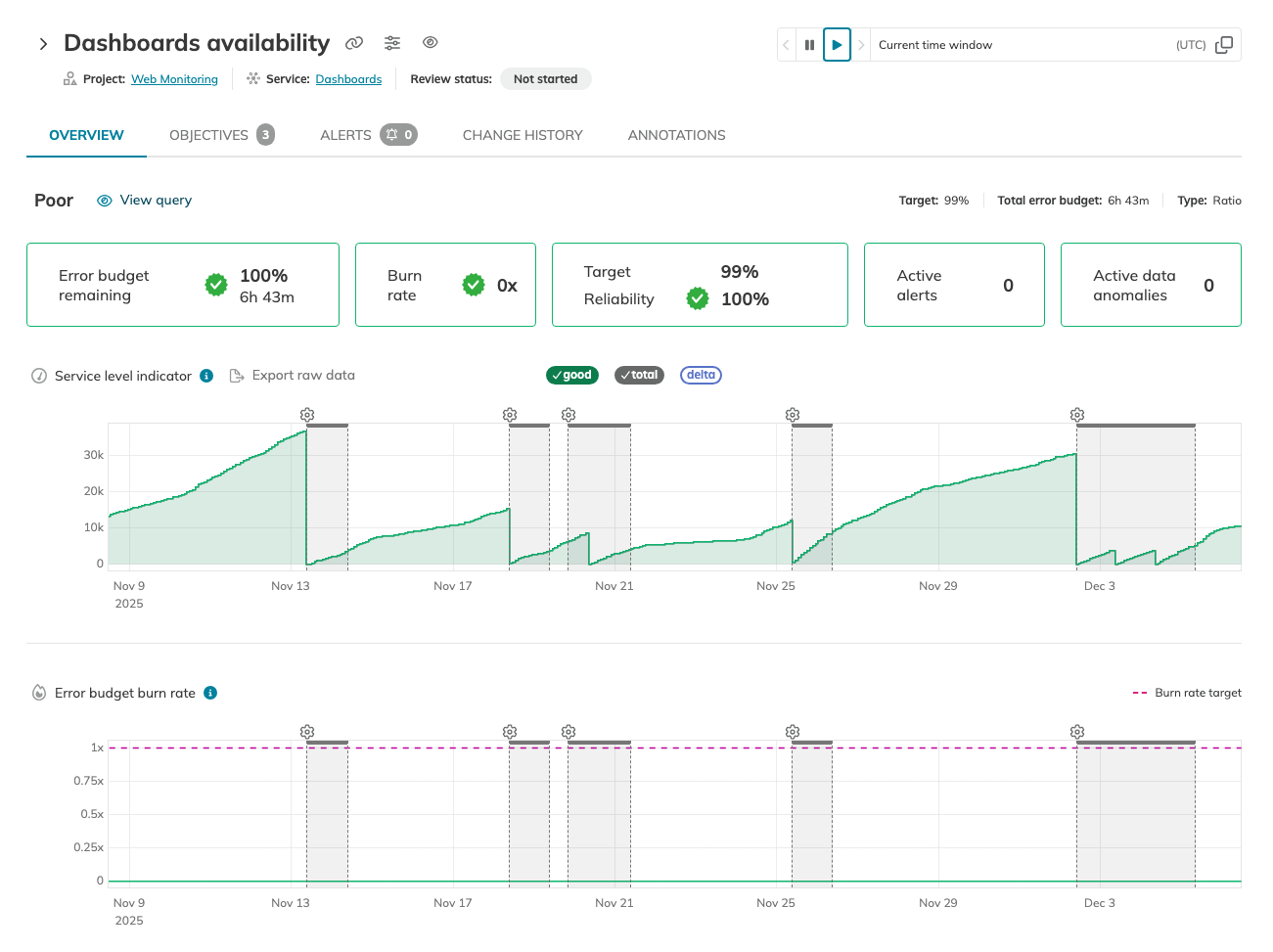
Example: SLO reliability timeline showing annotated events (source)

You can apply annotations to represent deployment events directly from your deployment pipeline. Taking Nobl9 as an example, a detailed annotation can be defined in simple markdown and applied with command-line tooling in your pipeline following the completion of a successful deployment using the sloctl CLI tool or the Nobl9 API:


sloctl apply -f {yamlFile}

The YAML definition file of the annotation looks like this:


apiVersion: n9/v1alpha
kind: Annotation
metadata:
  name: deployment-event-prod
  project: default
  labels:
    category:
      - release
    environment:
      - production
    team:
      - infrastructure
spec:
  slo: api-server-latency
  description: Deployment to production completion
  startTime: 2025-12-01T02:00:00Z
  endTime: 2025-12-01T04:00:00Z

For effective decision-making, SLOs must accurately reflect the desired level of reliability that ensures a positive customer experience. Regularly review your SLOs, adapt them to evolving systems, and ensure they capture user expectations, which can change over time. SLO specifications and system performance against those SLOs should be checked regularly, for example, during sprint retrospectives.

Review historical SLO performance data to establish realistic reliability goals and to inform aspirational SLO levels. Historical SLO target performance can also highlight the impact that previous deployments have had on reliability and how these reliability events unfolded, for example, gradually, rapidly, or specific to certain regions or segments.

With input from all business stakeholders, SLO targets ultimately represent an organization's risk appetite. You can then adhere to this risk tolerance by balancing reliability and speed while minimizing incidents. This allows you to tie SLO reliability to deployment policy:

  • When within error budgets, allow high deployment frequency.
  • When in breach of error budgets, slow or pause deployments.

Shown below is an example of visualizing the error burn rate in Nobl9:
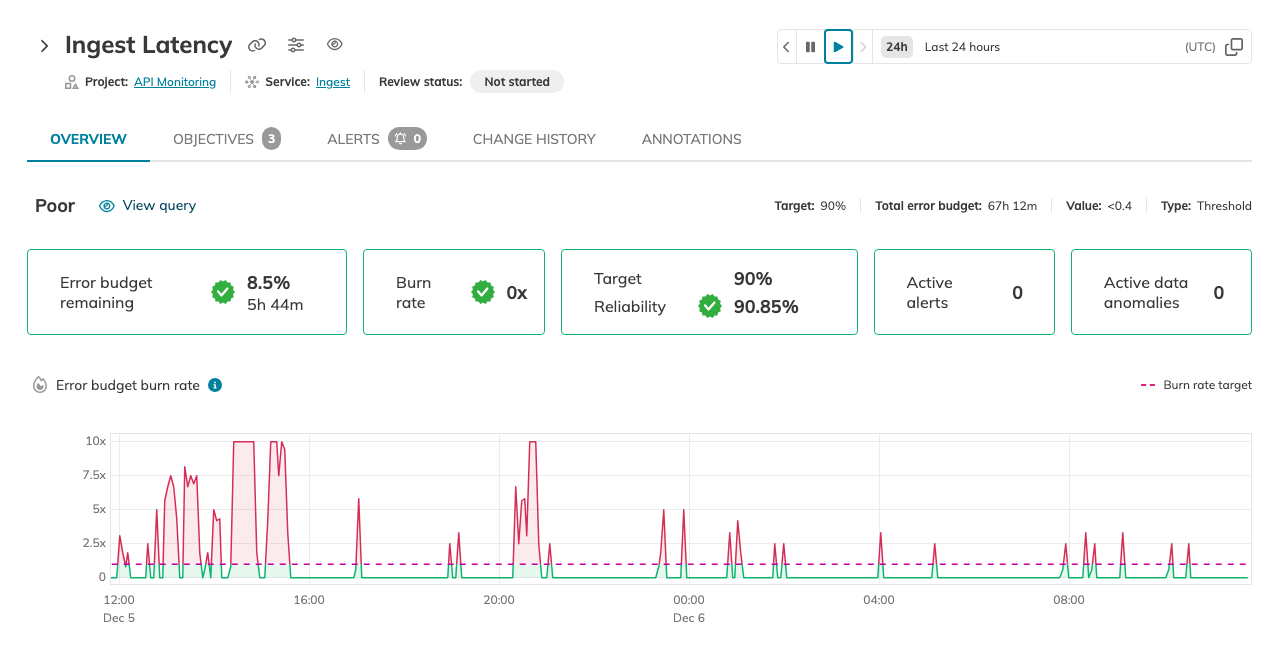
Example: error budget burn rate visualization (source)

You can extend this approach by implementing manual or automated enforcement, including SLO checks, in CI/CD gates.

Visit SLOcademy, our free SLO learning center

Visit SLOcademy. No Form.

Advanced maturity level: Accelerate frequency and speed

When quality and risk are well-managed, you'll have the confidence to increase deployment frequency and speed. This enables you to deploy multiple times per day, moving beyond the daily cadence achieved at the intermediate level. Achieving a high deployment cadence means delivering enhancements and fixes more quickly, thereby realizing business value more immediately. It also results in greater application security and compliance.

At this stage, more of the SLO-based controls for deployment reliability can be automated. Following a completed deployment, for example, an SLO report can be generated at a set interval post-deployment showing the reliability status. This report could include SLI data, reliability burn-down, error budget burn rate, and the remaining error budget. This can also be compared to the previous period and release.

Deployment gates can be added to deployment pipelines between environments. These gates can ensure that deployments with unacceptable reliability in lower environments do not inadvertently get promoted to production environments.

Reliability degradations (as demonstrated by error budget burn rates) in early deployments pose a risk to higher environments. Deployment gates that activate on reliability indicators can help you defend your production environment from unreliable releases.

Consider the following simplified GitHub Actions pipeline with a deployment gate:


jobs:

  DEPLOY_DEV:
    uses: ./.github/workflows/deployer.yml
    with:
      environment: dev
      release: $

  SLO_PROMOTION_GATE:
    needs: DEPLOY_DEV
    uses: ./.github/workflows/slo-reliability-monitor.yml
    with:
      release: $
      monitor_period: 2h

  DEPLOY_PRD:
    needs: SLO_PROMOTION_GATE
    uses: ./.github/workflows/deployer.yml
    with:
      environment: prod
      release: $

During deployments, reliability can also be measured to detect degradations resulting from the latest code release. You can integrate checks on error budget burn rates to verify that reliability isn't impacted. This can allow real-time decision-making.

After a deployment, you can compare the post-deployment behavior and related metrics with those of the previous release. This look-back approach can be beneficial to determine small, albeit acceptable, decreases in reliability before they develop into something larger. Subtle changes in error budget consumption can indicate architectural weaknesses that would not be visible through standard monitoring.

Regular deployments build a picture that enables you to strike a balance between innovation and reliability, and even agree on a formal level with business stakeholders. This analysis can yield new business metrics that can be shared and utilized at the executive level, demonstrating the business value added while maintaining service quality.

Automated deployments to test environments are also possible at this stage. For example, you could integrate all current changes into a specific code branch and deploy nightly to dedicated test environments that follow standardized test routines. The next day, developers analyze the reliability of the integrated changes and decide whether to promote them to the primary code branch. This process is automated, but promotion decisions still require human judgment as full autonomy comes at the expert level.

As more data accumulates, you'll build a long-term picture of your service's reliability, which can inform larger strategic decisions, such as architectural design patterns.

Learn how 300 surveyed enterprises use SLOs

Download Report

Expert maturity level: Use advanced and experimental deployment strategies

With SLI data and SLO reliability performance fully embedded in deployment pipelines and providing a continuous reliability loop, you can progress to autonomous deployments that are adaptive and self-correcting. This opens up new opportunities for orchestrating deployments and their potential applications, for example:

  • Progressive and adaptive rollouts
  • Progressive feature releases
  • Automated promotion of deployments on route to production
  • Automated rollback or remediation on detection of anomalies
  • Chaos and resilience testing

Progressive and adaptive rollouts

At the advanced maturity level, you implement progressive rollout strategies like canary and blue-green deployments. At the expert level, these strategies become fully autonomous, using feedback from SLO reliability data to automatically slow down, accelerate, or pause rollouts in response to changes in reliability. This can be achieved without human intervention.

In a fully autonomous canary deployment at the expert level, a new release is deployed to a small subset of users in production, and the system automatically monitors SLI data to ensure it remains within SLO thresholds, deciding whether to progress the rollout. The deployment starts at 5% of traffic and automatically expands to 25%, then 50%, and finally 100% based on SLO compliance, or it automatically rolls back if SLO violations are detected. No human intervention is required unless the system encounters an unexpected condition.

In a blue-green deployment, the new release is deployed everywhere in a passive state alongside the original version, which is still active. This allows for a wholesale, instantaneous switch from the old version to the new version. Once switched, reliability, as determined by SLO error budget burn rates, can indicate whether the latest version maintains sufficient reliability. If not, all environments are switched back to the previous version.

A rolling deployment can also be used to progressively deploy a new release to an increasing number of users while simultaneously monitoring that SLO thresholds are satisfied to avoid reliability degradation. This is more challenging to monitor and roll back, but it provides a controlled release.

These approaches help reduce failure rates and maintain reliability.

Progressive feature releases

An SLO reliability feedback loop also enables teams to test and compare different features.

Using feature flags, you can gradually enable new features and monitor the impact on SLIs and SLOs from different customer segments. This gives you control over how many users experience new features and how well these features perform. If SLIs degrade due to new features, you can disable the feature flags and re-engineer your solution.

Similarly, A/B testing can be used to deploy two different feature configurations simultaneously for comparison purposes. User behavior and system reliability can be compared between the dual versions.

These approaches give you confidence to innovate and release new features early while maintaining reliability. For deployments, this reduces failure rates and helps maintain a consistent deployment frequency.

Automated promotion of deployments on route to production

SLO reliability adherence can also be used to automate deployment promotion across environments.

Imagine an application that has development, acceptance, and production environments. An initial deployment can be performed in the development environment. A control gate can be implemented in the deployment pipeline to monitor the SLO error budget burn rate and only permit deployment to the acceptance environment if reliability is maintained in the lower development environment. This can be repeated, with more stringent reliability checks if required, before promoting the new code from acceptance to production. This route-to-production approach improves lead time, reliability, and delivery frequency.

Automated rollback or remediation on detection of anomalies

In the same way that rollouts can be progressive and automated, so too can rollbacks.

Anomalies or degradations in reliability and performance automatically halt and undo deployments without human intervention. A spike or increase in the error budget burn rate triggers the system to automatically stop the rollout, identify all affected infrastructure, scale the infrastructure appropriately, re-route traffic if necessary, and execute a rollback pipeline that restores the previous version and state. At the advanced level, these rollbacks require manual triggering or approval; at the expert level, they execute autonomously based on predefined SLO thresholds.

This approach intervenes early, helping reduce failure rates and significantly improve recovery times while maintaining reliability. Additionally, it provides confidence to development and operations teams.

Chaos and resilience testing

Chaos testing and related experiments can be an effective way for teams to build system resilience and harden deployment strategies. By introducing controlled chaos experiments, you can continually test automated recovery and response processes. This can be done in between deployments or even during deployments. If done during deployments, it can simulate unexpected failures or code problems introduced by a new release and help harden deployment resilience logic for when these failures occur in real-world scenarios.

Simulating general fault injection enables you to validate SLO behavior and platform responses to error budget events. This gives you confidence in your SLO settings and your ability to identify and mitigate reliability and stability risks as they emerge.

Experiences gained under simulated scenarios can feed back into improved SLOs, enhanced and more accurate responses, and more resilient deployment pipelines. Having tried-and-tested deployment pipelines that are resilient to unplanned failures and degradations gives you the confidence to increase deployment frequency and deliver new features more often.

This approach reduces failure rates, improves recovery times, and further strengthens SLOs.

Try our SLO Implementation ROI Calculator

Try ROI Calculator

Last thoughts

Observability data is crucial for maintaining reliable deployments. It is also an essential enabler for progressing up the continuous delivery maturity model.

SLOs based on your observability data provide a continuous feedback loop for driving continual improvement in deployment frequency and quality while maintaining reliability. With sufficient insight into the impact of new releases on system behavior, you can successfully optimize for both speed and reliability.

As you advance through the CDMM from beginner to expert, SLOs enable increasingly sophisticated data-driven decision-making. At beginner and intermediate levels, SLOs inform human decisions. At advanced levels, they trigger automated responses. At the expert level, they enable fully autonomous, adaptive, and self-correcting deployments that maximize business value while maintaining reliability.

Navigate Chapters:

Continue reading this series