
-1.png)
Table of Contents
Like this article?
Subscribe to our Linkedin Newsletter to receive more educational content
Subscribe now
Customer-Facing Reliability Powered by Service-Level Objectives
Service Availability Powered by Service-Level Objectives
Learn More
Integrate with your existing monitoring tools to create simple and composite SLOs

Rely on patented algorithms to calculate accurate and trustworthy SLOs

Fast forward historical data to define accurate SLOs and SLIs in minutes
Overview of application deployment tool categories and features
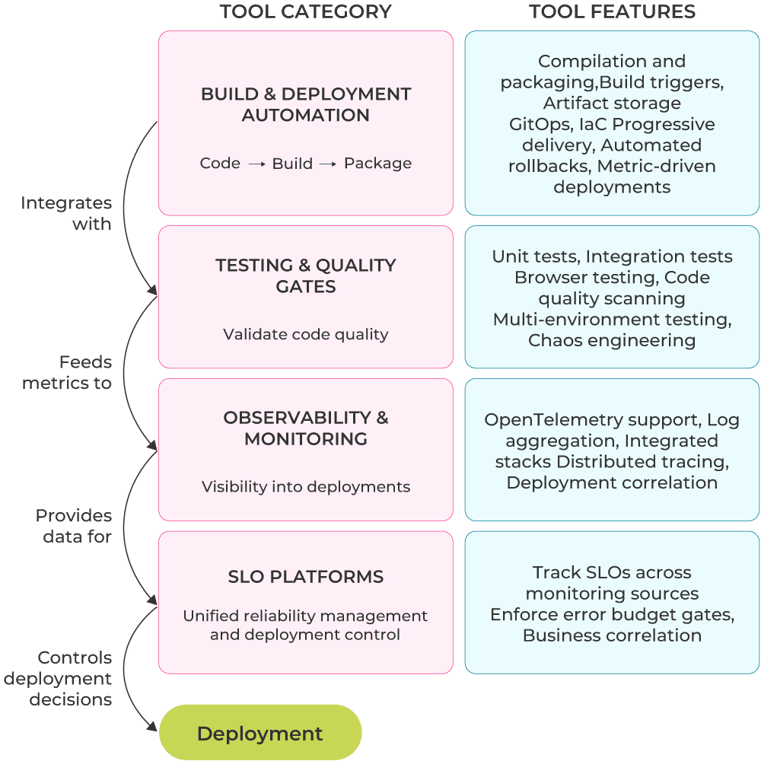
Tools progress alongside your maturity level, integrating to form a complete delivery pipeline. The diagram below shows how four tool categories work together, from building and deploying code through testing and monitoring to SLO-based deployment control.
Application deployment tool categories and features
The diagram shows four tool categories that integrate to form your delivery pipeline:
- Build and deployment automation handles code compilation, packaging, and deployment orchestration.
- Testing and quality gates validate code before production.
- Observability and monitoring provide visibility into deployments and system health.
- SLO platforms manage Service Level Objectives and error budgets across monitoring sources.
Customer-Facing Reliability Powered by Service-Level Objectives
Service Availability Powered by Service-Level Objectives
Learn More
Beginner maturity level tools
At the beginner stage, the primary goal is to automate code compilation, configure build triggers on commits, and conduct initial testing while keeping monitoring reactive. Because they’re so fundamental, tools picked at this stage tend to stick around because changing them later means rewriting pipelines and retraining people.
Build automation
Build automation tools handle compilation, packaging, and containerization. They integrate with repositories, testing frameworks, and artifact registries to create your pipeline foundation. Jenkins, Github Actions, and Gitlab CI are very popular choices.
|
Tool |
Hosting |
Best for |
|
Jenkins |
Self-managed |
Specific integrations and dedicated infrastructure teams |
|
GitHub Actions |
Cloud |
GitHub users wanting a quick setup |
|
GitLab CI |
Cloud or self-hosted |
Organizations wanting a full GitLab platform with built-in security |
Jenkins gives you complete control but requires infrastructure management. You'll handle setup, maintenance, and scaling yourself. The plugin ecosystem that comes with it connects to nearly any tool you need, and customization runs deep, but you'll maintain all of it.
GitHub Actions lives inside your repositories and lets you run YAML-based workflows in the cloud. Here’s an example:
name: Build and Test
on: [push]
jobs:
  build:
    runs-on: ubuntu-latest
    steps:
      - uses: actions/checkout@v4
      - uses: actions/setup-node@v4
        with:
          node-version: '20'
      - run: npm install
      - run: npm test
      - run: npm run build
The marketplace offers pre-built actions for common tasks.
GitLab CI works with both cloud-hosted and self-hosted environments. Security scanning and compliance features are shipped out of the box, which is valuable for regulated industries.
Artifact storage
With repeatable builds in place, you need reliable storage for build outputs. Artifact registries provide versioning and lifecycle management, and they integrate with build, testing, and deployment tools.
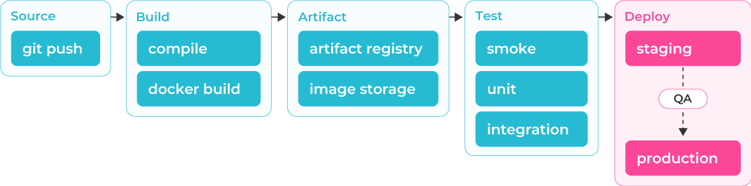
Example build pipeline flow showing: code → build (Jenkins/Actions/GitLab) → artifacts (Docker Hub/ECR/Harbor) → testing → deployment (source)
Docker Hub works globally and supports both public and private repositories. Automated builds are triggered from Git repositories, and their image scanning provides a baseline level of security. Use Docker Hub for open source projects or when you're just starting with containers.
Cloud provider registries (Google Artifact Registry, Amazon ECR, and Azure ACR) integrate tightly with their respective cloud platforms. They’re designed to connect seamlessly with identity and access management (IAM), networking, and deployment services. Choose these when you're already deep in a single-cloud ecosystem.
Harbor is an alternative that provides complete control through self-hosting with governance policies, vulnerability scanning, and air-gapped deployment support. It is a good choice when compliance mandates prevent the use of public or cloud-hosted registries.
Basic testing
With consistent builds and artifact storage, add automated testing to catch bugs before production. Start with three testing types: unit tests that run fast, integration tests against real infrastructure, and API contract tests.
Unit testing frameworks (e.g., Jest for JavaScript or pytest for Python) integrate through YAML configuration in your CI pipeline. You can use a GitHub Actions workflow to install dependencies, run tests, and report results in under 10 lines while setting up unit tests to catch bugs early in the process, when they're cheap to fix.
Testcontainers is a library that handles integration testing against real infrastructure. Here is an example for testing database connections:
from testcontainers.postgres import PostgresContainer

def test_database_integration():
    with PostgresContainer("postgres:15") as postgres:
        # Your test gets a real PostgreSQL instance
        connection_url = postgres.get_connection_url()
        # Run tests against actual database
        assert query_database(connection_url) == expected_result
Testing against an actual database beats mocking because you catch connection issues, query performance problems, and schema mismatches that mocks hide. Testcontainers can spin up ephemeral containers, run your tests, then tear everything down.
As a final step, you can use Postman and Newman to test API contracts through collections of requests: Build collections in Postman's UI with different scenarios (happy paths, error cases, edge conditions, etc.), then run them in CI using Newman. This is critical when your service exposes APIs that downstream consumers depend on.
Simple monitoring
As deployments increase, you need visibility to debug issues and catch production problems. To set up simple monitoring, build a few dashboards and create some basic alerts based on the metrics you’re watching. The table below shows popular tools you could use.
|
Tool |
Type |
Best for |
|
Prometheus/Grafana |
Open source |
Flexible visualization that works with existing metrics sources |
|
Datadog/Dynatrace |
Commercial |
Comprehensive out-of-the-box monitoring |
|
Splunk |
Log analytics |
Complex log correlation across microservices |
|
Dash0 |
OpenTelemetry-native |
Real-time observability without manual instrumentation |
|
AWS Cloudwatch |
Cloud platform |
Native AWS service monitoring and metrics |
Grafana connects to various data sources, including Prometheus, InfluxDB, and cloud-native monitoring systems. Start with Grafana when you want open-source flexibility and already have metrics sources. Begin simple, then evolve into a full Grafana stack (Mimir for metrics, Loki for logs, Tempo for traces) as needs grow.
Datadog and Dynatrace are full-stack platforms using agents to discover and monitor infrastructure. Both offer AI-based alerting and extensive integrations at premium prices. Dynatrace automates more with a more straightforward agent installation but requires less customization; Datadog requires more setup but lets you tune exactly what you want.
Splunk is good at log search and correlation across multiple sources. When incidents span microservices and you need to correlate logs from dozens of different components, Splunk aggregates them into searchable timelines.
Intermediate maturity level tools
To avoid sequential pipeline bottlenecks and to reduce build times, tests must be configured to run simultaneously rather than sequentially. At the intermediate maturity level, monitoring must be proactive: You make deployment decisions based on metrics rather than gut feel, and this is when you introduce SLOs to align teams to reliability goals.
Specialized CI/CD platforms
Specialized CI/CD platforms coordinate complex workflows: running jobs with multiple configurations in parallel, managing dependencies, and deploying conditionally to selected environments. Some key platforms here are shown in the table below.
|
Platform |
Best for |
Key capability |
|
GitHub Actions |
GitHub users |
Matrix build and marketplace actions |
|
CircleCI |
Large test suites |
Intelligent test splitting |
|
Tekton |
Kubernetes teams |
Native K8s orchestration |
As mentioned, GitHub Actions defines orchestration in YAML but also lets you configure parallel jobs, dependencies, and matrix builds, for example, to test multiple versions at the same time. This example creates nine jobs automatically, testing three Node versions across three operating systems:
strategy:
  matrix:
    node: [16, 18, 20]
    os: [ubuntu-latest, windows-latest, macos-latest]
steps:
  - uses: actions/checkout@v4
  - uses: actions/setup-node@v4
    with:
      node-version: $
  - run: npm test
CircleCI works similarly, by splitting tests based on historical execution time. For example, a 100-test suite taking 20 minutes gets distributed across four executors, completing in 5 minutes.
Tekton provides Kubernetes-native orchestration where everything runs as pods. In Tekton, you define pipelines as custom resource definitions (CRDs) and manage them via kubectl. It’s the ideal tool for teams already managing everything through Kubernetes.
Testing orchestration
When you’re running faster pipelines, you’ll be expanding your testing across browsers, environments, and code quality. There are three popular tools to consider here:
- Selenium Grid orchestrates the execution of distributed tests across various browsers and operating systems. It distributes tests across connected nodes (Chrome on Windows, Firefox on Linux, Safari on macOS) and aggregates the results.
- Playwright handles browser testing with built-in mobile emulation. Tests execute faster than Selenium because Playwright controls browsers through direct protocols rather than WebDriver, which makes it more suitable for web applications that require fast and reliable browser testing.
- SonarQube implements quality gates that block poor-quality deployments. For example, if coverage drops below 80% or critical bugs are identified, the deployment is blocked.
There are alternatives to these tools, as shown in the table below.
|
Tool |
Alternatives |
|
Selenium Grid |
BrowserStack, Sauce Labs, TestingBot, LambdaTest |
|
Playwright |
Cypress, Puppeteer, WebdriverIO, TestCafe |
|
SonarQube |
Codacy, CodeClimate, Coverity, Veracode |
Deployment automation
At the intermediate maturity level, infrastructure and application configurations must ideally be declarative and version-controlled. Deployment automation tools apply these configurations to create consistent environments with automated rollbacks in the event of failure.
The go-to tool nowadays is ArgoCD, which is designed to enable GitOps workflows for Kubernetes via YAML configuration files:
apiVersion: argoproj.io/v1alpha1
kind: Application
metadata:
  name: checkout-service
spec:
  source:
    repoURL: https://github.com/example/manifests
    path: checkout-service
  syncPolicy:
    automated:
      prune: true
      selfHeal: true
ArgoCD continuously syncs your cluster to match Git state. To roll back a deployment, you revert the commit in Git, and ArgoCD automatically applies that reversal to the cluster. You must still monitor deployments and manually trigger rollbacks by reverting commits. Use ArgoCD when you want Git as your single source of truth for Kubernetes deployments.
For infrastructure, the standard tool is Terraform, which handles infrastructure provisioning through code (implementing infrastructure as code). Terraform tracks the current state and applies only the changes you need by matching your configuration code. It’s cloud-provider-agnostic and is ideal for multi-cloud and multi-environement deployments.
Cloud providers offer native tools to manage infrastructure (e.g., AWS CloudFormation, Azure ARM Templates), but teams typically prefer cloud-agnostic options like ArgoCD and Terraform for hybrid environments.
Enhanced artifact management
These tools are designed to add security and governance to artifact storage. They’re used to scan for vulnerabilities, enforce policies, and block risky artifacts before deployment.
JFrog Artifactory and Sonatype Nexus manage all artifact types with promotion rules. Artifacts move from dev to staging only after passing security scans, reaching production only after QA approval, thus creating quality gates in your artifact flow (not just code flow).
Trivy, on the other hand, provides lightweight security scanning. Trivy fails builds fast when finding critical issues and is usually used in low complexity environment:
- name: Scan image
  uses: aquasecurity/trivy-action@master
  with:
    image-ref: 'myapp:latest'
    severity: 'CRITICAL,HIGH'
    exit-code: '1'
Integrated monitoring
Integrated monitoring combines metrics, logs, and distributed traces into a unified platform. Good monitoring should let you jump from a metric spike to relevant logs to specific traces in seconds.
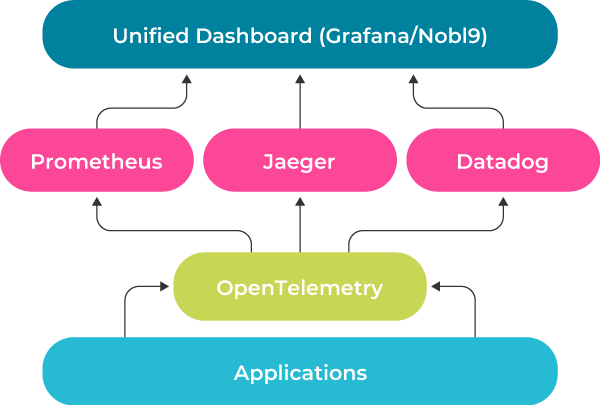
Observability stack showing: applications → OpenTelemetry → multiple backends (Prometheus/Jaeger/Datadog) → unified dashboards (Grafana/Nobl9)
Grafana Stack provides complete open-source observability through specialized components: Mimir (metrics), Loki (logs), Tempo (traces), and Grafana (visualization).
OpenTelemetry collects and exports observability data to any backend. The idea is that you instrument your application once and send the data to multiple backends without changing code or being locked in.
Jaeger visualizes traces to show the complete journey of your requests. For instance, when checkout takes 5 seconds instead of 500 ms, Jaeger may show you that 4.2 seconds were spent waiting for the payment service.
Datadog and Dynatrace help you correlate performance changes with deployments. For example, when error rates spike, these platforms automatically highlight that the spike started, say, 3 minutes after deploying version 2.1.4. It is this type of granular monitoring that saves you time during troubleshooting.
At intermediate maturity, monitoring tends to fragment across teams. For instance, payment services could be using Datadog while authentication uses Prometheus and frontend uses CloudWatch. Each team tracks reliability independently, but no one can answer “Can we deploy safely right now?” across the entire system. SLO management platforms like Nobl9 solve this by aggregating metrics from multiple sources into unified reliability objectives.
SLO management
Start tracking service-level objectives at intermediate maturity to build the foundation for advanced error budget enforcement later. Nobl9 manages SLOs across multiple monitoring sources and integrates with existing tools (Prometheus, Datadog, Dynatrace, and CloudWatch):
apiVersion: n9/v1alpha
kind: SLO
metadata:
  name: checkout-availability
spec:
  service: checkout-system
  objective: 99.9
  timeWindows:
    - unit: Day
      count: 30
  indicator:
    metricSource:
      name: prometheus-prod
    spec:
      prometheus:
        query: |
          sum(rate(checkout_requests_total{status="success"}[5m]))
          / sum(rate(checkout_requests_total[5m]))
As shown in the example above, you can define objectives like “99.9% of requests succeed” and track whether you're meeting reliability targets. Nobl9 pulls metrics from your monitoring tools and automatically calculates error budgets.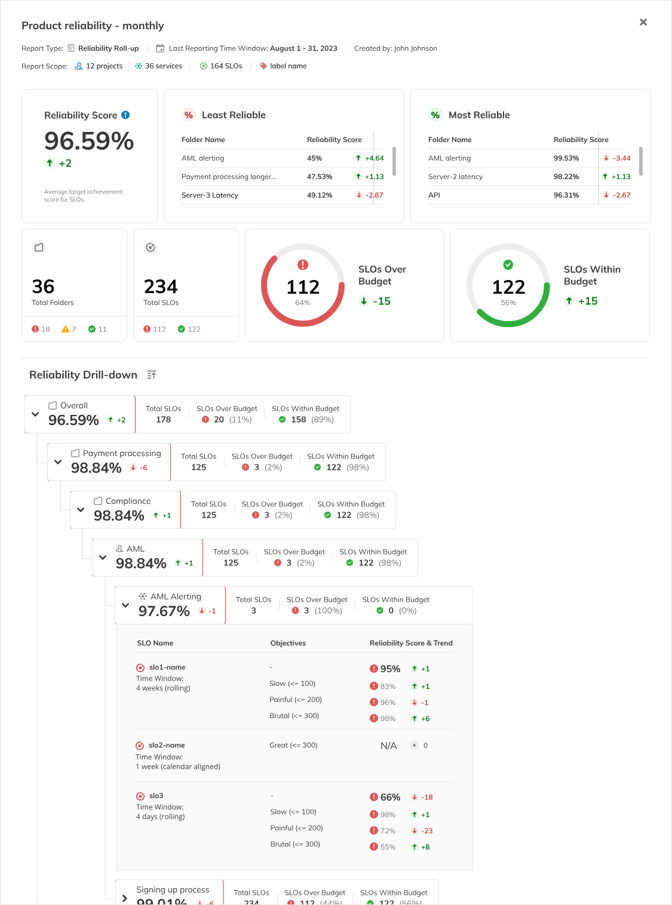
Overview of the Reliability Roll-up report (auto-generated structure)
At intermediate maturity, you can use Nobl9 to track SLOs and align teams around reliability. At more advanced maturity levels, these same SLOs become deployment gates that automatically block releases when error budgets are depleted.
Expert maturity level tools
At advanced maturity, you have progressive deployments with automated rollbacks. Expert maturity goes further: SLOs become governance tools that control deployments automatically and error budgets gate releases. When reliability degrades and the budget depletes, the system halts new deployments until recovery.
SLO platforms and error budget enforcement
When teams work independently with different monitoring tools, a tool like Nobl9 provides the integration layer, as shown below.
|
Team |
Monitoring tool |
SLO tracked |
|
Payment service |
Datadog |
Transaction success rate |
|
Auth service |
Prometheus |
Login availability |
|
Frontend |
CloudWatch |
Page load latency |
|
System-wide |
Nobl9 |
Composite checkout reliability |
Nobl9 integrates with all monitoring sources to calculate unified SLOs:
apiVersion: n9/v1alpha
kind: SLO
metadata:
  name: checkout-availability
  project: ecommerce
spec:
  service: checkout-system
  budgetingMethod: Occurrences
  objective: 99.9
  timeWindows:
    - unit: Day
      count: 30
  indicator:
    metricSource:
      name: prometheus-prod
    spec:
      prometheus:
        query: |
          sum(rate(checkout_requests_total{status="success"}[5m]))
          / sum(rate(checkout_requests_total[5m]))
In the example above, with a 99.9% SLO, you have a 0.1% error budget over 30 days. When error rates spike and burn through 80% of the monthly budget in three days, Nobl9 signals deployments to halt.
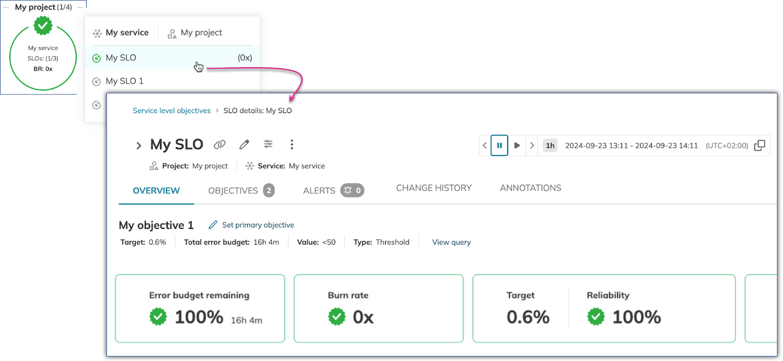
Nobl9 SLO view showing burn rate summary, showing targets, reliability percentage, burn rate status, and remaining budget percentage.
For a more robust monitoring system, you can (and should) integrate error budgets with deployment pipelines, for example, here in GitHub Actions:
# GitHub Actions deployment gate
BUDGET=$(curl -H "Authorization: Bearer $TOKEN" \
  "https://api.nobl9.com/v1/slos/checkout-availability/error-budget" \
  | jq '.remaining_percentage')

if [ $(echo "$BUDGET < 25" | bc) -eq 1 ]; then
  echo "Error budget below 25% - blocking deployment"
  exit 1
fi
Your orchestration tools can query the Nobl9 API and check error budgets before proceeding, enabling automatic governance. Deployments occur freely when reliability is good, and pause automatically when reliability degrades.
Nobl9 can also aggregate multi-source SLOs by calculating composite SLOs across services:
apiVersion: n9/v1alpha
kind: SLO
metadata:
  name: checkout-composite
spec:
  service: checkout-system
  objective: 99.5
  composite:
    operator: AND
    components:
      - project: ecommerce
        slo: payment-service-availability
        weight: 40
      - project: ecommerce
        slo: inventory-service-availability
        weight: 30
      - project: ecommerce
        slo: frontend-availability
        weight: 30
The composite SLO calculates overall checkout reliability from component SLOs. When any component degrades significantly, error budget enforcement applies across the entire flow.
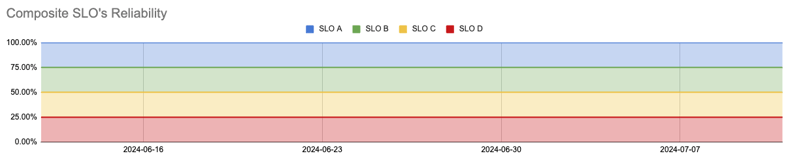
Nobl9 composite SLO view showing how component SLOs roll up to system-wide reliability
Advanced observability
Advanced observability is about active governance. At this level, observability platforms feed data into SLO tools for unified reliability calculation, and traces validate whether experiments stay within error budgets.
OpenTelemetry collects traces and metrics from all services, sending them to your observability backend (Jaeger, Prometheus, Datadog). Nobl9 supports OpenTelemetry and pulls from these backends to calculate SLOs, creating closed-loop reliability management where observability data directly drives deployment decisions.
For example, during canary deployments, trace data can be used to determine whether the new version increases latency. Similarly, when a feature flag enables a new recommendation algorithm and traces reveal that it adds 200 ms to the p99 latency (violating your SLO), the system automatically disables the flag. Distributed tracing tools like Jaeger and Zipkin feed trace data into Nobl9, validating whether canary deployments and feature flag experiments stay within error budgets.
Production testing
Production testing validates changes in the live environment before exposing them to all users. Teams can use feature flags to progressively deploy new features while measuring the impact on SLOs and can use synthetic monitoring to track real user behavior.
LaunchDarkly manages feature flags with automatic kill switches based on SLO violations. LaunchDarkly integrates with Nobl9 to continuously monitor error budgets. For example, when an error budget drops below 20%, the flag is disabled automatically, reverting all users to the legacy flow without redeployment.
Synthetic monitoring (Datadog Synthetic, Dynatrace Synthetic, New Relic Synthetics) simulates user journeys continuously from multiple global locations. Tests can be run at a fixed interval (ex, 5 minutes), executing the full checkout flow. When a deployment breaks the payment form or increases response time beyond thresholds, synthetic monitoring alerts you before customers notice.
Business integration
When you connect metrics to business outcomes, you can, for example, demonstrate that maintaining 99.9% SLO compliance increases customer retention by 3%, or show that error budget depletion correlates with $50K per day in revenue impact during incidents. Connect technical metrics directly to business outcomes to demonstrate that your reliability investments protect revenue.
|
Technical metric |
Business impact |
Example correlation |
|
Deployment frequency |
Feature velocity and customer acquisition |
+0.78 (strong positive) |
|
SLO compliance |
Customer satisfaction and retention |
+0.82 (strong positive) |
|
Error budget depletion |
Revenue loss and support costs |
-0.75 (strong negative) |
Nobl9 business intelligence integration connects SLO data with business intelligence platforms by letting you export your data to analyze later:
apiVersion: n9/v1alpha
kind: DataExport
metadata:
  name: executive-dashboard
spec:
  exportType: BigQuery
  destination:
    datasetId: reliability_metrics
  schedule: "0 */6 * * *"
You can query SLO and business data together:
SELECT slo.date, slo.error_budget_remaining, revenue.daily_revenue
FROM reliability_metrics.slo_data slo
JOIN revenue_data.daily_summary revenue ON slo.date = revenue.date
You can then build role-specific dashboards that speak directly to your stakeholders, as shown below.
|
Dashboard |
Key metrics |
Business question answered |
|
Executive |
|
Is reliability protecting revenue? |
|
Product Manager |
|
Can we launch this feature safely? |
|
Engineering Manager |
|
Are our practices improving outcomes? |
At expert maturity, where deployments need automated control, manual gates create bottlenecks as deployment frequency increases. On the other hand, automated gates without reliability context create outages by allowing deployments during degraded states. Nobl9, by providing the right SLO based visibility, helps you control your deployment: Release when reliability is good, halt when budgets deplete.
Navigate Chapters: