
-1.png)
Table of Contents
Like this article?
Subscribe to our Linkedin Newsletter to receive more educational content
Subscribe now
Customer-Facing Reliability Powered by Service-Level Objectives
Service Availability Powered by Service-Level Objectives
Learn More
Integrate with your existing monitoring tools to create simple and composite SLOs

Rely on patented algorithms to calculate accurate and trustworthy SLOs

Fast forward historical data to define accurate SLOs and SLIs in minutes
Customer-Facing Reliability Powered by Service-Level Objectives
Service Availability Powered by Service-Level Objectives
Learn More
Automate testing before increasing deployment frequency
Manual testing becomes a bottleneck the moment you try to deploy more than once a day. Your QA team can only work so fast, and if every deployment requires a two-hour manual regression pass, releases start queuing up behind QA time. Automated testing breaks this bottleneck by letting machines handle repetitive verification work while humans focus on exploratory testing and edge cases that require judgment.
Automated testing doesn't eliminate manual testing; it automates the repetitive verification that blocks deployments, freeing you to move faster without shipping bugs. The test pyramid shown below is the standard approach. The bulk of your tests are fast and focused, with fewer slow, comprehensive tests at the top.
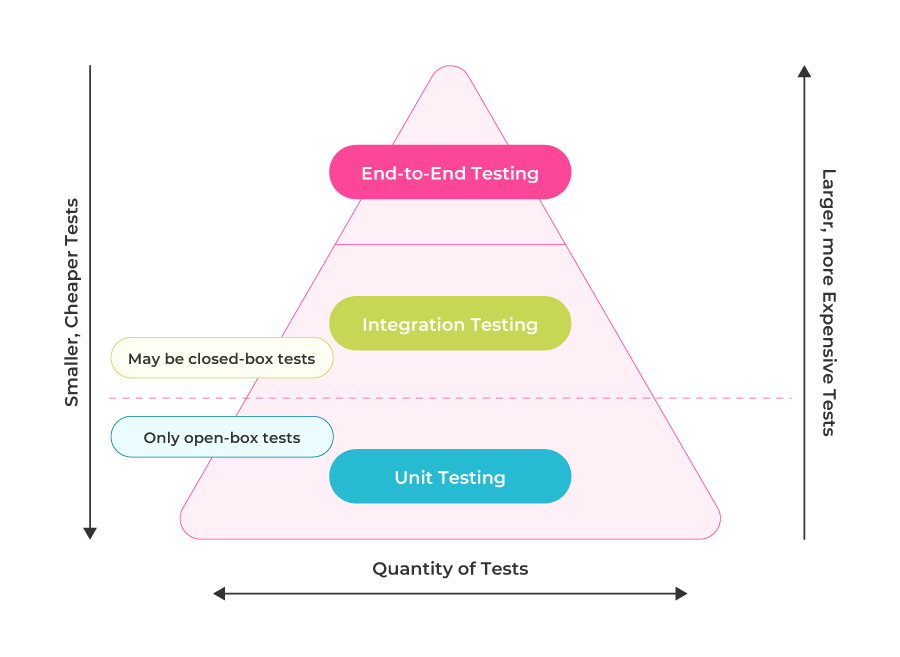 Sample test pyramid diagram (source)
The pyramid shape matters because if you invert it and rely mostly on slow end-to-end tests, your CI pipeline takes forever, and developers stop waiting for results. Teams that gate deployments on CI test results usually catch broken code before it reaches production.
Before increasing deployment frequency, make sure three things are true:
- Required CI checks finish fast.
- Failed checks block releases.
- Flaky failures are rare.
|
Metric |
Target |
Why it matters |
|
Code coverage |
70%+ |
Provides confidence that changes are actually tested. |
|
Test duration |
< 10 minutes |
Developers wait for results instead of ignoring them. |
|
Flaky rate |
< 1% |
Test failures mean something is actually wrong, not random noise you learn to ignore. |
These targets are informed by AWS's CI/CD best practices. Use them as operating targets and tune them to your system and team; once you hit them consistently, you have the quality foundation that makes increasing deployment frequency safe rather than reckless.
Implement comprehensive metrics before deploying multiple times daily
When your checkout service starts failing after the third deployment of the day, you need to know which of those three deployments caused the problem. That means having metrics that correlate issues with specific deployments rather than just showing you that something is broken somewhere.
Service-level indicators (SLIs) measure what actually matters to users rather than just whether your servers are responding to health checks. Combined with service-level objectives (SLOs) that set reliability targets, these metrics provide the foundation for data-driven deployment decisions.
|
SLI |
What it measures |
Example SLO |
|
Error rate |
Percentage of requests failing |
< 0.5% of checkout requests return errors |
|
Latency percentiles |
How long successful requests take |
95th percentile checkout latency < 2 seconds |
|
Checkout completion rate |
Whether users accomplish their goals |
99.5% of checkout attempts complete successfully |
For a checkout service, the primary SLI is the checkout completion rate. The SLO is the target for that metric, for example, 99.5% of checkout attempts complete successfully. Error rate and latency are supporting SLIs that help explain what changed when the completion rate drops.
Your deployment pipeline needs SLIs, too, because it can bottleneck everything else. At the intermediate level, you're deploying daily; to move to advanced (multiple times per day), track these pipeline metrics.
|
Metric |
Target |
Why it matters |
|
Build time |
< 10 minutes |
Developers stop waiting for feedback if builds take longer. |
|
Deploy frequency |
3+ per day |
Higher values indicate healthy flow through the pipeline. |
|
Commit to production |
< 2 hours |
Fast feedback loops catch bugs sooner. |
|
Rollback time |
< 5 minutes |
Quick recovery when deployments go wrong. |
When build times suddenly jump from 8 minutes to 20, treat it as an incident rather than just accepting slower builds; slow pipelines compound into slower everything else. You can still run A/B tests without deployment or variant tagging, but the results are harder to trust when behavior shifts. To test two checkout flows and see which converts better, tag metrics with both deployment version and experiment variant so you can actually determine a winner.
  var checkoutAttempts = prometheus.NewCounterVec(
    prometheus.CounterOpts{
        Name: "checkout_attempts_total",
        Help: "Total checkout attempts",
    },
    []string{"status", "deployment_version", "experiment_variant"},
)

func recordCheckout(success bool, version string, variant string) {
    status := "completed"
    if !success {
        status = "failed"
    }
    checkoutAttempts.WithLabelValues(status, version, variant).Inc()
}
The deployment version and experiment variant labels give teams the context they need to correlate release changes with SLI movement and A/B test outcomes. In Nobl9, deployment annotations add that context directly to the SLO timeline, making it easier to see when a release or hotfix lines up with a reliability shift.
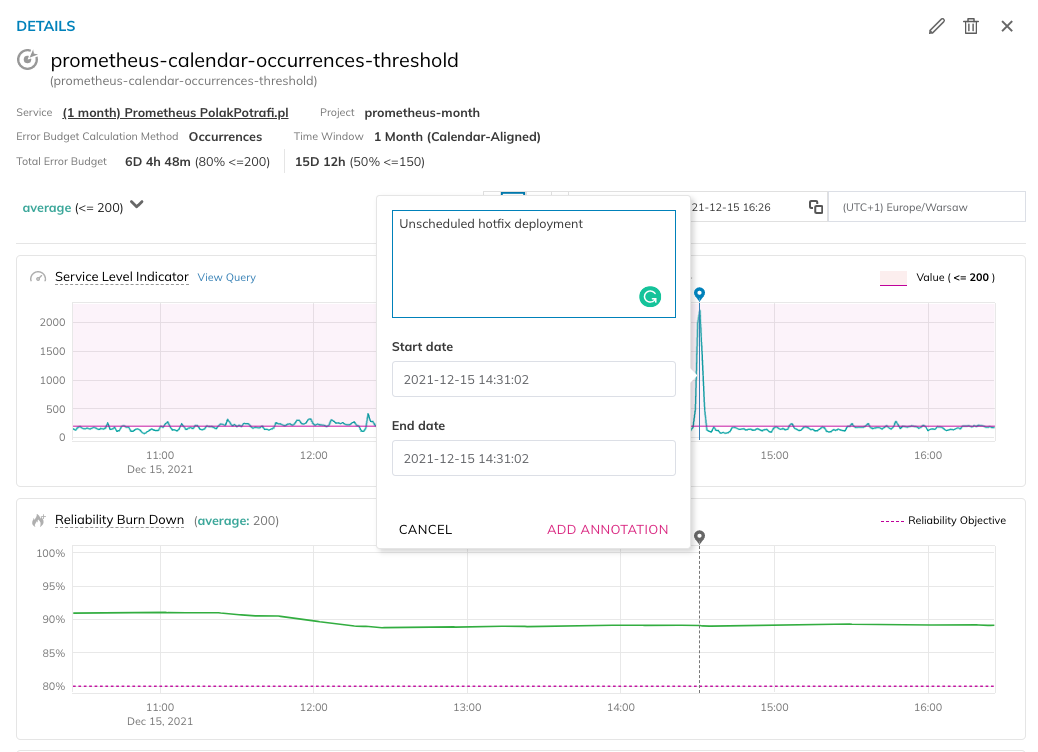
Nobl9 SLO timeline showing an annotated hotfix deployment and its reliability impact
When checkout completion drops after a deployment, the version and variant labels show exactly where the change started. Instead of guessing across multiple deploys in a day, you can quickly decide whether to keep rolling out or pause to investigate.
Establish automated rollback before advanced quality gates
Automated rollbacks need health signals to trigger on, and those signals need to mean something before you can build more advanced quality gates on top of them. Error-budget deployment gates work best after basic rollback thresholds are reliable, and those thresholds depend on solid metrics that show when something is actually wrong.
Basic rollback triggers
Start with these three triggers as baseline examples; they catch most deployment problems without any fancy analysis. They are common rollback signals, and the exact values should ultimately be tuned to each service's baseline behavior and SLO targets. When any of these thresholds are crossed, the system rolls back without waiting for someone to notice and intervene.
|
Trigger |
Example threshold |
What it catches |
|---|---|---|
|
Error rate |
> 5% for 5 minutes |
Bad code, dependency failures |
|
Latency degradation |
p99 > 4 seconds |
Performance regressions, resource exhaustion |
|
Health check failures |
3 consecutive failures |
Service crashes, infrastructure issues |
Here’s a rollback scenario using a canary deployment (an advanced-level progressive delivery strategy). You're running stable on v1.0.0 with normal error rates, then deploy v2.0.0-canary to 5% of production traffic to test a new payment flow. A few minutes in, the canary starts showing elevated errors and latency spikes as requests time out.
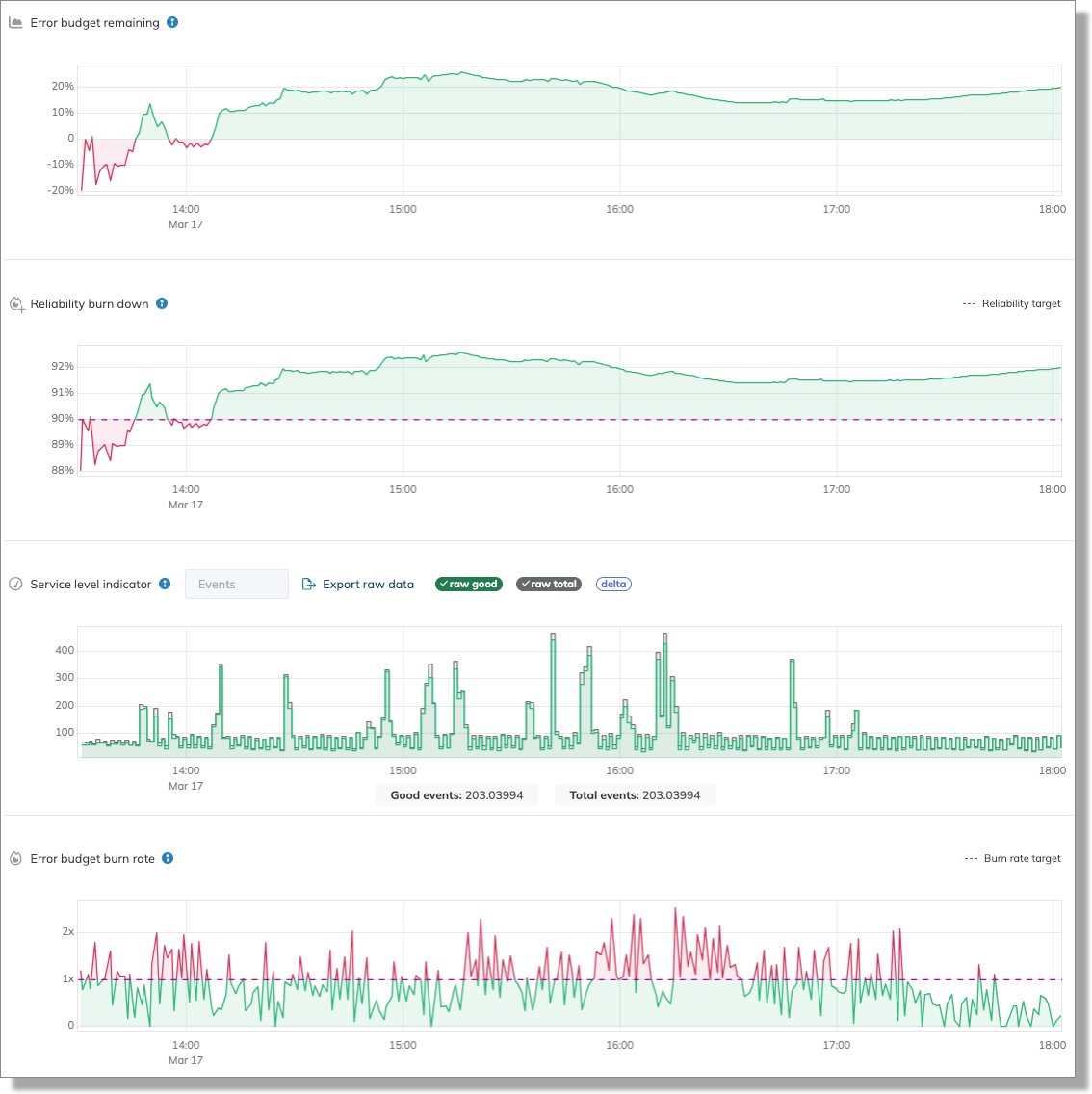
Nobl9 error-budget and burn-rate view showing reliability degradation after a canary rollout
The Nobl9 view shows the rollback signal clearly. Error budget remaining drops, burn rate rises above the target line, and reliability falls below the service objective. Instead of debating whether the canary is bad enough to stop, the team has a shared signal that says the rollout should pause and the previous version should take traffic again.
Automating the rollback
The automation that catches this can start simply as a script that queries Prometheus for the canary's error rate, compares it against a threshold, and triggers rollback when exceeded:
 # Check error rate every 15 seconds after deployment
: "${CURRENT_VERSION:?CURRENT_VERSION must be set}"
: "${PREVIOUS_VERSION:?PREVIOUS_VERSION must be set}"

ERROR_THRESHOLD="0.05"
PROMETHEUS_URL="http://prometheus.internal.com:9090"

error_rate=$(curl -s "$PROMETHEUS_URL/api/v1/query?query=\ sum(rate(checkout_errors_total{deployment_version=\"$CURRENT_VERSION\"}[1m]))/\ sum(rate(checkout_requests_total{deployment_version=\"$CURRENT_VERSION\"}[1m]))" \ | jq -r '.data.result[0].value[1]')

if (( $(echo "$error_rate > $ERROR_THRESHOLD" | bc -l) )); then
  echo "!!! Error rate exceeds threshold ($ERROR_THRESHOLD)"
  echo "!!! Triggering automatic rollback..."           DEPLOYMENT_VERSION=$PREVIOUS_VERSION docker-compose up -d checkout-service
fi
Argo Rollouts does the same thing with built-in analysis templates:
 apiVersion: argoproj.io/v1alpha1
kind: AnalysisTemplate
metadata:
  name: checkout-error-rate
  namespace: checkout
spec:
  args:
    - name: service-name
  metrics:
    - name: error-rate
      interval: 30s
      count: 3
      successCondition: result[0] < 0.05
      failureLimit: 2
      provider:
        prometheus:
          address: http://prometheus.monitoring:9090
          query: |
            (sum(rate(checkout_errors_total{error_type!="none"}[2m])) or vector(0))
            /
            (sum(rate(checkout_request_latency_seconds_count[2m])) + 0.001)
The template checks the error rate every 30 seconds and takes up to three measurements. With failureLimit set to 2, the rollout aborts after two failed measurements. The successCondition: result[0] < 0.05 means anything above 5% error rate fails the analysis.
Implementing deployment gates with error budgets
Once basic rollbacks work reliably (advanced maturity level), you can build error-budget-based rollout gates on top of them. Instead of checking whether the error rate exceeds a fixed threshold, you check whether the deployment is burning through your error budget faster than expected. If your checkout service has an SLO of 99.5% and a monthly error budget, a canary running at 95% success is burning through the budget at 10x the sustainable rate, even though 95% might look acceptable on its own.
Nobl9 calculates burn rates across your SLOs and can feed those signals into your deployment pipeline. A GitHub Actions workflow might check the error budget before allowing a deployment to proceed, as shown below.
  jobs:
  check-error-budget:
    runs-on: ubuntu-latest
    steps:
      - name: Check for hotfix bypass
        id: bypass
        run: |
          if [[ "$" == hotfix/* ]] || [[ "$" == "true" ]]; then
            echo "bypass=true" >> $GITHUB_OUTPUT
          fi

      - name: Check SLO Budget
        if: steps.bypass.outputs.bypass != 'true'
        run: |
          BUDGET=$(curl -s -H "Authorization: Bearer $" \
            "https://api.nobl9.com/v1/slos/checkout-service/status" | jq '.errorBudgetRemaining')

          if [ "$BUDGET" -lt "25" ]; then
            echo "❌ Error budget below 25% - deployment blocked"
            exit 1
          fi
This blocks deployments when the error budget is already depleted, preventing teams from shipping new changes on top of existing reliability problems. Teams often add bypass logic for hotfix branches or labeled PRs so urgent fixes can still get through. The deployment gate doesn't replace automated rollbacks; it complements them by preventing bad situations from getting worse.
Navigate Chapters: