
-1.png)

AI coding assistants, such as Copilot, Cursor, and Cody, are now integral to everyday software development. They speed up boilerplate code generation and reduce time spent on repetitive work.
However, they also change where risk enters the system. Instead of dealing with simple syntax errors or obvious logic bugs, engineering teams must now address issues that only appear under real-world workloads. AI-generated code appears correct and passes basic tests, yet still introduces problems such as outdated API use, incomplete error handling, subtle performance regressions, or logic drift.
These problems often show up later in production as rising P95 latency, higher error rates, unnecessary retries, and increased cloud costs.
This article covers the significant risks of AI-generated code at each stage of the software lifecycle. It explains how SLO-driven observability exposes issues early and helps teams build a safer, more predictable development process.
Summary of key risks of AI-generated code
Architectural inconsistencies during the design stage
AI coding assistants often generate designs that appear reasonable but fail to meet actual reliability or operational requirements. The model assembles patterns from training examples rather than system context. Hence, the output commonly omits resilience mechanisms or adds unnecessary complexity that becomes difficult to maintain.
Missing resilience components
AI-generated designs often omit resilience mechanisms such as retries, timeouts, rate limits, circuit breakers, or bulkheads unless explicitly requested. These gaps may not appear during development but quickly fail under real traffic or dependency slowdowns, turning into reliability incidents once the system is exposed to load.
Over-engineered or overly abstract architecture
AI tools sometimes generate architectures filled with patterns that add no real value. Extra indirection layers, generic factories, or deep inheritance chains make the system appear structured but slow down development and increase fragility.
Missing security and compliance considerations
AI-generated designs often miss essential security elements such as authentication, audit logging, and data-access controls, unless explicitly prompted. These gaps introduce risks that only become visible later and typically require costly redesigns to fix.
How SLOs improve architectural decisions
An early definition of availability and latency targets provides reviewers a concrete basis for evaluating design proposals. SLOs create constraints that prevent architectural drift. For example:
- If the system must meet a 99.9% availability target, the design must include fallback paths and isolation boundaries.
- If the service must respond within 100 milliseconds, long chains of synchronous calls are not acceptable.
- If the error budget is small, retry policies, backpressure, and reasonable timeout settings become mandatory.
These targets help teams evaluate AI-generated designs against real operational requirements, rather than surface-level correctness.
Hidden security vulnerabilities during development
AI-generated code can introduce security gaps due to missing context or outdated patterns. They could surface as authentication errors, unexpected responses, or exploitable behaviors in real-world conditions.
Missing authentication and authorization checks
AI-generated code may call internal services or data stores without enforcing authentication or authorization because the model has no awareness of identity flow or ACL requirements. These missing checks create risks such as privilege escalation or unintended data access.
Hallucinated or unsafe dependencies
LLMs can generate plausible-looking library names that do not exist. Attackers exploit this by publishing malicious packages under those names, creating a new supply chain risk because the dependency appears legitimate to developers and build systems.
Unsafe default patterns
AI tools may suggest insecure defaults, such as disabling TLS verification, exposing debug endpoints, or logging sensitive data, because they favor patterns frequently seen in public training data.
Hard-coded secrets and tokens
Some AI suggestions include placeholder credentials or API keys that look harmless but can be accidentally committed. These are sometimes copied from public repositories or synthetic examples. If a key is included in a repository or build artifact, it can create a serious security incident.
How SLOs reveal security weaknesses
AI-generated security flaws often look like valid code so that reviewers may miss checks or unsafe defaults. These issues rarely cause immediate failures and typically surface only when real authentication flows or adversarial inputs reach the system.
Security flaws created during development often surface as operational signals rather than apparent failures. SLOs help teams detect unusual patterns such as:
- Unexpected spikes in 401 or 403 responses
- Error rates that increase only for specific user cohorts
- Higher 500 errors during authentication peaks
These signals help teams identify whether an AI-generated change is causing unintended behavior, even when the root cause is not immediately obvious.
Performance inefficiencies during development
AI-generated code can behave correctly in small tests but perform poorly at scale. LLMs tend to favor simple patterns that work for small inputs yet introduce latency spikes or resource contention under real-world workloads.
For example, consider a service retrieving user profiles in a single database call.
# Original hand-written version (efficient)
def load_users(user_ids, db):
    return db.query("SELECT * FROM users WHERE id IN (%s)" % ",".join(user_ids))
# After an AI refactor, the code was changed to iterate one ID at a time:
# AI-generated refactor (real-world regression pattern)
def load_users(user_ids, db):
    results = []
    for user_id in user_ids:
        row = db.query("SELECT * FROM users WHERE id = %s" % user_id)  # N queries
        results.append(row)
    return results
The AI-generated version behaves correctly in small tests but triggers N+1 queries in production. This causes a multiplicative load increase on the database, leading to P95/P99 latency spikes.
Inefficient algorithms and loops
AI-generated code often relies on inefficient but straightforward patterns, such as nested loops or repeated scans of growing collections. These issues do not appear in small test datasets but increase P95 and P99 latency under real traffic.
Redundant or unbatched calls
AI tools sometimes replace optimized batch operations with per-record calls. This pattern works for small inputs but significantly increases database or API load at scale, causing latency spikes and higher resource usage.
Outdated or incorrect API usage
Generated code may follow API patterns that were valid in older versions but are inefficient today. These suggestions trigger silent performance regressions when underlying systems handle more work than expected.
Memory growth and resource leaks
AI-generated implementations may allocate large objects or open files, streams, or buffers without cleanup. Over time, this leads to memory pressure, slower garbage collection, and degraded throughput.
How SLOs reveal performance issues
Early development and unit tests usually run on small datasets, so performance issues do not appear until the service receives production traffic. However, operational performance issues can surface more quickly when teams track latency, throughput, and resource indicators through SLOs. Key signals include:
- Rising P95 or P99 latency during peak load
- Increased CPU usage or memory pressure
- Higher error rates due to timeouts or retries
- Higher cloud compute cost for the same traffic level
Even when functional tests pass, SLO dashboards often reveal early signs of performance issues that originate from AI-generated logic. Visualizing latency percentiles alongside error-budget burn makes it easier to spot regressions shortly after deployment.
The following is an example SLO visualization based on a Nobl9 dashboard.
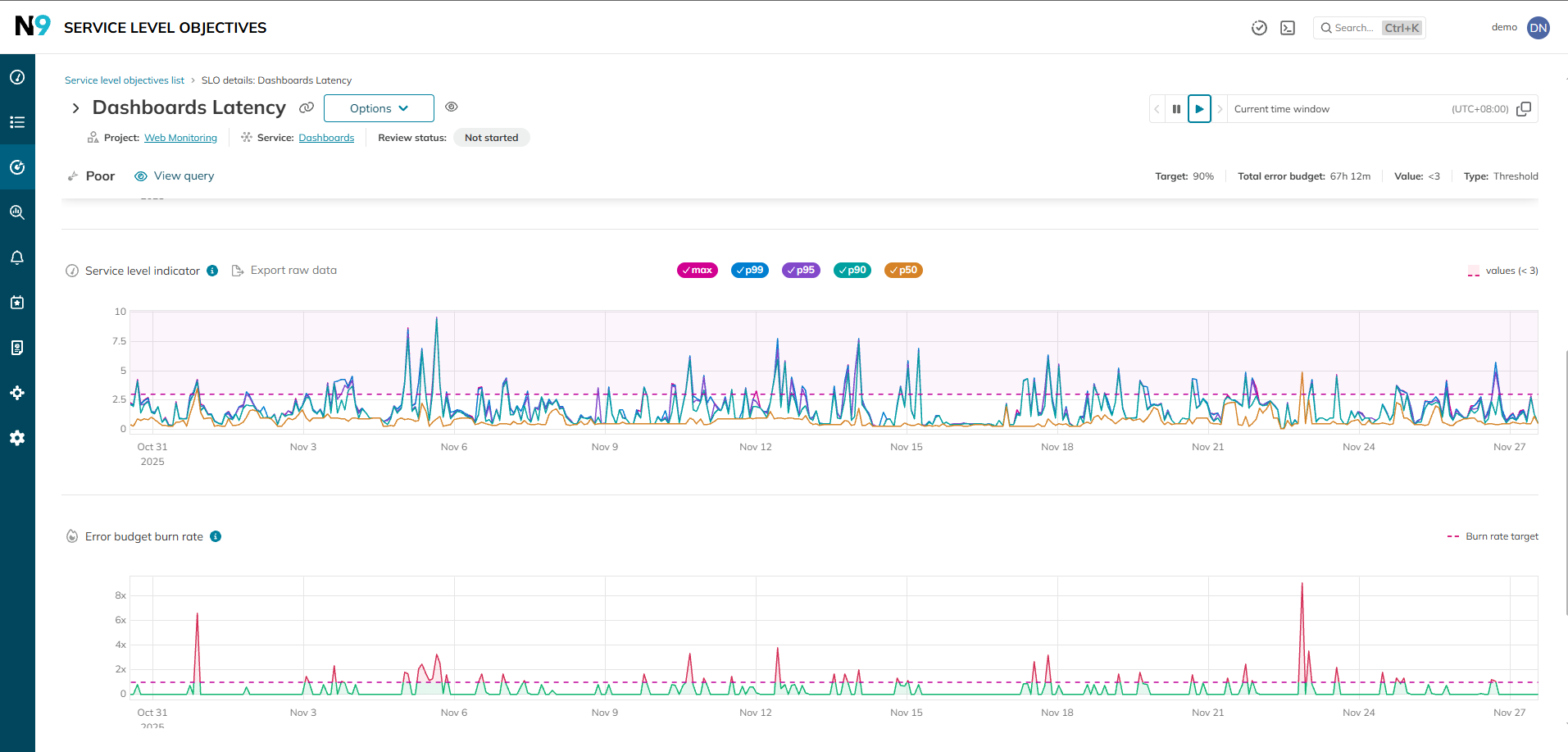
Combined latency and error-budget SLO view
This visualization highlights how minor efficiency regressions quickly surface as rising P95/P99 latency and accelerated error-budget burn. These indicators help detect AI-induced performance regressions even when the system remains functionally correct.
False test confidence during the testing stage
AI-generated tests often validate only the easy or predictable paths for the code that models generate most frequently. This creates the illusion of strong test coverage while missing the scenarios that reveal real-world failures.
Happy-path bias
AI-generated tests often focus on the simplest and most common use cases. These tests check that the function returns expected results with well-formed inputs, stable dependencies, and ideal conditions. Real-world environments involve network failures, malformed data, and concurrency issues. Tests that do not explore these scenarios provide limited protection.
Mirroring the implementation
When asked to produce tests for a code sample, the model frequently restates the same logic in the test suite. For example, if the implementation sorts a list, the generated test recreates the same sorting logic and verifies the output using identical assumptions. This leads to a situation where the test passes even if the implementation is incorrect. Several engineering teams have described this effect as “asserting the same mistake twice.”
Lack of adversarial thinking
Human testers often look for scenarios that break the system, such as malformed JSON, unexpected character encodings, or extreme data volume. AI-generated tests tend not to consider these cases because they do not appear often in example code. As a result, critical edge cases remain untested until they show up in staging or production.
How SLOs help identify test gaps
The absence of adversarial cases makes the test suite fragile, but this fragility is not apparent during code review. Both the implementation and the tests appear clean and consistent. Automated coverage tools further reinforce the illusion by reporting high coverage percentages, even though the underlying test quality is poor. Developers see high coverage and assume the code is well validated.
SLOs expose issues that functional tests overlook. When AI-generated code suffers from performance or reliability flaws, service-level signals reveal the problem. These signals include:
- Increased error rates during traffic spikes
- Inconsistent behavior across different user cohorts
- Early signs of error budget consumption after deployment
These operational metrics show whether the system behaves correctly under real-world conditions, even when the test suite reports complete success.
Reliability drift during release and production
AI-generated code may behave correctly in staging yet introduce slower paths once deployed. Minor regressions accumulate over time and are difficult to detect without production metrics and SLO monitoring.
Silent performance regressions
AI-generated changes often alter the efficiency of internal operations. A slight increase in latency for a frequently executed code path raises the overall P95 and P99 service latency. This effect grows with traffic, so the regression appears only when real users interact with the system.
Changes in data access patterns
Generated code alters how data is fetched or combined. For example, moving from a batched query to a series of minor queries can significantly increase database load. These patterns are not obvious when reading the code, but become visible under production-level traffic.
Subtle behavioral drift
In some cases, AI-generated refactoring changes a function's semantics without changing its interface. The behavior remains technically correct but no longer aligns with operational expectations. These differences show up as inconsistent responses or unexpected side effects.
Why drift escapes traditional release gates
Most release pipelines check for correctness, not efficiency or stability under load. Unit tests and integration tests confirm that the logic works, but they do not verify whether the system meets latency or availability goals.
Another challenge is that reliability regressions are gradual. A minor increase in latency or resource usage may go unnoticed for several releases.
A healthy feedback loop ensures AI-generated regressions improve future prompts, reviews, and standards instead of repeating the same mistakes.
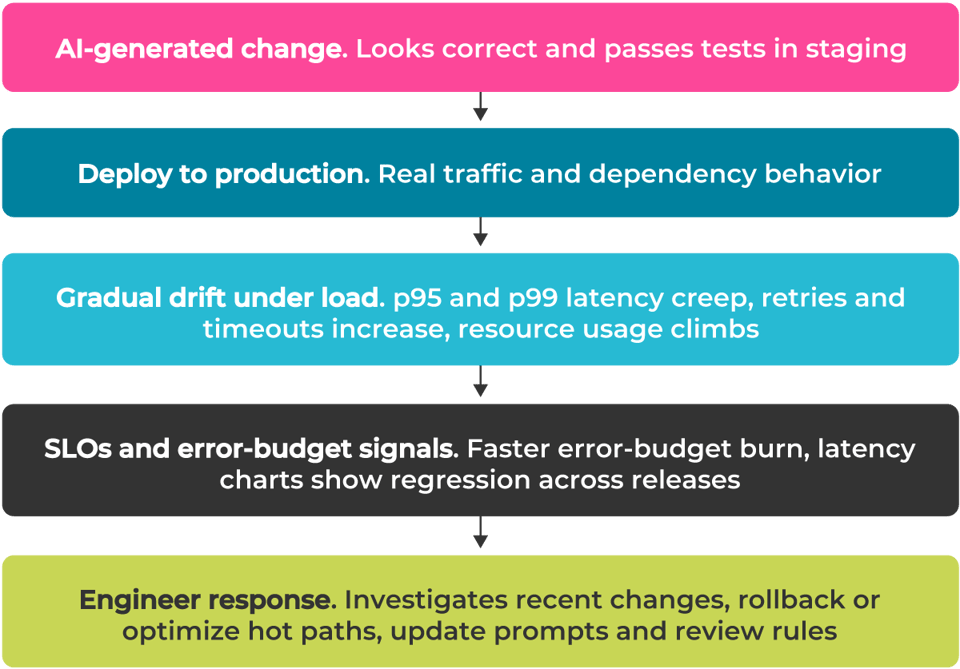
Reliability drift under real traffic
This drift pattern is common with AI-generated changes: minor regressions remain invisible in testing but appear quickly in SLO dashboards once exposed to real workloads.
How SLOs Detect Reliability Drift
SLOs provide early signals that a service is no longer performing as expected. Key indicators include:
- Rising P95 or P99 latency over several release cycles
- Increased error rates for specific endpoints
- Higher memory usage or more frequent garbage collection
- Higher CPU utilization for the same traffic pattern
- Faster consumption of the monthly error budget
These signals highlight operational issues long before they turn into outages. They also help distinguish between natural variation and actual regressions caused by new code. Platforms such as Nobl9 help teams visualize these trends clearly by comparing SLO performance across releases. Seeing P95 or P99 latency shift over time makes it easier to identify AI-related regressions before they become incidents.
Looking at SLOs over time provides even more profound insight. Trendlines make it clear when minor regressions accumulate across releases, allowing teams to detect drift long before it becomes an incident.
The following example visualizations use a Nobl9 dashboard to illustrate how latency and error-budget signals typically appear in practice. It highlights how error-budget consumption evolves across releases and helps teams trace long-term reliability drift introduced by AI-generated changes.
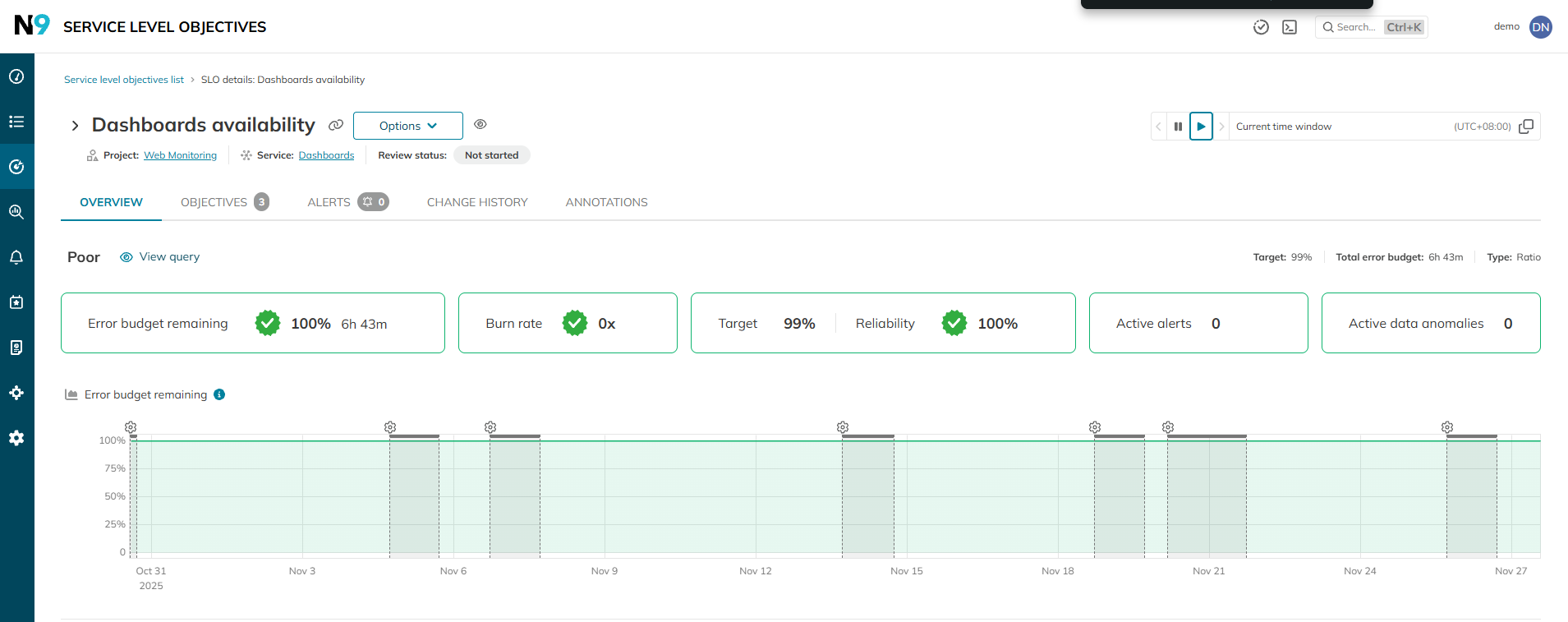
Error-budget timeline showing historical service reliability
Weak feedback loop after release
AI-generated code introduces new behaviors that require monitoring after release. Many teams adopt AI tools quickly but do not update their review practices, post-incident rituals, or knowledge-sharing habits. As a result, the same mistakes recur across multiple releases.
A weak feedback loop is not a single failure. It is a pattern of over-trust in generated output, repeated misunderstandings, or missing guardrails. Incidents are treated as isolated, without addressing the underlying root causes.
The loop becomes far more effective when teams use SLO insights to refine prompts, coding standards, and review checklists.
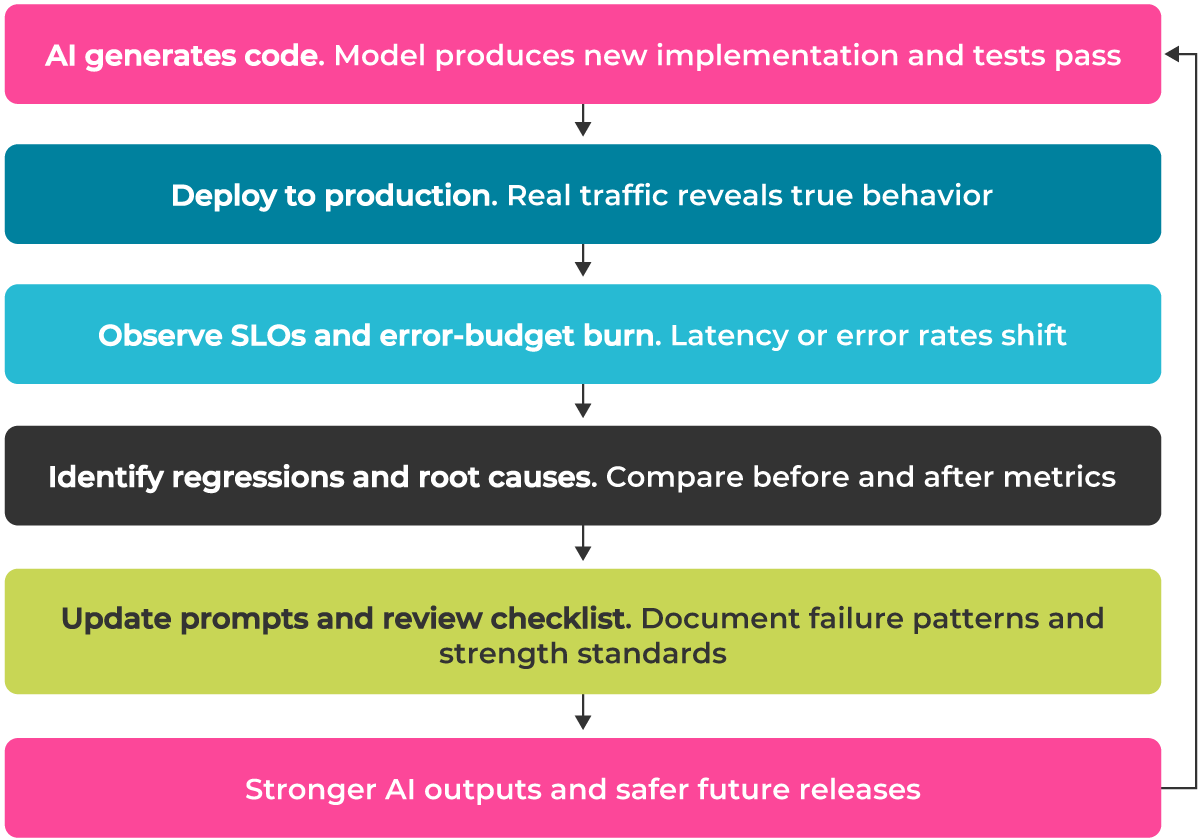
AI-to-SLO learning loop
This diagram shows how SLO signals feed into prompt libraries, review workflows, and reliability practices, preventing repeated AI-related regressions.
How SLOs strengthen the feedback loop
In practice:
- Missing post-incident learning leads to repeated regressions.
- Teams rarely maintain shared examples of AI-related failures.
- Over-reliance on AI weakens debugging skills.
- Unchanged prompting habits reproduce insecure or inefficient patterns.
SLOs reveal recurring reliability issues by tracking performance, error rates, and resource use across releases. These trends help teams identify systemic gaps and turn individual incidents into durable process improvements.
Conclusion
AI coding tools are becoming routine in software development, accelerating delivery and reducing repetitive work. But they also introduce behavior that passes small tests but fails under real traffic. Issues such as missing security checks, inefficient patterns, and logic drift often escape traditional review and only surface through production signals.
Managing these risks requires lifecycle-wide adjustments. Designs must include resilience and security reviews must verify dependencies and access controls. Performance testing must use a realistic load, and test suites must cover more than happy paths. Release pipelines should monitor latency, error rates, and resource usage. Teams need a feedback loop that captures lessons from reliability incidents.
SLO-driven observability provides a foundation for this process. Clear service targets surface regressions early and help teams validate each change against real operational expectations.
AI can accelerate development, but predictable outcomes still depend on engineering judgment and strong operational discipline.
Share:








Do you want to add something? Leave a comment